
#FactCheck: Viral AI video being shared online claiming Iran has destroyed Tel Aviv Ben Gurion Airport in an Iranian missile strike
Executive Summary:
A video circulating on Social media has claimed that Iran has launched a missile strike destroying Ben Gurion Airport in Tel Aviv. With rising tensions in geopolitics, the video quickly became popular. However, our research has detailed inspections through digital verification tools and visual analysis showed that the video is AI-generated. No incident or damage ever occurred.

Claim:
A viral video circulating on social media platforms claims to show Tel Aviv’s Ben Gurion Airport destroyed following an Iranian missile strike. The video is being shared with captions suggesting it is the last recorded visuals from the attack, with some users asserting it as evidence of escalating conflict between Iran and Israel.

Fact Check:
After looking into the video that purported to show the destruction of Tel Aviv's Ben Gurion Airport in an Iranian missile strike, we researched the topic whether the claim is accurate or not. The video depicts a damaged airport terminal, with debris and fires, but a visual analysis determined that there were a number of suspicious characteristics: asymmetrical layout, artificial-looking smoke patterns, and the absence of activity or humans—those are all typical indications of AI generation. Our research traced the origins of the video to an Instagram post, with a date of May 27, 2025, made by what seems to be a user who frequently shares AI-generated images.


In order to verify our conclusions, we used Hive Moderation, an AI content detection tool, which produced a result of an 80% probability that the video is altered, and this level of probability strongly supports the idea that the footage is not real. Additionally, reports from popular organizations like India Today and Reuters supported these results. All findings resulting from our research established that the video is synthetic and unrelated to any event occurring at Ben Gurion Airport, and therefore debunked a false narrative propagated on social media.

To confirm, we also compared the visuals with a real aerial image of Tel Aviv’s Ben Gurion Airport available on aviation stock sites.


Fig: Google Maps image of Tel Aviv’s Ben Gurion Airport
The visuals from the viral video are not real locations or scenes of Aviv’s Ben Gurion Airport's true location and configuration therefore it is fake and misleading.
Conclusion:
After thorough research it is concluded that the viral video is fake and it is not an actual missile strike at Ben Gurion Airport. The video is made with AI, and posted by a content creator of synthetic content well before any conflict update. There is no official confirmation or credible news coverage to substantiate the claim, with a high probability of AI-detection, and it has been proven to be digitally manipulated. Therefore, the claim is untrue and misleading.
- Claim: A video shows Iran's missile strike destroying Tel Aviv’s Ben Gurion Airport.
- Claimed On: Social Media
- Fact Check: False and Misleading

Related Blogs
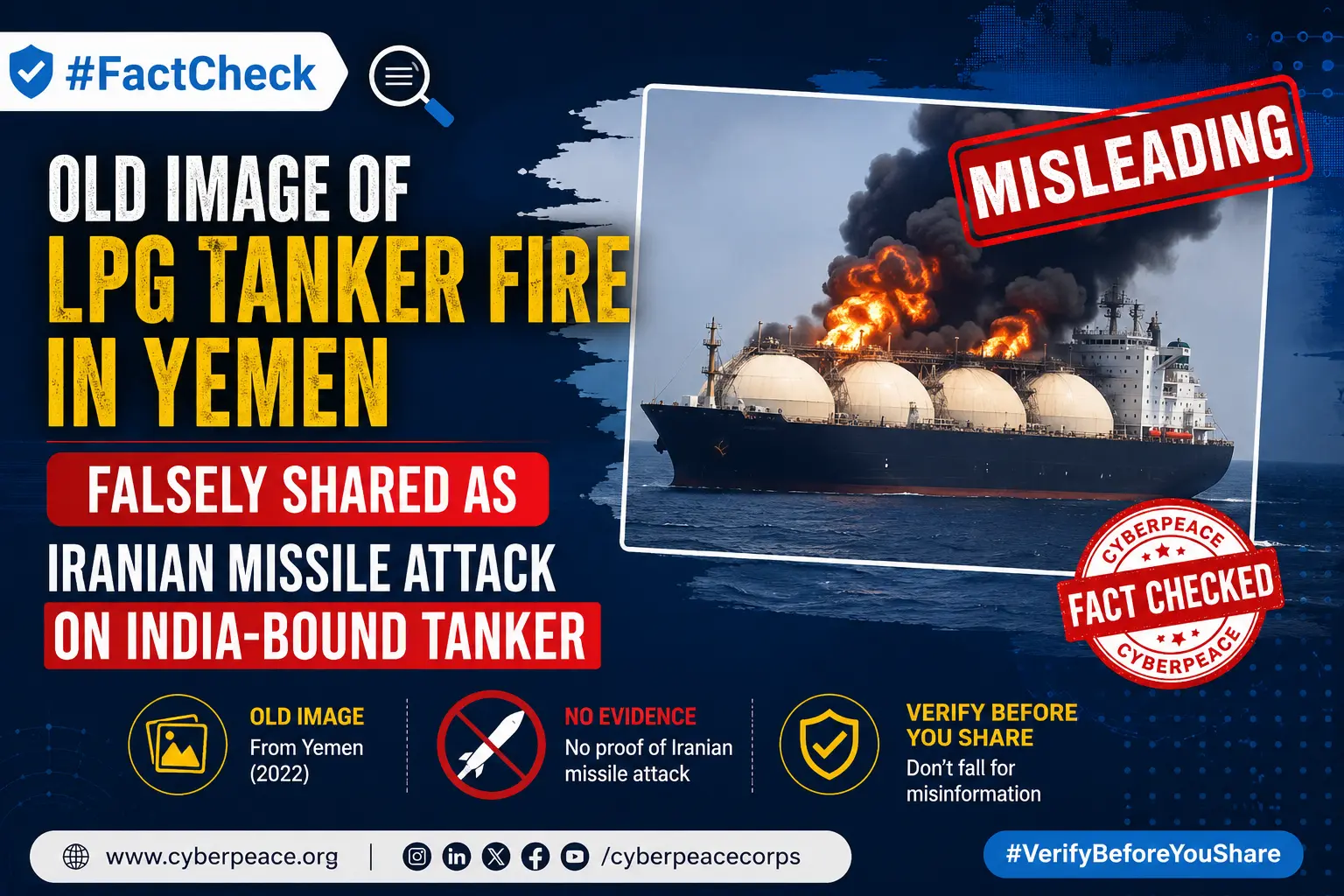
Executive Summary
An image is being widely shared on social media with the claim that Iranian missile forces targeted an LPG tanker heading towards India, causing a massive fire onboard. CyberPeace Research Wing ’s research found the claim to be misleading. The research revealed that the viral image is not related to any recent Iran-India development or any missile attack. The image actually shows a fire incident involving the Cameroon-flagged LPG tanker MV Falcon near the coast of Aden, Yemen, in October 2025, and is being circulated with a false context.
Claim
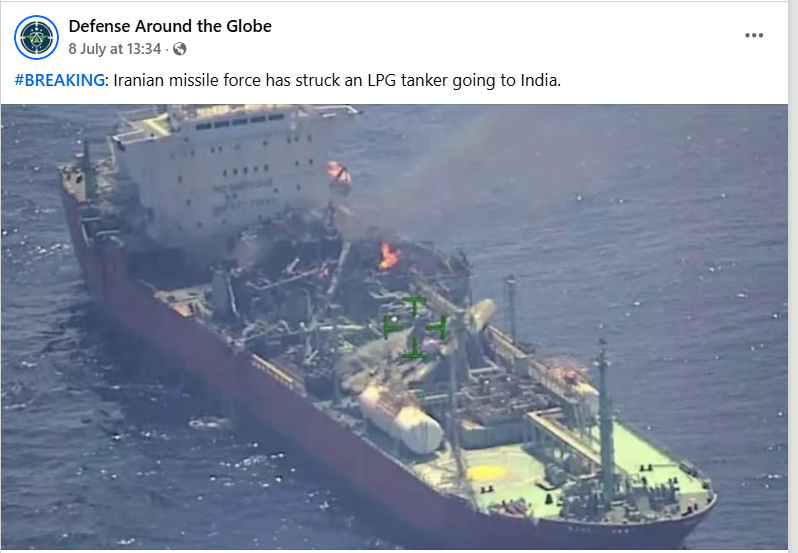
A Facebook user shared the viral image on July 8, 2026, claiming: “Iranian missile force has struck an LPG tanker going to India.” The post link, archive link, and screenshot are provided below.
Fact Check
To verify the viral claim, we conducted a keyword-based search on Google. However, we did not find any credible media report confirming that an India-bound LPG tanker was targeted by Iranian missile forces. During the research, we extracted keyframes from the viral image and conducted a reverse image search using Google Lens. The search led us to a report published by NDTV on October 20, 2025, which contained the same visuals as the viral image. The report link and screenshot are provided below.
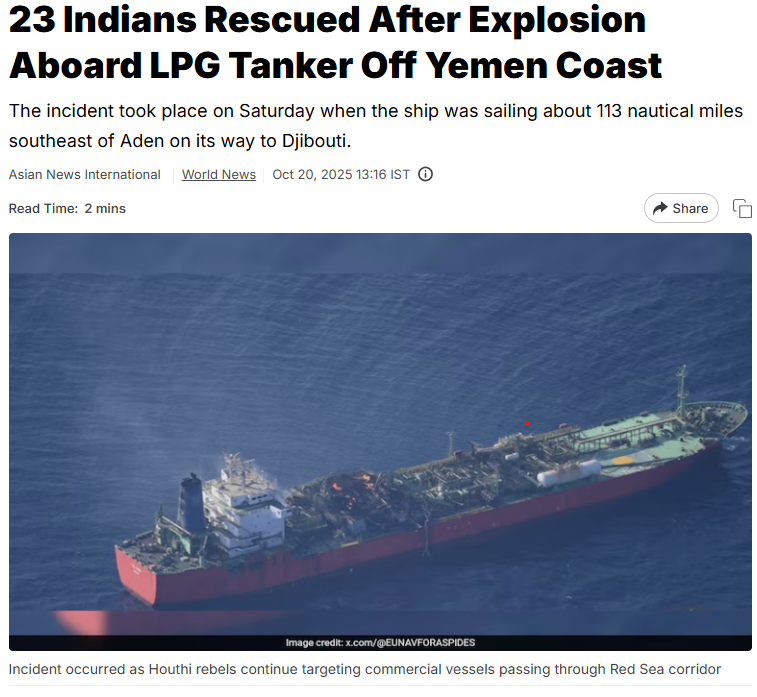
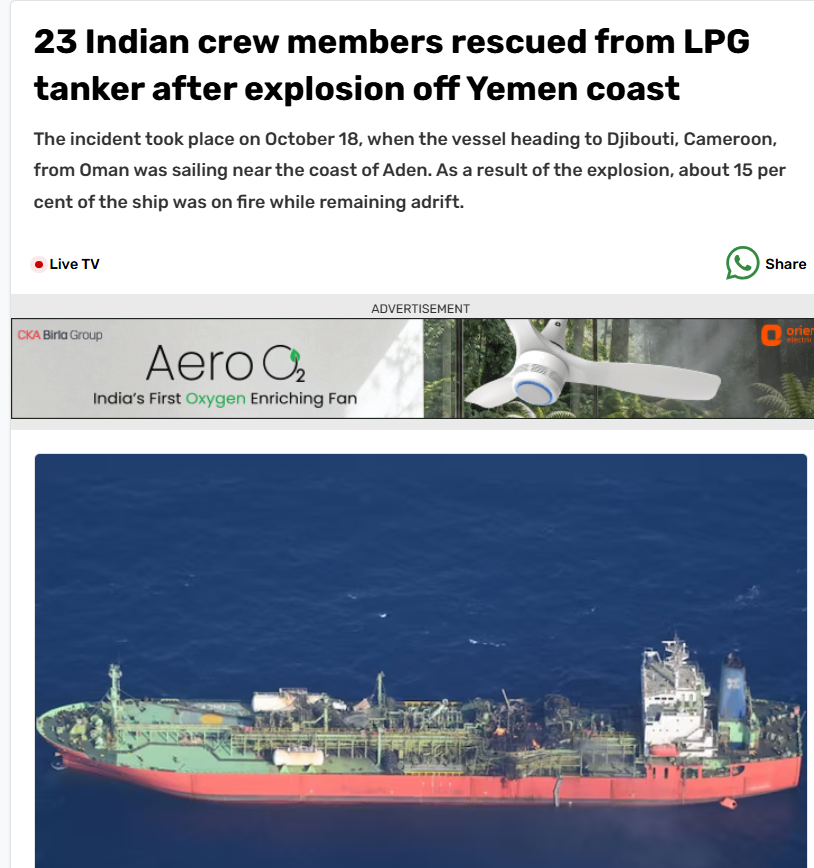
According to the NDTV report, a fire broke out onboard the Cameroon-flagged LPG tanker MV Falcon following an explosion near the coast of Aden, Yemen. The incident involved 23 Indian crew members, who were rescued safely. The incident occurred on October 18, 2025, at around 07:00 UTC, when the vessel was sailing approximately 113 nautical miles southeast of Aden while heading towards Djibouti. Following the explosion, the vessel went adrift and around 15% of the ship was engulfed in flames. Further verification through keyword searches led us to an India Today report published on October 20, 2025, which also confirmed that the MV Falcon caught fire after an explosion off the coast of Aden, Yemen. The report stated that all 23 Indian crew members onboard were rescued. The report also mentioned that authorities had initiated an research into the incident and ruled out speculation that the explosion was caused by a Houthi attack. The report link and screenshot are provided below.
Conclusion
Our research found that the viral claim is misleading. The image being shared as proof of an Iranian missile strike on an India-bound LPG tanker is actually from an unrelated incident that occurred in October 2025. The image shows the fire that broke out onboard the Cameroon-flagged LPG tanker MV Falcon near Aden, Yemen, following an explosion. The old image is being circulated with a false narrative linking it to Iran and India.
Executive Summary
A video is being widely shared on social media showing what appears to be a military facility coming under heavy aerial bombardment. Soldiers can be seen running for cover as explosions occur, followed by thick plumes of smoke rising from the site. Users sharing the clip claim that tensions in the Middle East have escalated once again and that the United States has launched fresh strikes on Iranian-linked military positions. CyberPeace Research Wing's research found the viral claim to be false. Our research revealed that the circulating video is AI-generated and has no connection with the ongoing tensions between the United States and Iran.
Claim
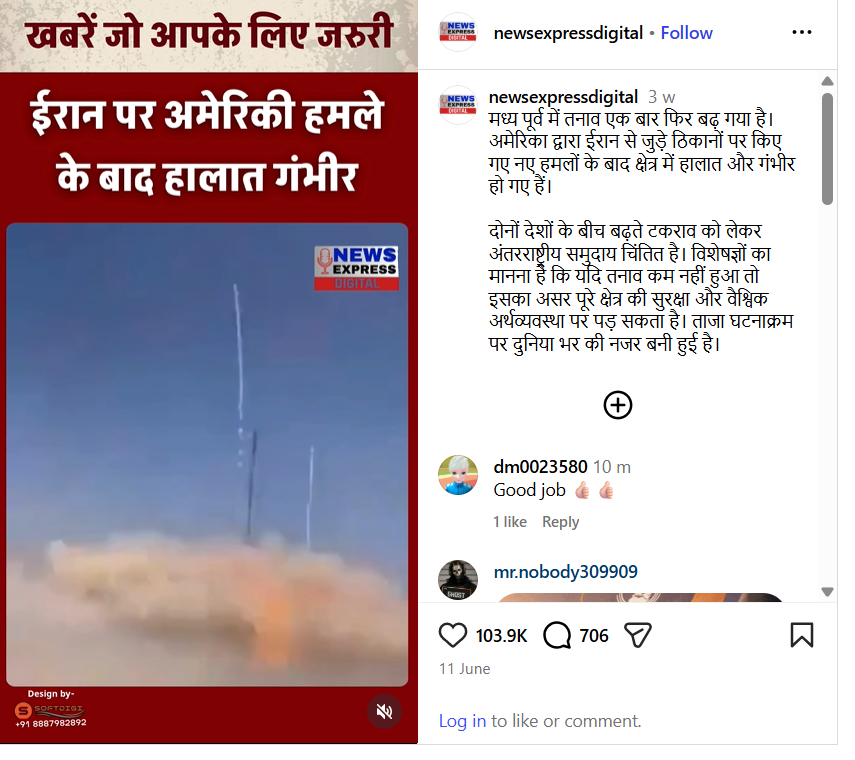
An Instagram user shared the video claiming that fresh US strikes on Iranian-linked targets had significantly escalated the situation in the Middle East.
https://www.instagram.com/reel/DZeaatFNv2E/?igsh=aWRvaTZvNTV2aDR3
https://www.instagram.com/reel/DZeaatFNv2E/?igsh=aWRvaTZvNTV2aDR3
Fact Check
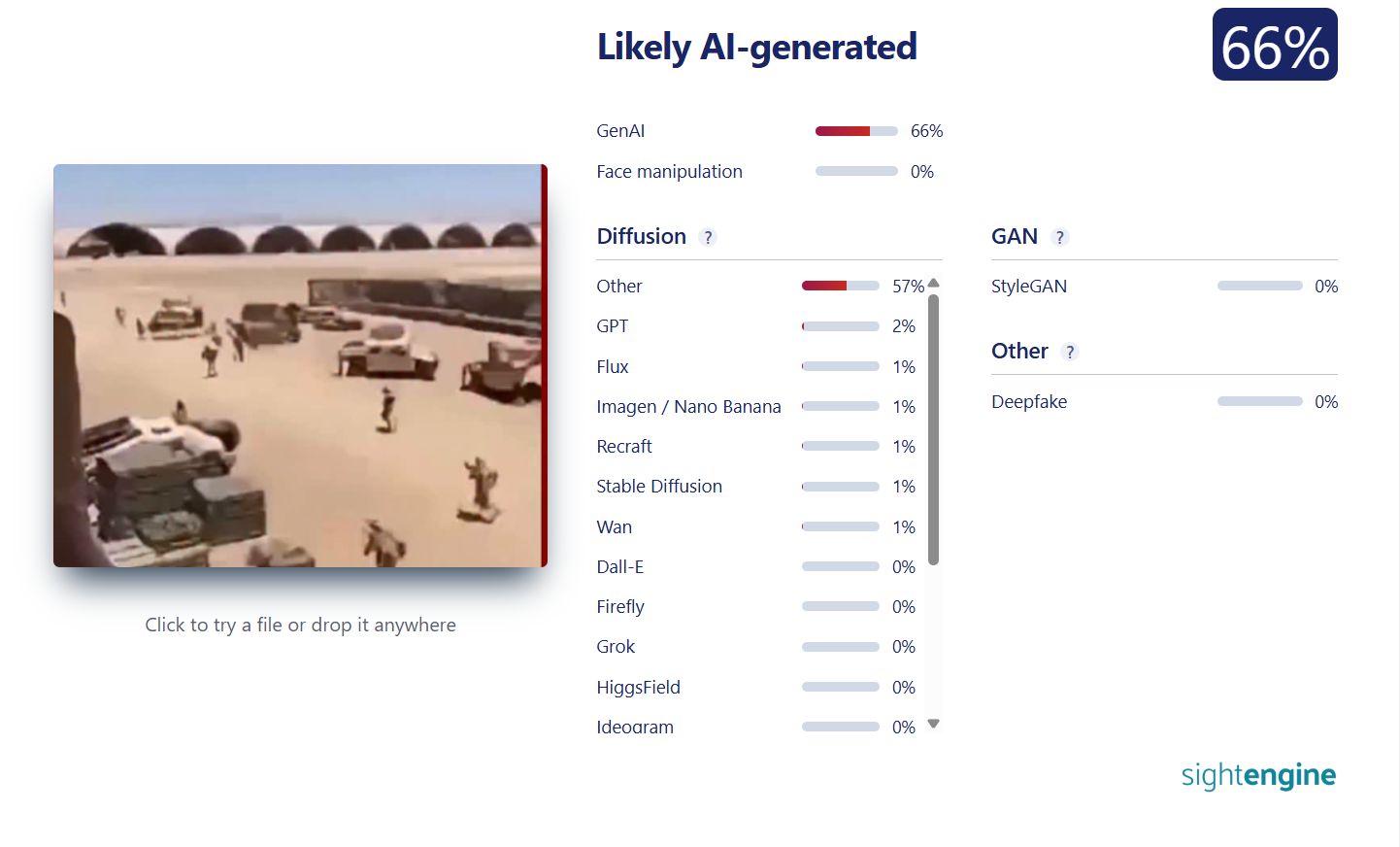
We extracted several keyframes from the viral video and conducted a reverse image search using Google Lens. The search did not lead to any credible news reports or verified sources related to the footage. We then closely examined the video and observed several visual inconsistencies. In the opening frames, the soldiers, military vehicles, and surrounding objects display unnatural shapes and distortions—artifacts commonly associated with AI-generated content. In the next stage of our research, we analysed the clip using the AI detection tool Sightengine. The analysis indicated that the video is approximately 66 per cent AI-generated, further supporting our findings that the footage is not authentic.
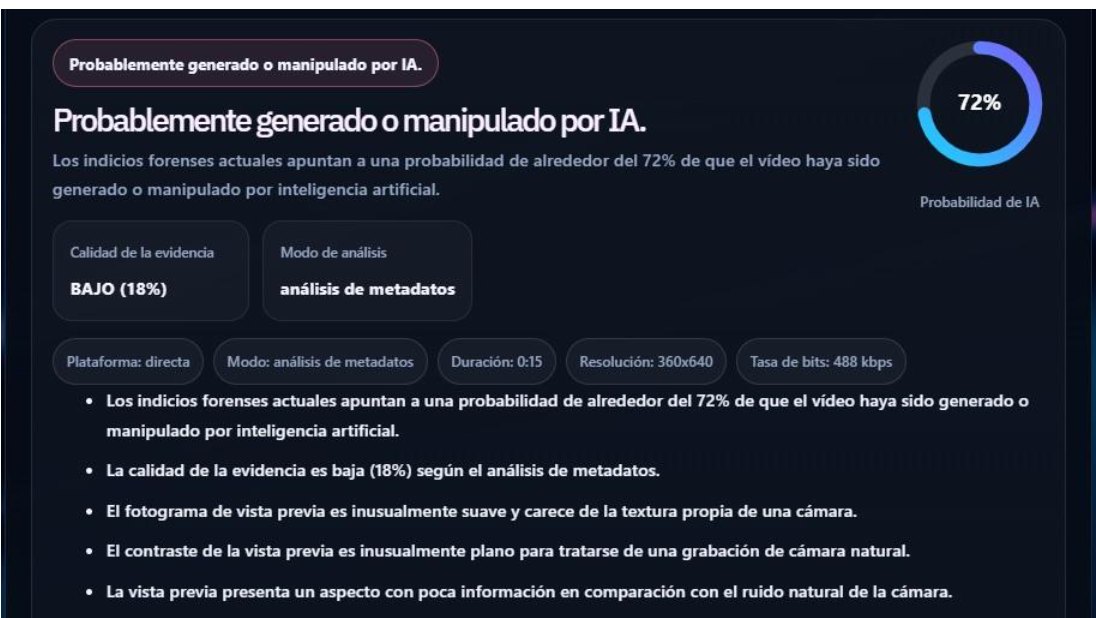
Another analysis of the recording using the DetectVideo AI tool found a 72 per cent probability that it was generated using artificial intelligence (AI).
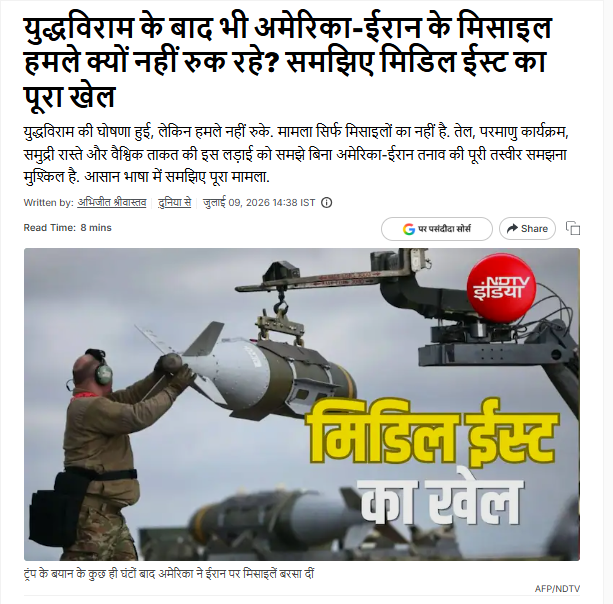
Finally, we searched for recent developments related to the US-Iran tensions using relevant keywords on Google. During the search, we found an NDTV report published on July 9, 2026. The report explains that despite ongoing diplomatic engagement, tensions between the United States and Iran continue to persist due to decades-old political, strategic, and geopolitical disputes. It discusses why incidents of military escalation continue to occur despite repeated attempts at dialogue and de-escalation.
https://ndtv.in/world-news/us-iran-conflict-explained-why-peace-remains-so-elusive-11747960
Conclusion
Our research found that the viral video is not genuine. It is an AI-generated video being circulated with a false claim linking it to recent US military strikes on Iran. There is no credible evidence to suggest that the video depicts any real incident connected to the current US-Iran conflict.

THREE CENTRES OF EXCELLENCE IN ARTIFICIAL INTELLIGENCE:
India’s Finance Minister, Mrs. Nirmala Sitharaman, with a vision of ‘Make AI for India’ and ‘Make AI work for India, ’ announced during the presentation of Union Budget 2023 that the Indian Government is planning to set up three ‘Centre of Excellence’ for Artificial Intelligence in top Educational Institutions to revolutionise fields such as health, agriculture, etc.
Under the ‘Amirt Kaal,’ i.e., the budget of 2023 is a stepping stone by the government to have a technology-driven knowledge-based economy and the seven priorities that have been set up by the government called ‘Saptarishi’ such as inclusive development, reaching the last mile, infrastructure investment, unleashing potential, green growth, youth power, and financial sector will guide the nation in this endeavor along with leading industry players that will partner in conducting interdisciplinary research, developing cutting edge applications and scalable problem solutions in such areas.
The government has already formed the roadmap for AI in the nation through MeitY, NASSCOM, and DRDO, indicating that the government has already started this AI revolution. For AI-related research and development, the Centre for Artificial Intelligence and Robotics (CAIR) has already been formed, and biometric identification, facial recognition, criminal investigation, crowd and traffic management, agriculture, healthcare, education, and other applications of AI are currently being used.
Even a task force on artificial intelligence (AI) was established on August 24, 2017. The government had promised to set up Centers of Excellence (CoEs) for research, education, and skill development in robotics, artificial intelligence (AI), digital manufacturing, big data analytics, quantum communication, and the Internet of Things (IoT) and by announcing the same in the current Union budget has planned to fulfill the same.
The government has also announced the development of 100 labs in engineering institutions for developing applications using 5G services that will collaborate with various authorities, regulators, banks, and other businesses.
Developing such labs aims to create new business models and employment opportunities. Among others, it will also create smart classrooms, precision farming, intelligent transport systems, and healthcare applications, as well as new pedagogy, curriculum, continual professional development dipstick survey, and ICT implementation will be introduced for training the teachers.
POSSIBLE ROLES OF AI:
The use of AI in top educational institutions will help students to learn at their own pace, using AI algorithms providing customised feedback and recommendations based on their performance, as it can also help students identify their strengths and weaknesses, allowing them to focus their study efforts more effectively and efficiently and will help train students in AI and make the country future-ready.
The main area of AI in healthcare, agriculture, and sustainable cities would be researching and developing practical AI applications in these sectors. In healthcare, AI can be effective by helping medical professionals diagnose diseases faster and more accurately by analysing medical images and patient data. It can also be used to identify the most effective treatments for specific patients based on their genetic and medical history.
Artificial Intelligence (AI) has the potential to revolutionise the agriculture industry by improving yields, reducing costs, and increasing efficiency. AI algorithms can collect and analyse data on soil moisture, crop health, and weather patterns to optimise crop management practices, improve yields and the health and well-being of livestock, predict potential health issues, and increase productivity. These algorithms can identify and target weeds and pests, reducing the need for harmful chemicals and increasing sustainability.
ROLE OF AI IN CYBERSPACE:
Artificial Intelligence (AI) plays a crucial role in cyberspace. AI technology can enhance security in cyberspace, prevent cyber-attacks, detect and respond to security threats, and improve overall cybersecurity. Some of the specific applications of AI in cyberspace include:
- Intrusion Detection: AI-powered systems can analyse large amounts of data and detect signs of potential cyber-attacks.
- Threat Analysis: AI algorithms can help identify patterns of behaviour that may indicate a potential threat and then take appropriate action.
- Fraud Detection: AI can identify and prevent fraudulent activities, such as identity theft and phishing, by analysing large amounts of data and detecting unusual behaviour patterns.
- Network Security: AI can monitor and secure networks against potential cyber-attacks by detecting and blocking malicious traffic.
- Data Security: AI can be used to protect sensitive data and ensure that it is only accessible to authorised personnel.
CONCLUSION:
Introducing AI in top educational institutions and partnering it with leading industries will prove to be a stepping stone to revolutionise the development of the country, as Artificial Intelligence (AI) has the potential to play a significant role in the development of a country by improving various sectors and addressing societal challenges. Overall, we hope to see an increase in efficiency and productivity across various industries, leading to increased economic growth and job creation, improved delivery of healthcare services by increasing access to care and, improving patient outcomes, making education more accessible and effective as AI has the potential to improve various sectors of a country and contribute to its overall development and progress. However, it’s important to ensure that AI is developed and used ethically, considering its potential consequences and impact on society.
