
#FactCheck: Edited Broadcast Misused to Spread False Assam Political Rift Claim
Executive Summary:
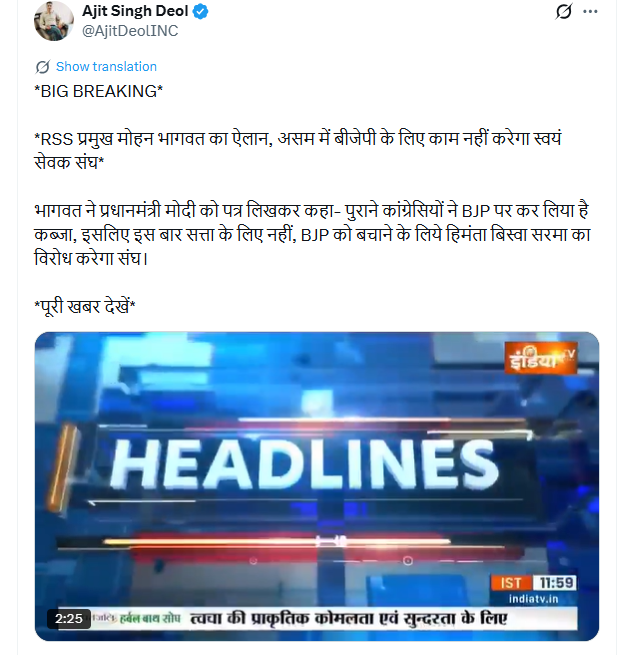
A video from an India TV news show related to the Assam elections is going viral on social media. In the clip, anchor Meenakshi Joshi is allegedly seen claiming that there is a rift between the BJP and the RSS in Assam. The video further suggests that RSS chief Mohan Bhagwat wrote a letter to Prime Minister Narendra Modi stating that former Congress members have taken over the BJP, and that RSS volunteers would not work for the party in Assam. However, a research by the CyberPeace found that the viral video is edited and misleading. The original video contains no such claims.
Claim:
A social media user Ajit Singh shared the video on X with the caption:“The core idea of today’s BJP is to capture power by any means. We have been saying this for long, and now even RSS has accepted that BJP in Assam has been taken over by Congress mindset.”
Fact Check:
To verify the claim, we searched relevant keywords about the alleged letter by RSS chief Mohan Bhagwat to Prime Minister Narendra Modi. However, we found no credible media reports supporting this claim. We then checked the YouTube channel of India TV but could not find the viral clip there. During the search, we did find a similar video from Meenakshi Joshi’s show. In the beginning of that video, the portion seen in the viral clip appears.
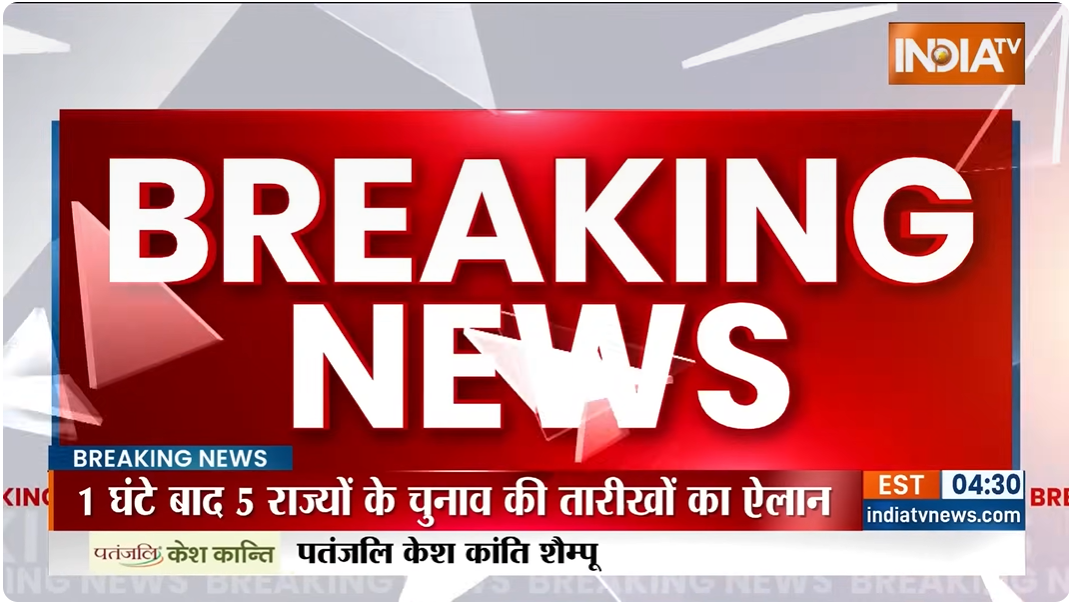
In the original video, the anchor is discussing the announcement of election dates in five states. There is no mention of any rift between the BJP and RSS in Assam.
Conclusion:
The viral India TV video claiming a rift between the BJP and RSS in Assam is edited and misleading. The original broadcast was about election dates in five states and did not include any such claims.

Related Blogs

Executive Summary:
A video online alleges that people are chanting "India India" as Ohio Senator J.D. Vance meets them at the Republican National Convention (RNC). This claim is not correct. The CyberPeace Research team’s investigation showed that the video was digitally changed to include the chanting. The unaltered video was shared by “The Wall Street Journal” and confirmed via the YouTube channel of “Forbes Breaking News”, which features different music performing while Mr. and Mrs. Usha Vance greeted those present in the gathering. So the claim that participants chanted "India India" is not real.

Claims:
A video spreading on social media shows attendees chanting "India-India" as Ohio Senator J.D. Vance and his wife, Usha Vance greet them at the Republican National Convention (RNC).


Fact Check:
Upon receiving the posts, we did keyword search related to the context of the viral video. We found a video uploaded by The Wall Street Journal on July 16, titled "Watch: J.D. Vance Is Nominated as Vice Presidential Nominee at the RNC," at the time stamp 0:49. We couldn’t hear any India-India chants whereas in the viral video, we can clearly hear it.
We also found the video on the YouTube channel of Forbes Breaking News. In the timestamp at 3:00:58, we can see the same clip as the viral video but no “India-India” chant could be heard.

Hence, the claim made in the viral video is false and misleading.
Conclusion:
The viral video claiming to show "India-India" chants during Ohio Senator J.D. Vance's greeting at the Republican National Convention is altered. The original video, confirmed by sources including “The Wall Street Journal” and “Forbes Breaking News” features different music without any such chants. Therefore, the claim is false and misleading.
Claim: A video spreading on social media shows attendees chanting "India-India" as Ohio Senator J.D. Vance and his wife, Usha Vance greet them at the Republican National Convention (RNC).
Claimed on: X
Fact Check: Fake & Misleading

Introduction
India & Bangladesh have adopted proactive approaches, focusing on advancing cyber capacity building in the region. Bangladeshi and Indian cybersecurity experts have emphasised the importance of continuous technology training to protect the digital space from growing cyber-attacks and threats. They call for greater collaboration to share knowledge and expertise in cyber resilience, network vulnerability, and cyber risk assessment. The Cyber-Maitree 2023 event held in Dhaka aimed to enrich and build capacity to counter cyber-attacks and threats. The senior director of India's Computer Emergency Response Team acknowledged the growing dependence on cyberspace and the need for increased preparedness as critical infrastructures, energy systems, banks, and utilities are connected to the internet. Recently, Bangladesh Cyber Security Summit 2024, organised by Grameenphone, was held in Dhaka on March 5th, 2024. Such collaborative dialogues between the countries serve as a shining example of cooperation between the governments of Bangladesh and India, serving as a platform for knowledge sharing, capacity building, and international cooperation in cyber security.
Cyber Maitree held in 2023
In 2023, India and Bangladesh held 'Cyber Maitree 2023', an initiative hosted by the ICT Division of the Bangladeshi Government, to address cybersecurity challenges in a rapidly globalising world characterised by digitisation. The event, which translates to "Cyber Friendship," was an interface for cybersecurity experts and aspirants from both nations, creating an avenue for extensive training, practical exercises, and a dynamic exchange of information. We need to emphasise the importance of bolstering digital safety as both nations grapple with the rapid digitisation of the world.
India-Bangladesh joint efforts aim to fortify cyber resilience, pinpoint potential network vulnerabilities, bolster rigorous risk assessments, and illuminate the landscape of cyber threats. It encompasses various sectors, including cybersecurity, artificial intelligence, ICT, and IT-driven human resource expansion. The growing camaraderie between India and Bangladesh has been evident through strategic engagements, such as the India-Bangladesh Startup Bridge and the establishment of 12 High Tech Parks in Bangladesh.
Highlights of the India-Bangladesh MoUs for Cyber Security Cooperation
In 2017, India and Bangladesh signed a Memorandum of Understanding (MoU) focused on cyber security cooperation.
In 2022, Both nations crafted a Memorandum of Understanding (MoU), highlighting collaboration in spheres such as e-governance, e-public service delivery, research, and development. A separate agreement was also inked focusing on mutual information sharing pertaining to cyber-attacks and incidents. The first MoU aims to provide a framework for training Bangladesh Railway employees at Indian Railways' training institutes, including field visits. The Indian Railways will coordinate with officials from the Ministry of Railways, Government of Bangladesh to improve training facilities in Bangladesh. The second MoU focuses on collaboration in IT systems, for the Bangladesh Railway. The Ministry of Railway, Government of India, will offer IT solutions for passenger ticketing, freight operations, train inquiry systems, asset management digitisation, HR and finance infrastructure. The MoUs aim to strengthen the friendship bond between India and Bangladesh and promote friendly cooperation in the railway sector.
Way Ahead
Zunaid Ahmed Palak, State Minister for Posts, Telecom and ICT, Bangladesh, has announced that Bangladesh and India will collaborate to ensure the safety of the cyber world. The two countries are expected to sign a final agreement within the next three to six months. He stressed the importance of attracting investments in the postal, telecommunication, and IT sectors. He also highlighted the strong ties between Bangladesh and India. He also announced that 12 high-tech parks will be constructed in Bangladesh with an Indian Line of Credit, starting operation by 2025. He further referred to the Indian Cyber Emergency Response Team (CERT), and said "We are very much enthusiastic in fighting against the cyber attacks and crimes as the team is now working with us".
Bangladesh Cyber Security Summit 2024
The Bangladesh Cyber Security Summit 2024, organised by Grameenphone, was held in Dhaka on 5th March 2024, focusing on cybersecurity issues and opportunities, fostering collaboration between government, private organisations, industry experts, and sponsors investing in Bangladesh's digital future.
Conclusion
India and Bangladesh share a common vision for a secure digital future, focusing on cybersecurity collaboration to safeguard shared aspirations and empower nations to thrive in the digital age. We must emphasise the need to fortify digital defenses, leveraging expertise, innovation, and collaboration to secure interconnected futures. Collaborative relations in Information and Communication Technology and Cyber Security will strengthen digital defense and establish cyber resilience.
References:
- https://caribbeannewsglobal.com/bangladesh-and-india-call-for-more-cyber-security-training/?amp=1
- https://www.indianewsnetwork.com/en/20231005/bangladesh-and-india-strengthen-ties-through-cyber-maitree-2023
- https://www.bssnews.net/news-flash/150763
- https://digibanglatech.news/english/bangladesh-english/125439/
- https://www.mea.gov.in/Portal/LegalTreatiesDoc/BG17B3024.pdf
- https://digibanglatech.news/english/bangladesh-english/125439/
- https://www.tbsnews.net/tech/ict/bangladesh-india-work-together-cyber-security-palak-712182

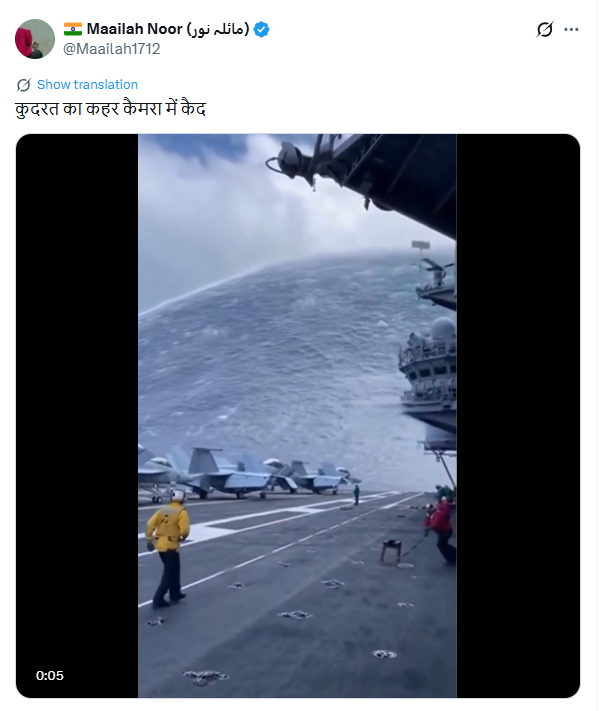
Social media users are widely sharing a video claiming to show an aircraft carrier being destroyed after getting trapped in a massive sea storm. In the viral clip, the aircraft carrier can be seen breaking apart amid violent waves, with users describing the visuals as a “wrath of nature.”
However, CyberPeace Foundation’s research has found this claim to be false. Our fact-check confirms that the viral video does not depict a real incident and has instead been created using Artificial Intelligence (AI).
Claim:
An X (formerly Twitter) user shared the viral video with the caption,“Nature’s wrath captured on camera.”The video shows an aircraft carrier appearing to be devastated by a powerful ocean storm. The post can be viewed here, and its archived version is available here.
https://x.com/Maailah1712/status/2011672435255624090
Fact Check:
At first glance, the visuals shown in the viral video appear highly unrealistic and cinematic, raising suspicion about their authenticity. The exaggerated motion of waves, structural damage to the vessel, and overall animation-like quality suggest that the video may have been digitally generated. To verify this, we analyzed the video using AI detection tools.
The analysis conducted by Hive Moderation, a widely used AI content detection platform, indicates that the video is highly likely to be AI-generated. According to Hive’s assessment, there is nearly a 90 percent probability that the visual content in the video was created using AI.

Conclusion
The viral video claiming to show an aircraft carrier being destroyed in a sea storm is not related to any real incident.It is a computer-generated, AI-created video that is being falsely shared online as a real natural disaster. By circulating such fabricated visuals without verification, social media users are contributing to the spread of misinformation.
