
#FactCheck- AI-Generated Video Falsely Claims Free Mobile Phones for Ration Card Holders
Executive Summary
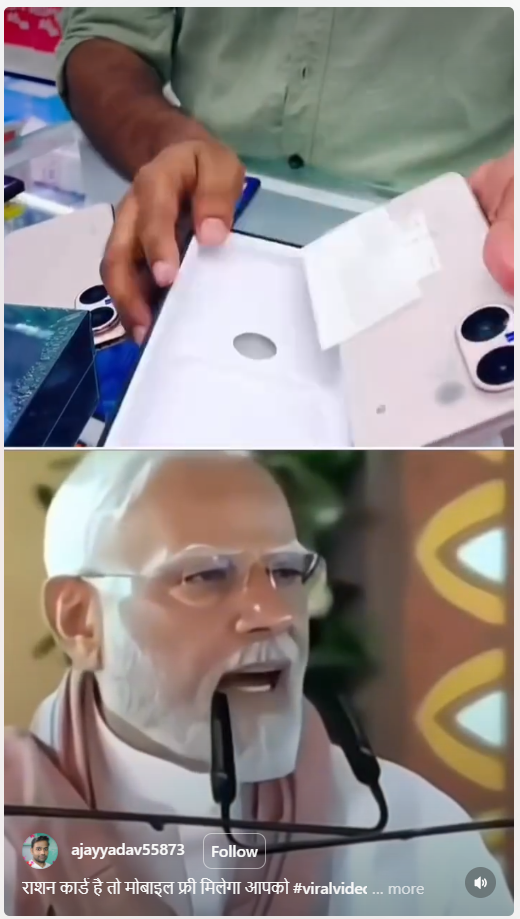
A video of Prime Minister Narendra Modi is being widely shared on social media, in which he appears to announce that all ration card holders will receive free mobile phones, provided no member of their family is a government employee. However, research by the CyberPeace has found this claim to be false. Our research reveals that the viral video is AI-generated and does not reflect any real announcement.
Claim:
An Instagram user shared the viral video with the caption, “If you have a ration card, you will get a free mobile phone.”
- Post link: https://www.instagram.com/reels/DWqDKWxy6lJ/
- Archived link: https://archive.ph/wip/dmpIf
Fact Check
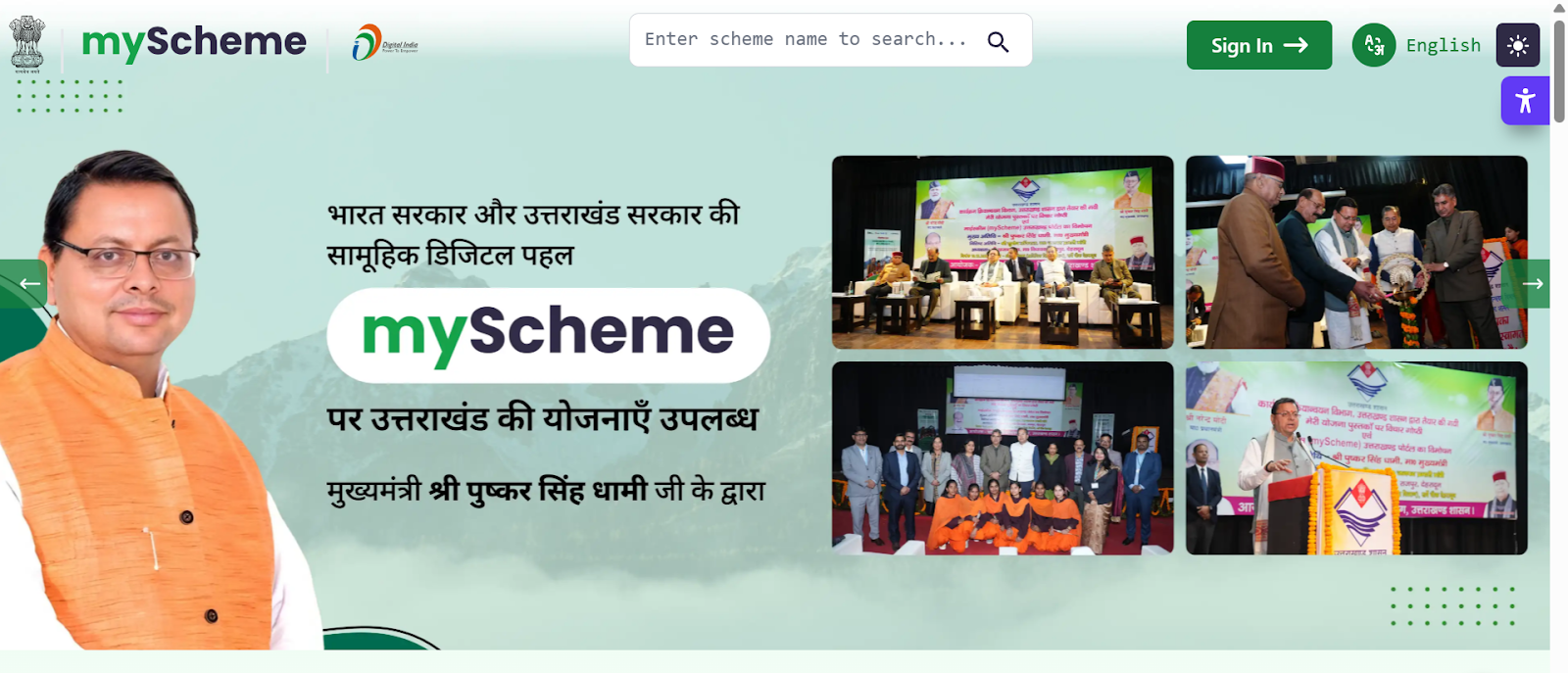
To verify the claim, we first conducted a keyword-based search on Google. However, we did not find any credible media reports supporting such an announcement, raising doubts about the authenticity of the video. We then checked the official government welfare schemes portal, myscheme.gov.in, which provides verified information about central government schemes. No such scheme offering free mobile phones to ration card holders was found on the platform.
Conclusion
Our research confirms that the viral video is fake and AI-generated. There is no official announcement or credible report suggesting that ration card holders will receive free mobile phones under any government scheme. The video has been digitally manipulated using artificial intelligence and is being circulated with a misleading claim. This serves as another example of how AI-generated content can be used to spread misinformation.

Related Blogs
Introduction
Regulatory agencies throughout Europe have stepped up their monitoring of digital communication platforms because of the increased use of Artificial Intelligence in the digital domain. Messaging services have evolved into being more than just messaging systems, they now serve as a gateway for Artificial Intelligence services, Business Tools and Digital Marketplaces. In light of this evolution, the Competition Authority in Italy has taken action against Meta Platforms and ordered Meta to cease activities on WhatsApp that are deemed to restrict the ability of other companies to sell AI-based chatbots. This action highlights the concerns surrounding Gatekeeping Power, Market Foreclosure and Innovation Suppression. This proceeding will also raise questions regarding the application of Competition Law to the actions of Dominant Digital Platforms, where they leverage their own ecosystems to promote their own AI products to the detriment of competitors.
Background of the Case
In December 2025, Italy’s competition authority, the Autorità Garante della Concorrenza e del Mercato (AGCM), ordered Meta Platforms to suspend certain contractual terms governing WhatsApp. These terms allegedly prevented or restricted the operation of third-party AI chatbots on WhatsApp’s platform.
The decision was issued as an interim measure during an ongoing antitrust investigation. According to the AGCM, the disputed terms risked excluding competing AI chatbot providers from accessing a critical digital channel, thereby distorting competition and harming consumer choice.
Why WhatsApp Matters as a Digital Gateway
WhatsApp is situated uniquely within the European digital landscape. It has hundreds of millions of users throughout the entire European Union; therefore, it is an integral part of the communication infrastructure that supports communications between individual consumers and companies as well as between companies and their service providers. AI chatbot developers depend heavily upon WhatsApp as it provides the ability to connect directly with consumers in real-time, which is critical to their success as business offers.
According to the Italian regulator's opinion, a corporation that controls the ability to communicate via such a popular platform has a tremendous influence over innovation within that market as it essentially operates as a gatekeeper between the company creating an innovative service and the consumer using that service. If Meta is permitted to stop competing AI chatbot developers while providing more productive and useful offers than those offered by competing developers, it is likely that competing developers will be unable to market and distribute their innovative products at sufficient scale to remain competitive.
Alleged Abuse of Dominant Position
Under EU and national competition law, companies holding a dominant market position bear a special responsibility not to distort competition. The AGCM’s concern is that Meta may have abused WhatsApp’s dominance by:
- Restricting market access for rival AI chatbot providers
- Limiting technical development by preventing interoperability
- Strengthening Meta’s own AI ecosystem at the expense of competitors
Such conduct, if proven, could amount to an abuse under Article 102 of the Treaty on the Functioning of the European Union (TFEU). Importantly, the authority emphasised that even contractual terms—rather than explicit bans—can have exclusionary effects when imposed by a dominant platform.
Meta’s Response and Infrastructure Argument
Meta has openly condemned the Italian ruling as “fundamentally flawed,” arguing that third-party AI chatbots represent a major economic burden to the infrastructure and risk the performance, safety, and user enjoyment of WhatsApp.
Although the protection of infrastructure is a valid issue of concern, competition authorities commonly look at whether the justifications for such restrictions are appropriate and non-discriminatory. One of the principal legal issues is whether the restrictions imposed by Meta were applied in a uniform manner or whether they were selectively imposed in favour of Meta's AI services. If the restrictions are asymmetrical in application, they may be viewed as anti-competitive rather than as legitimate technical safeguards.
Link to the EU’s Digital Markets Framework
The Italian case fits into a wider EU context in relation to their efforts to regulate the actions of large technology companies with the use of prior (ex-ante) regulation as contained in the Digital Markets Act (DMA). The DMA has put in place obligations on a set of gatekeepers to make available to third parties on a non-discriminatory basis in order to maintain equitable access, interoperability and no discrimination against those parties.
While the Italian case has been brought pursuant to an Italian competition law, its philosophy is consistent with that of the DMA in that dominant digital platforms should not undertake actions that use their control over their core products and services to prevent other companies from being able to innovate. The trend with some EU national regulators is to be increasingly willing to take swift action through the application of interim measures rather than await many years for final decisions.
Implications for AI Developers and Platforms
The Italian order signifies to developers of AI-based chatbots that competitive access to AI technology via messaging services is an important factor for regulatory bodies. The order also serves as a warning to the large incumbent organisations that are establishing a foothold in the messaging services market to integrate AI into their already established platforms that they will not be protected from competition laws.
Additionally, the overall case showcases the growing consensus amongst regulatory agencies regarding the role of competition in the development of AI. If a handful of large companies are allowed to control both the infrastructure and the AI technology being operated on top of that infrastructure, the result will likely be the development of closed ecosystems that eliminate or greatly reduce the potential for technology diversity.
Conclusion
Italy's move against Meta highlights a significant intersection between competitive laws and artificial intelligence. The Italian antitrust authority has reinforced the principle that digital gatekeepers cannot use contractual methods to block off access to competition in targeting WhatsApp's restrictive terms. As AI becomes a larger part of our day to day digital services, regulatory bodies will likely continue to increase their scrutiny on platform behaviour. The result of this investigation will impact not just the Metaverse's AI strategy, but also create a baseline for future European regulators' methods of balancing innovation versus competition versus consumer choice in an increasingly AI-driven digital marketplace.
References
- https://www.reuters.com/sustainability/boards-policy-regulation/italy-watchdog-orders-meta-halt-whatsapp-terms-barring-rival-ai-chatbots-2025-12-24/
- https://techcrunch.com/2025/12/24/italy-tells-meta-to-suspend-its-policy-that-bans-rival-ai-chatbots-from-whatsapp/
- https://www.communicationstoday.co.in/italy-watchdog-orders-meta-to-halt-whatsapp-terms-barring-rival-ai-chatbots/
- https://www.techinasia.com/news/italy-watchdog-orders-meta-halt-whatsapp-terms-ai-bot

Over the last decade, battlefields have percolated from mountains, deserts, jungles, seas, and the skies into the invisible networks of code and cables. Cyberwarfare is no longer a distant possibility but today’s reality. The cyberattacks of Estonia in 2007, the crippling of Iran’s nuclear program by the Stuxnet virus, the SolarWinds and Colonial Pipeline breaches in recent years have proved one thing: that nations can now paralyze economies and infrastructures without firing a bullet. Cyber operations now fall beyond the traditional threshold of war, allowing aggressors to exploit the grey zone where full-scale retaliation may be unlikely.
At the same time, this ambiguity has also given rise to the concept of cyber deterrence. It is a concept that has been borrowed from the nuclear strategies during the Cold War era and has been adapted to the digital age. At the core, cyber deterrence seeks to alter the adversary’s cost-benefit calculation that makes attacks either too costly or pointless to pursue. While power blocs like the US, Russia, and China continue to build up their cyber arsenals, smaller nations can hold unique advantages, most importantly in terms of their resilience, if not firepower.
Understanding the concept of Cyber Deterrence
Deterrence, in its classic sense, is about preventing action through the fear of consequences. It usually manifests in four mechanisms as follows:
- Punishment by threatening to impose costs on attackers, whether by counter-attacks, economic sanctions, or even conventional forces.
- Denial of attacks by making them futile through hardened defences, and ensuring the systems to resist, recover, and continue to function.
- Entanglement by leveraging interdependence in trade, finance, and technology to make attacks costly for both attackers and defenders.
- Norms can also help shape behaviour by stigmatizing reckless cyber actions by imposing reputational costs that can exceed any gains.
However, great powers have always emphasized the importance of punishment as a tool to showcase their power by employing offensive cyber arsenals to instill psychological pressure on their rivals. Yet in cyberspace, punishment has inherent flaws.
The Advantage of Asymmetry
For small states, smaller geographical size can be utilised as a benefit. Three advantages of this exist, such as:
- With fewer critical infrastructures to protect, resources can be concentrated. For example, Denmark, with a modest population of $40 million cyber budget, is considered to be among the most cyber-secure nations, despite receiving billions of US spending.
- Smaller bureaucracies enable faster response. The centralised cyber command of Singapore allows it to ensure a rapid coordination between the government and the private sector.
- Smaller countries with lesser populations can foster a higher public awareness and participation in cyber hygiene by amplifying national resilience.
In short, defending a small digital fortress can be easier than securing a sprawling empire of interconnected systems.
Lessons from Estonia and Singapore
The 2007 crisis of Estonia remains a case study of cyber resilience. Although its government, bank, and media were targeted in offline mode, Estonia emerged stronger by investing heavily in cyber defense mechanisms. Another effort in this case stood was with the hosting of NATO’s Cooperative Cyber Defence Centre of Excellence to build one of the world’s most resilient e-governance models.
Singapore is another case. Where, recognising its vulnerability as a global financial hub, it has adopted a defense-centric deterrence strategy by focusing on redundancy, cyber education, and international partnership rather than offensive capacity. These approaches can also showcase that deterrence is not always about scaring attackers with retaliation, it is about making the attacks meaningless.
Cyber deterrence and Asymmetric Warfare
Cyber conflict is understood through the lens of asymmetric warfare, where weaker actors exploit the unconventional and stronger foes. As guerrillas get outmanoeuvred by superpowers in Vietnam or Afghanistan, small states hold the capability to frustrate the cyber giants by turning their size into a shield. The essence of asymmetric cyber defence also lies in three principles, which can be mentioned as;
- Resilience over retaliation by ensuring a rapid recovery to neutralise the goals of the attackers.
- Undertaking smart investments focusing on limited budgets over critical assets, not sprawling infrastructures.
- Leveraging norms to shape the international opinions to stigmatize the aggressors and increase the reputational costs.
This also helps to transform the levels of cyber deterrence into a game of endurance rather than escalating it into a domain where small states can excel.
There remain challenges as well, as attribution problems persist, the smaller nations still depend on foreign technology, which the adversaries have sought to exploit. Issues over the shortage of talent have plagued the small states, as cyber professionals have migrated to get lucrative jobs abroad. Moreover, building deterrence capability through norms requires active multilateral cooperation, which may not be possible for all small nations to sustain.
Conclusion
Cyberwarfare represents a new frontier of asymmetric conflict where size does not guarantee safety or supremacy. Great powers have often dominated the offensive cyber arsenals, where small states have carved their own path towards security by focusing on defence, resilience, and international collaboration. The examples of Singapore and Estonia demonstrate the fact that the small size of a state can be its identity of a hidden strength in capabilities like cyberspace, allowing nimbleness, concentration of resources and societal cohesion. In the long run, cyber deterrence for small states will not rest on fearsome retaliation but on making attacks futile and recovery inevitable.
References
- https://bluegoatcyber.com/blog/asymmetric-warfare/
- https://digitalcommons.usf.edu/cgi/viewcontent.cgi?article=2268&context=jss
- https://www.linkedin.com/pulse/rising-tide-cyberwarfare-battle-between-superpowers-hussain/
- https://digitalcommons.odu.edu/cgi/viewcontent.cgi?article=1243&context=gpis_etds
- https://www.scirp.org/journal/paperinformation?paperid=141708
- https://digitalcommons.odu.edu/cgi/viewcontent.cgi?article=1243&context=gpis_etds
Executive Summary
A video is being widely shared on social media, allegedly showing Chief of Defence Staff (CDS) Raja Subramani referring to the resignation of more than 30,000 Indian soldiers. The video is being circulated with the claim that CDS Raja Subramani confirmed that over 30,000 personnel resigned in protest following the demonstration held at Jantar Mantar. CyberPeace Research Wing’s research found that the viral claim is false. The research revealed that the video featuring CDS Raja Subramani has been digitally manipulated and created using Artificial Intelligence (AI). The original video does not contain any statement related to soldiers’ resignations or the Jantar Mantar protest.
Claim
A Facebook user shared the video with a claim stating: “After the protests at Jantar Mantar, India’s Chief of Defence Staff Raja Subramani has issued an emergency alert, saying that more than 30,000 soldiers have resigned in protest because their children were brutally beaten at Jantar Mantar.”
The post link, archive link and screenshot are provided below:

Fact Check
To verify the authenticity of the viral video, we extracted a key frame and conducted a reverse image search using Google Lens. During the search, we found the same video uploaded by the Eastern Command of the Indian Army (@easterncomd) on its official X account on July 21, 2026. The original video shows CDS Raja Subramani extending his best wishes to all participating teams of the 135th Indian Oil Durand Cup Football Tournament. There is no mention of any soldier resignations or the Jantar Mantar protest in the original footage.
https://x.com/easterncomd/status/2079485496988967225
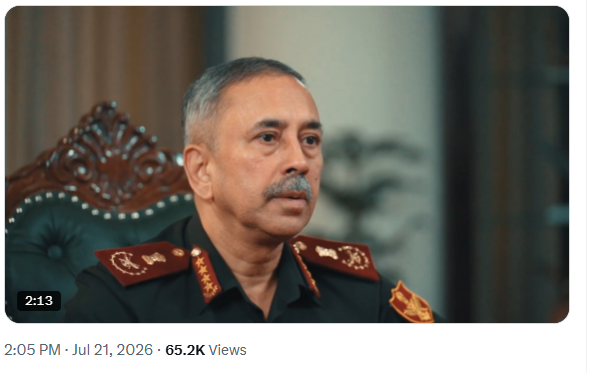
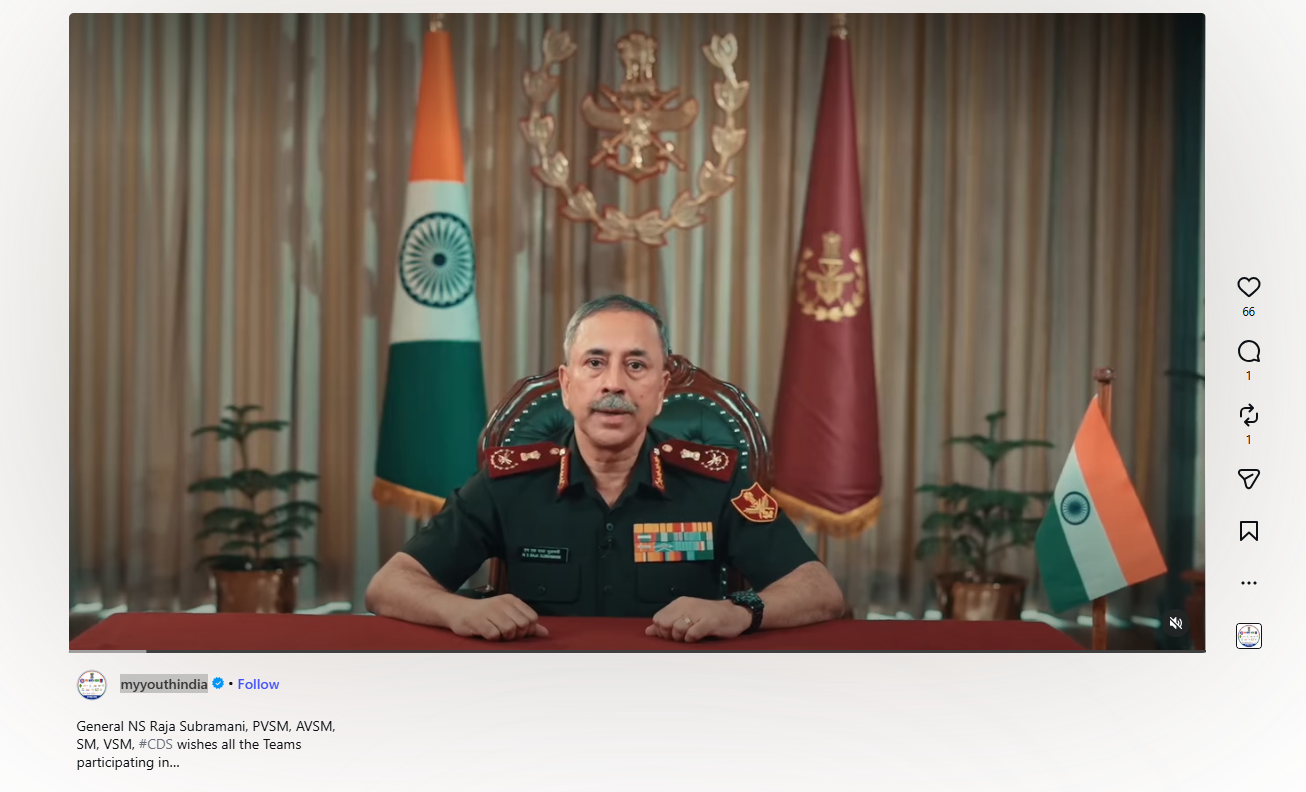
Further research led us to the same video posted by the Instagram account myyouthindia, where CDS Raja Subramani can again be seen wishing teams participating in the 135th Indian Oil Durand Cup Football Tournament.
https://www.instagram.com/reels/DbEGRGBsKv8/
Conclusion
The research established that the viral video of CDS Raja Subramani has been manipulated using AI-generated content. The original video is related to the 135th Indian Oil Durand Cup Football Tournament and does not contain any statement about the resignation of 30,000 Indian soldiers or the Jantar Mantar protest. The digitally altered video is being shared with a false claim.
