
#FactCheck-AI-Generated Audio Falsely Added to Dharmendra Pradhan Video to Claim His Resignation as Education Minister
Executive Summary
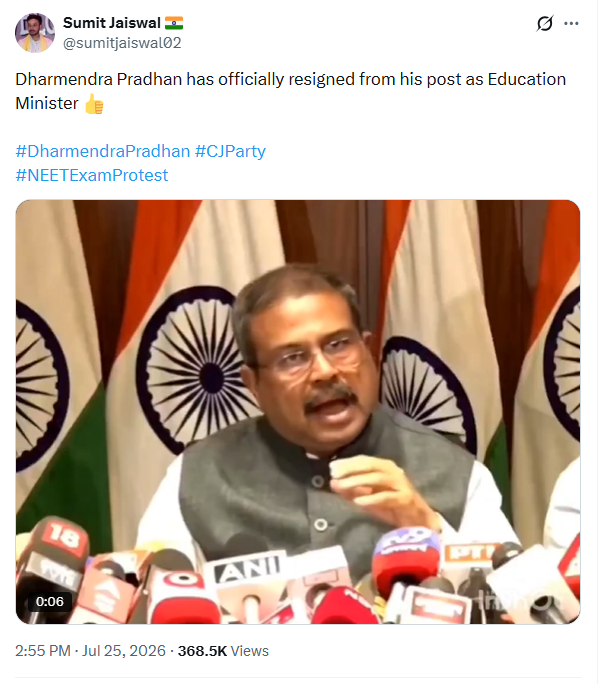
A video featuring Union Education Minister Dharmendra Pradhan is being widely shared on social media, claiming that he has resigned from his post. In the viral video, Pradhan can be seen addressing a press conference and is allegedly heard saying, “I am resigning from the post of Education Minister due to personal reasons. I thank everyone for this opportunity.” CyberPeace Research Wing’s research found that the claim is misleading. The research revealed that an AI-generated audio clip was added to an old video of Dharmendra Pradhan, falsely attributing a resignation statement to him. The video was digitally altered using a short segment from Pradhan’s press conference held in May 2026 regarding the NEET UG 2026 re-examination.
Claim:
A user on social media platform X, with the username @sumitjaiswal02, shared the viral video on July 25, 2026, claiming that “Dharmendra Pradhan has officially resigned from the post of Education Minister.” In the video, Pradhan is allegedly heard saying, “I am resigning from the post of Education Minister due to personal reasons. I thank everyone for this opportunity.”
The link, archive link and screenshot of the post are provided below
https://x.com/sumitjaiswal02/status/2080947511150448868?s=20
Fact Check:
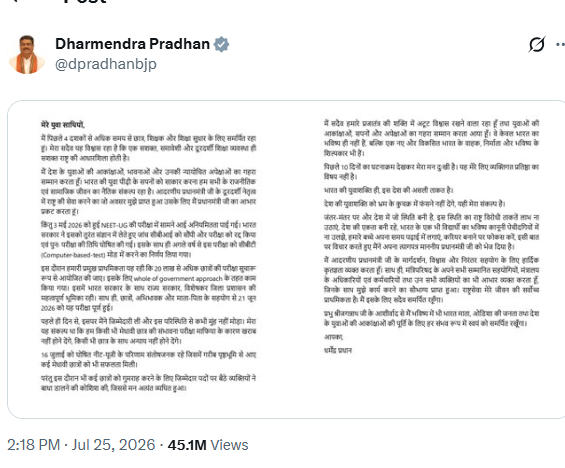
To verify the viral claim, the Desk conducted an open-source search. During the research, several reports related to Dharmendra Pradhan’s resignation were found on credible news platforms and official sources. However, no authentic video was found on any official platform or verified news outlet showing Pradhan making the resignation statement heard in the viral clip.The research did find his resignation letter, which he shared through his official social media account. However, no official video statement announcing his resignation was available. Dharmendra Pradhan’s X post regarding his resignation can be accessed here:
https://x.com/dpradhanbjp/status/2080938216505667663?s=20
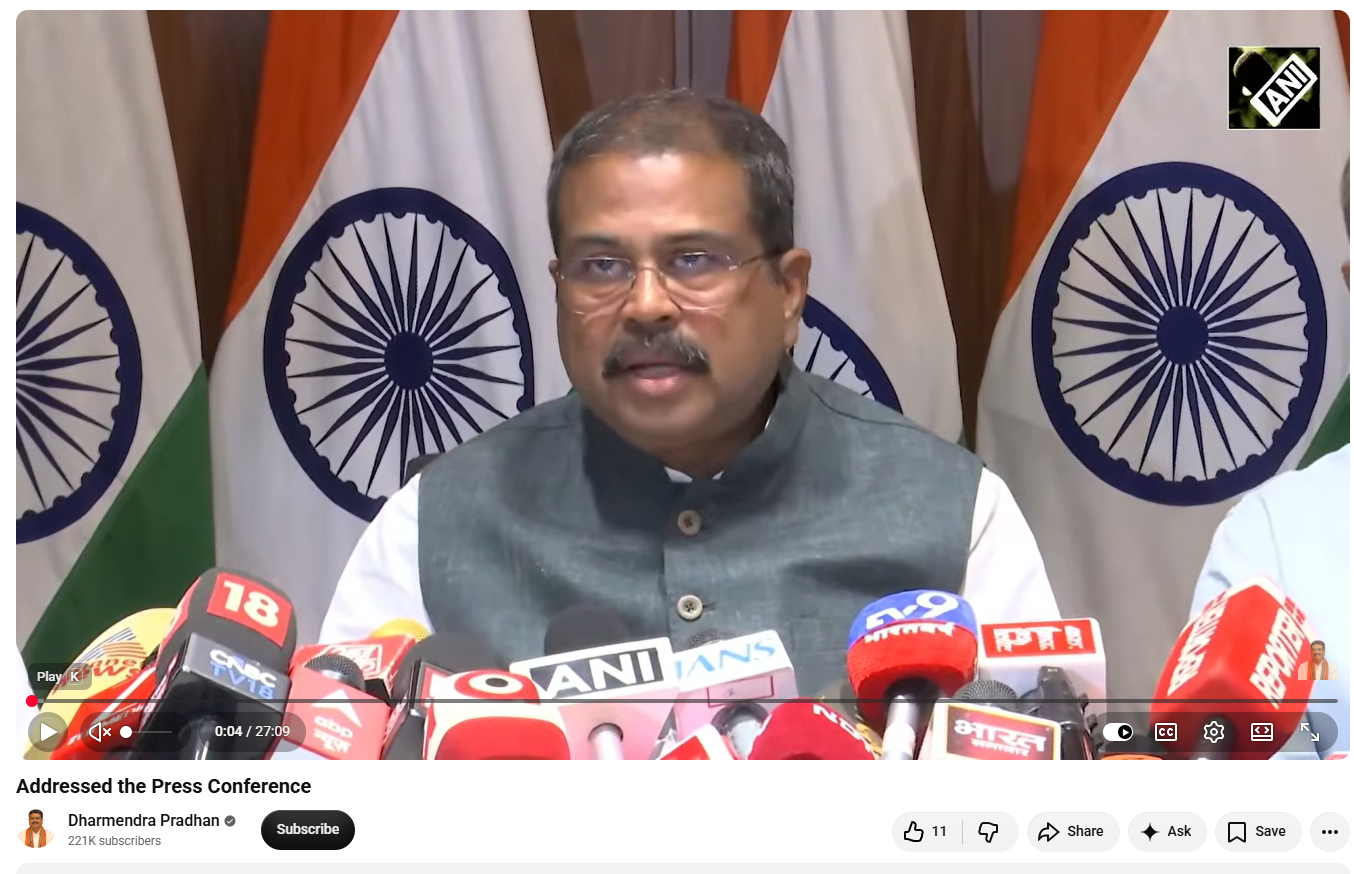
Further research involved extracting key frames from the viral video and conducting a reverse image search using Google Lens. This led the Desk to a video uploaded on Dharmendra Pradhan’s official YouTube channel on May 15, 2026. The video showed Pradhan addressing a press conference regarding the NEET UG 2026 re-examination. The video link and screenshot are provided below:
https://www.youtube.com/watch?v=XkcYnwOAj0M
After analysing the audio of the viral video, the PTI Fact Check Desk extracted the audio track and examined it using the AI audio detection tool Resemble AI. The analysis indicated that the audio used in the viral video was AI-generated and did not contain Dharmendra Pradhan’s original voice or any genuine statement made by him.

Conclusion:
Based on the research, the Desk concluded that the viral video has been digitally altered by adding AI-generated audio to falsely attribute a resignation statement to Union Education Minister Dharmendra Pradhan. The research found that the video uses a short segment from Pradhan’s May 2026 press conference on the NEET UG 2026 re-examination, which was modified by adding a fabricated AI-generated voice. The altered video is being circulated with a misleading claim about his resignation.

Related Blogs
Introduction
India’s new Policy for Data Sharing from the National Transport Repository (NTR) released by the Ministry of Road Transport and Highways (MoRTH) in August, 2025, can be seen as a constitutional turning point and a milestone in administrative efficiency. The state has established an unprecedentedly large unified infrastructure by combining the records of 390 million vehicles, 220 million driver’s licenses, and the streams from the e-challan, e-DAR, and FASTag systems. Its supporters hail its promise of private-sector innovation, data-driven research, and smooth governance. However, there is a troubling paradox beneath this facade of advancement: the very structures intended to improve citizen mobility may simultaneously strengthen widespread surveillance. Without strict protections, the NTR runs the risk of violating the constitutional trifecta of need, proportionality, and legality as stated in Puttaswamy v. UOI, which brings to light important issues at the nexus of liberty, law, and data.
The other pertinent question to be addressed is as India unifies one of its comprehensive datasets on citizen mobility the question becomes more pressing: while motorised citizens are now in the spotlight for accountability, what about the millions of other datasets that are still dispersed, unregulated, and shared inconsistently in the areas of health, education, telecom, and welfare?
The Legal Backdrop
MoRTH grounds its new policy in Sections 25A and 62B of the Motor Vehicles Act, 1988. Data is consolidated into a single repository since states are required by Section 136A to electronically monitor road safety. According to the policy, it complies with the Digital Personal Data Protection Act, 2023.
The DPDP Act itself, however, is rife with state exclusions, particularly Sections 7 and 17, which give government organisations access to personal information for “any function under any law” or for law enforcement purposes. This is where the constitutional issue lies. Prior judicial supervision, warrants, or independent checks are not necessary. With legislative approval, MoRTH is essentially creating a national vehicle database without any constitutional protections.
Data, Domination and the New Privacy Paradigm
As an efficiency and governance reform, VAHAN, SARATHI, e-challan, eDAR, and FASTag are being consolidated into a single National Transport Repository (NTR). However, centralising extensive mobility and identity-linked records on a large scale is more than just a technical advancement; it also changes how the state and private life interact. The NTR must therefore be interpreted through a more comprehensive privacy paradigm, one that acknowledges that data aggregation is a means of enhancing administrative capacity and has the potential to develop into a long-lasting tool of social control and surveillance unless both technological and constitutional restrictions are placed at the same time.
Two recent doctrinal developments sharpen this concern. First, the Supreme Court’s foundational ruling that privacy is a fundamental right remains the constitutional lodestar, any state interference must satisfy legality, necessity and proportionality (KS Puttaswamy & Anr. vs UOI). Second, as seen by the court’s most recent refusals to normalise ongoing, warrantless location monitoring, such as the ruling overturning bail requirements that required accused individuals to provide a Google maps pin, as movement tracking necessitates closer examination (Frank Vitus v. Narcotics Control Bureau & Ors.,).When taken as a whole, these authorities maintain that unrestricted, ongoing access to mobility and toll-transaction records is a constitutional issue and cannot be handled as an administrative convenience.
Structural Fault Lines in the NTR Framework
Fundamentally, the NTR policy generates structural vulnerabilities by providing nearly unrestricted access through APIs and even mass transfers on physical media to a broad range of parties, including insurance companies, law enforcement, and intelligence services. This design undermines constitutional protections in three ways: first, it makes it possible to draw conclusions about private life patterns that the Supreme Court has identified as one of the most sensitive data categories by exposing rich mobility trails like FASTag logs and vehicle-linked identities; Second, it allows bulk datasets to circulate outside the ministry’s custodial boundary, which creates the possibility of function creep, secondary use, and monetisation risks reminiscent of the bulk sharing regime that the government itself once abandoned; and third, it introduces coercive exclusion by tying private sector access to Aadhaar-based OTP consent.
Reference

Executive Summary:
Recently, CyberPeace faced a case involving a fraudulent Android application imitating the Punjab National Bank (PNB). The victim was tricked into downloading an APK file named "PNB.apk" via WhatsApp. After the victim installed the apk file, it resulted in unauthorized multiple transactions on multiple credit cards.
Case Study: The Attack: Social Engineering Meets Malware
The incident started when the victim clicked on a Facebook ad for a PNB credit card. After submitting basic personal information, the victim receives a WhatsApp call from a profile displaying the PNB logo. The attacker, posing as a bank representative, fakes the benefits and features of the Credit Card and convinces the victim to install an application named PNB.apk. The so called bank representative sent the app through WhatsApp, claiming it would expedite the credit card application. The application was installed in the mobile device as a customer care application. It asks for permissions such as to send or view SMS messages. The application opens only if the user provides this permission.

It extracts the credit card details from the user such as Full Name, Mobile Number, complain, on further pages irrespective of Refund, Pay or Other. On further processing, it asks for other information such as credit card number, expiry date and cvv number.


Now the scammer has access to all the details of the credit card information, access to read or view the sms to intercept OTPs.
The victim, thinking they were securely navigating the official PNB website, was unaware that the malware was granting the hacker remote access to their phone. This led to ₹4 lakhs worth of 11 unauthorized transactions across three credit cards.
The Investigation & Analysis:
Upon receiving the case through CyberPeace helpline, the CyberPeace Research Team acted swiftly to neutralize the threat and secure the victim’s device. Using a secure remote access tool, we gained control of the phone with the victim’s consent. Our first step was identifying and removing the malicious "PNB.apk" file, ensuring no residual malware was left behind.
Next, we implemented crucial cyber hygiene practices:
- Revoking unnecessary permissions – to prevent further unauthorized access.
- Running antivirus scans – to detect any remaining threats.
- Clearing sensitive data caches – to remove stored credentials and tokens.
The CyberPeace Helpline team assisted the victim to report the fraud to the National Cybercrime Portal and helpline (1930) and promptly blocked the compromised credit cards.
The technical analysis for the app was taken ahead and by using the md5 hash file id. This app was marked as malware in virustotal and it has all the permissions such as Send/Receive/Read SMS, System Alert Window.


In the similar way, we have found another application in the name of “Axis Bank” which is circulated through whatsapp which is having similar permission access and the details found in virus total are as follows:


Recommendations:
This case study implies the increasingly sophisticated methods used by cybercriminals, blending social engineering with advanced malware. Key lessons include:
- Be vigilant when downloading the applications, even if they appear to be from legitimate sources. It is advised to install any application after checking through an application store and not through any social media.
- Always review app permissions before granting access.
- Verify the identity of anyone claiming to represent financial institutions.
- Use remote access tools responsibly for effective intervention during a cyber incident.
By acting quickly and following the proper protocols, we successfully secured the victim’s device and prevented further financial loss.

Introduction
In the digital era, where technology is growing rapidly, the role of Artificial Intelligence (AI) has been making its way to different corners of the world. Where nothing seems to be impossible, technology and innovation have been moving conjointly and once again, and such innovation is in the limelight with its groundbreaking initiative known as “Project Groot”, which has been announced by the AI chip leader “Nvidia”. The core of this project is the fusion of technology with AI and robotics, where a humanoid can be produced with the capability to understand the natural language and interact with it to further learn from the physical environment by observing human actions and skills. Project Groot aims to assist humans in diverse sectors such as Healthcare and so on.
Humanoid robots are based on NVIDIA’s thor system-on-chip (SoC). The thor powers the intelligence of these robots, and the chip has been designed to handle complex tasks and ensure a safe and natural interaction between humans and robots. However, a big question arises about the ethical considerations of privacy, autonomy and the possible replacement of human workers.
Brief Analysis
Nvidia has announced Project GR00T, or Generalist Robot 00 Technology, which aims to create AI-powered humanoid robots with human-like understanding and movement. The project is part of Nvidia's efforts to drive breakthroughs in robotics and embodied AI, which can interact with and learn from a physical environment. The robots built on this platform are designed to understand natural language and emulate movements by observing human actions, such as coordination, dexterity, and other skills.
The model has been trained on NVIDIA GPU-accelerated simulation, enabling the robots to learn from human demonstrations with imitation learning and from the robotics platform NVIDIA Isaac Lab for reinforcement learning. This multimodal AI system acts as the mind for humanoid robots, allowing them to learn new skills and interact with the real world. Leading names in robotics, such as Figure, Boston Dynamics, Apptronik, Agility Robotics, Sanctuary AI, and Unitree, are reported to have collaborated with Nvidia to leverage GR00T.
Nvidia has also updated Isaac with Isaac Manipulator and Isaac Perceptor, which add multi-camera 3D vision. The company also unveiled a new computer, Jetson Thor, to aid humanoid robots based on NVIDIA's SoC, which is designed to handle complex tasks and ensure a safe and natural interaction between humans and robots.
Despite the potential job loss associated with humanoid robots potentially handling hazardous and repetitive tasks, many argue that they can aid humans and make their lives more comfortable rather than replacing them.
Policy Recommendations
The Nvidia project highlights a significant development in AI Robotics, presenting a brimming potential and ethical challenges critical for the overall development and smooth assimilation of AI-driven tech in society. To ensure its smooth assimilation, a comprehensive policy framework must be put in place. This includes:
- Human First Policy - Emphasis should be on better augmentation rather than replacement. The authorities must focus on better research and development (R&D) of applications that aid in modifying human capabilities, enhancing working conditions, and playing a role in societal growth.
- Proper Ethical Guidelines - Guidelines stressing human safety, autonomy and privacy should be established. These norms must include consent for data collection, fair use of AI in decision making and proper protocols for data security.
- Deployment of Inclusive Technology - Access to AI Driven Robotics tech should be made available to diverse sectors of society. It is imperative to address potential algorithm bias and design flaws to avoid discrimination and promote inclusivity.
- Proper Regulatory Frameworks - It is crucial to establish regulatory frameworks to govern the smooth deployment and operation of AI-driven tech. The framework must include certification for safety and standards, frequent audits and liability protocols to address accidents.
- Training Initiatives - Educational programs should be introduced to train the workforce for integrating AI driven robotics and their proper handling. Upskilling of the workforce should be the top priority of corporations to ensure effective integration of AI Robotics.
- Collaborative Research Initiatives - AI and emerging technologies have a profound impact on the trajectory of human development. It is imperative to foster collaboration among governments, industry and academia to drive innovation in AI robotics responsibly and undertake collaborative initiatives to mitigate and address technical, societal, legal and ethical issues posed by AI Robots.
Conclusion
On the whole, Project GROOT is a significant quantum leap in the advancement of robotic technology and indeed paves the way for a future where robots can integrate seamlessly into various aspects of human lives.
References
- https://indianexpress.com/article/explained/explained-sci-tech/what-is-nvidias-project-gr00t-impact-robotics-9225089/
- https://medium.com/paper-explanation/understanding-nvidias-project-groot-762d4246b76d
- https://www.techradar.com/pro/nvidias-project-groot-brings-the-human-robot-future-a-significant-step-closer
- https://www.barrons.com/livecoverage/nvidia-gtc-ai-conference/card/nvidia-announces-ai-model-for-humanoid-robot-development-BwT9fewMyD6XbuBrEDSp
