
#FactCheck- Old Bangladesh Clip Misused as West Bengal Election Incident
Executive Summary
A video showing two men attempting to break into a house, only to be confronted by armed personnel who force them to kneel, is being widely shared on social media in the context of the upcoming West Bengal Assembly elections. The clip is being circulated with claims that it shows Central Reserve Police Force personnel intervening after workers of the Trinamool Congress allegedly tried to intimidate locals. However, an research by the CyberPeace Research Wing found that the claim is false. The viral video has no connection to India or the West Bengal elections and is being shared with a misleading narrative.
Claim
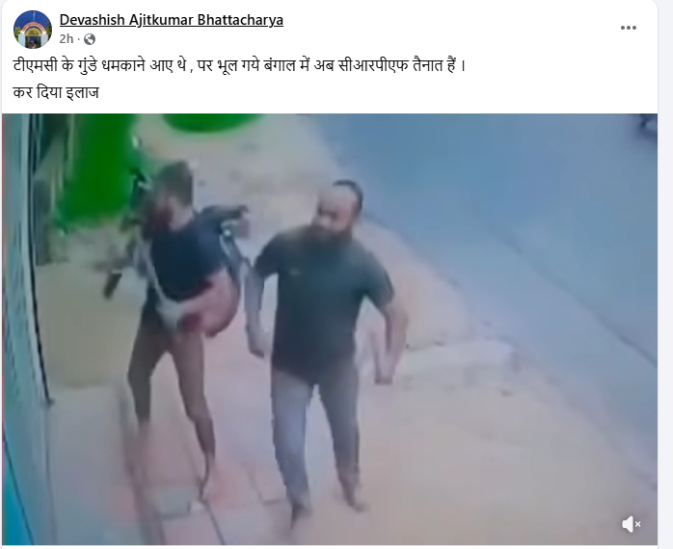
A Facebook user named Devashish Ajitkumar Bhattacharya shared the video on April 20, 2026, with the caption suggesting that TMC workers attempted to threaten people but were stopped by CRPF personnel deployed in West Bengal.
- Archive link: https://perma.cc/R42V-49FV
Fact Check
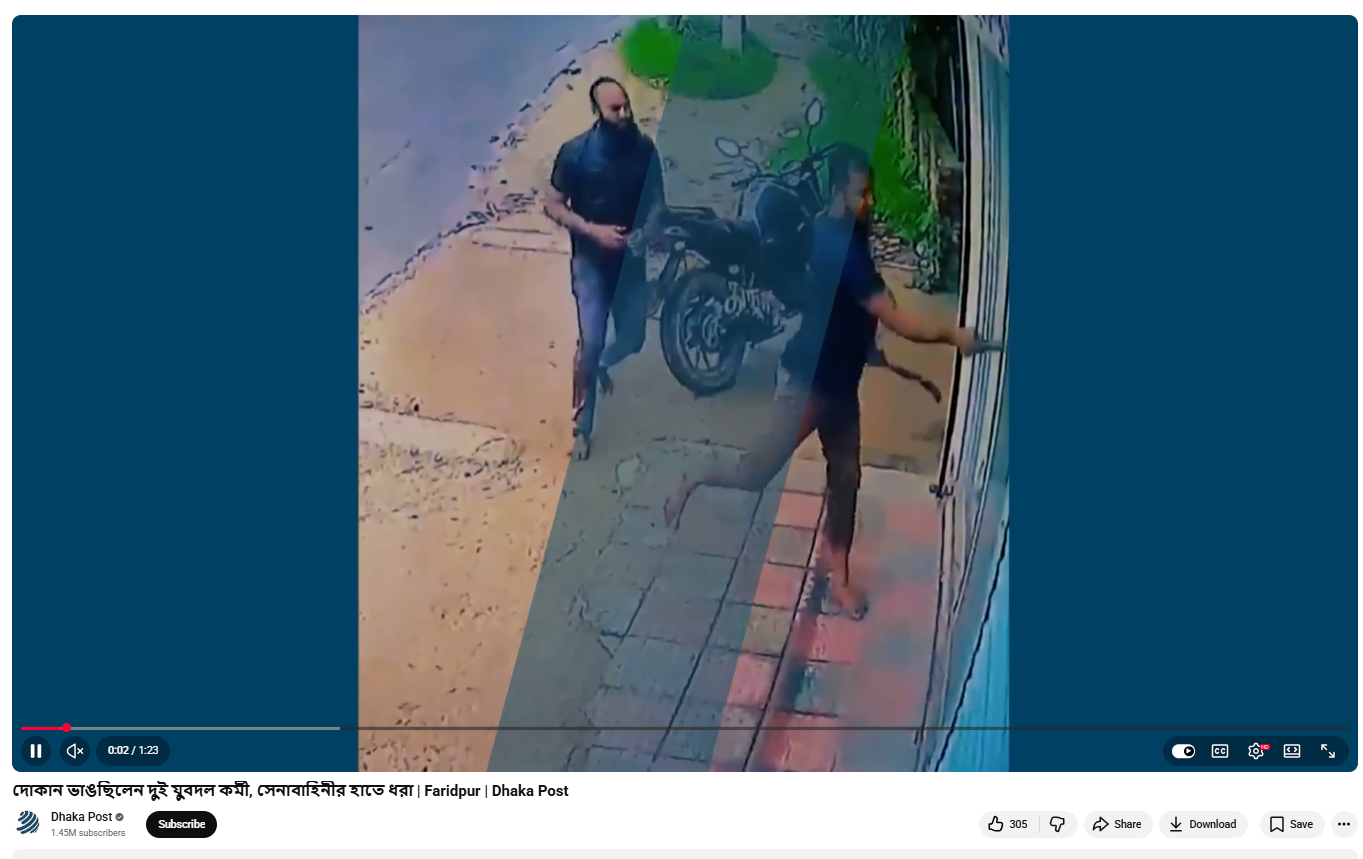
To verify the claim, we extracted keyframes from the viral video and conducted a reverse image search. This led us to the same video uploaded on August 17, 2024, on the official YouTube channel of Bangladeshi news outlet Dhaka Post. The details accompanying the video confirmed that the incident took place in Bangladesh.
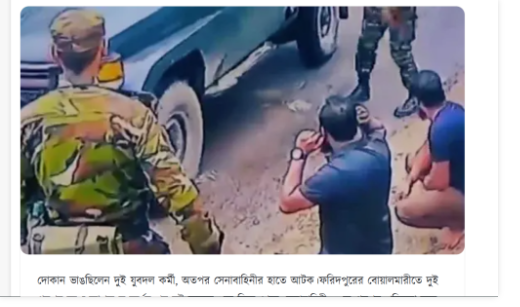
Further research led us to a report published on August 17, 2024, by 24 Hours Khobor, which stated that the incident occurred in Faridpur, Bangladesh. According to the report, a clash broke out between two groups, following which the army intervened and arrested two individuals identified as Tutul Hossain and Dukhu Mia. Both were later sent to jail by a court.
Conclusion
The viral claim linking the video to the West Bengal Assembly elections is false. The footage does not show any incident involving CRPF personnel or political workers in India. Instead, it is from an unrelated घटना in Bangladesh that took place in 2024. The video has been taken out of context and is being circulated with a misleading narrative to create confusion around the ongoing election environment.

Related Blogs
Executive Summary:
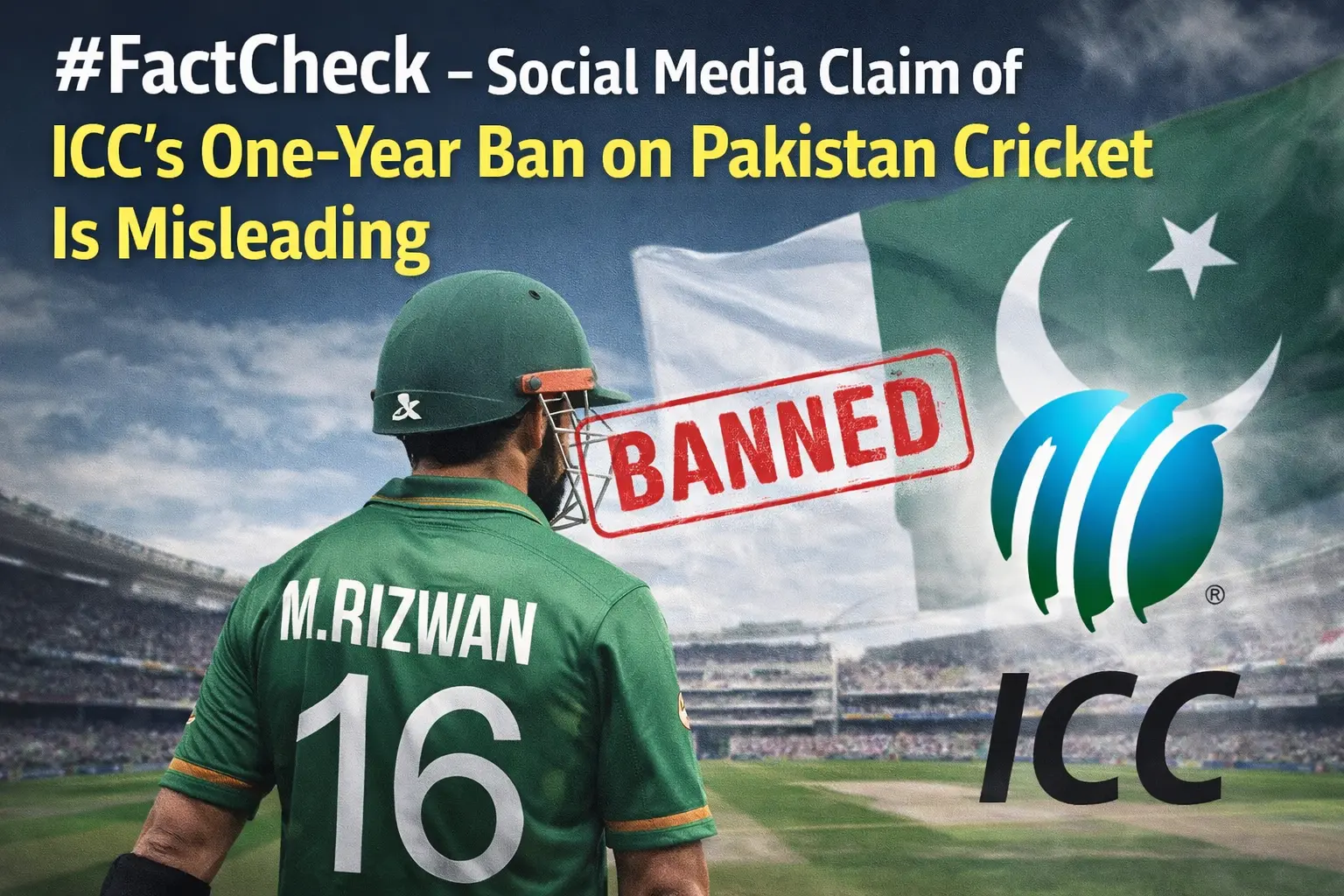
A purported media release allegedly issued in the name of the International Cricket Council (ICC) is being widely circulated on social media. The release claims that the ICC has decided to impose a one-year ban on Pakistan cricket. CyberPeace’s research found this claim to be false.The research revealed that the media release circulating on social media is fake, and no such letter or official statement has been issued by the ICC.
Claim:
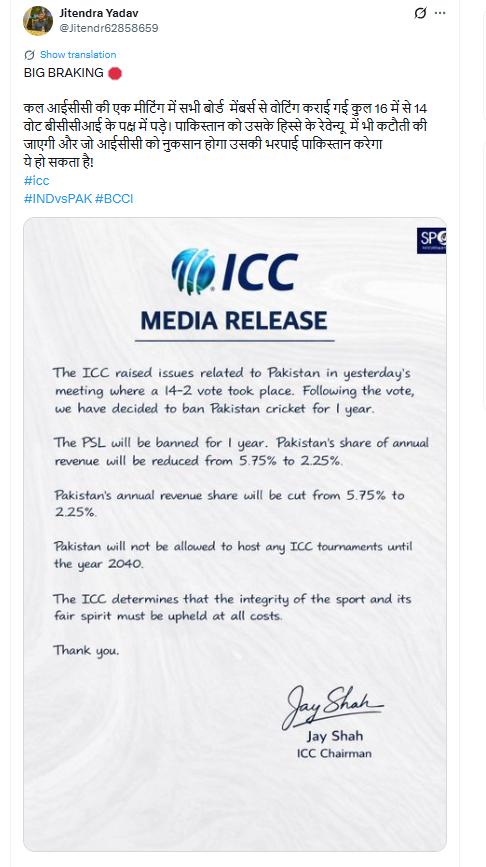
On social media platform X (formerly Twitter), a user shared the viral letter on February 3, 2026, claiming that an ICC meeting was held in which board members voted on issues related to Pakistan. The post alleged that 14 out of 16 votes were cast in favour of the BCCI. The user further claimed that Pakistan’s share of ICC revenue would be reduced and that Pakistan might be asked to compensate for losses incurred by the ICC.
The viral letter, written in English, stated that matters related to Pakistan were discussed in an ICC meeting and that a 14–2 majority vote led to the decision to impose a one-year ban on Pakistan cricket. It further claimed that the Pakistan Super League (PSL) would be suspended for one year, Pakistan’s annual revenue share would be reduced from 5.75 percent to 2.25 percent, and Pakistan would not be allowed to host any ICC tournaments until 2040. The letter also claimed that these decisions were taken to safeguard the integrity and spirit of the game. Links to the viral post, archive link, and screenshots can be seen below.
Fact Check:
To verify the viral claim, CyberPeace conducted a Google search using relevant keywords. However, no credible or reliable media reports supporting the claim were found. In the next step of the research , an official press release uploaded on DD Sports’ Facebook page on February 2, 2026, was found. The press release responded to Pakistan’s decision not to play against India in a Group A match. The DD Sports statement said that the Pakistan Cricket Board should consider the long-term and serious implications of such a decision, as it could impact the global cricket ecosystem—of which Pakistan is itself a member and beneficiary.
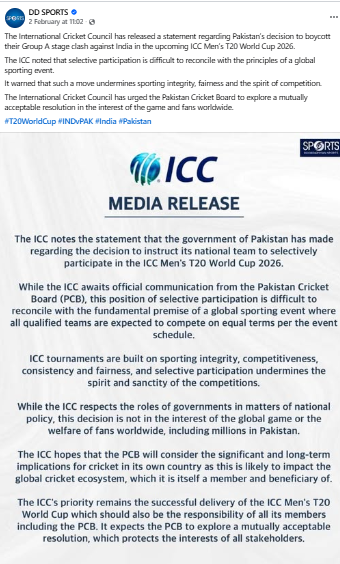
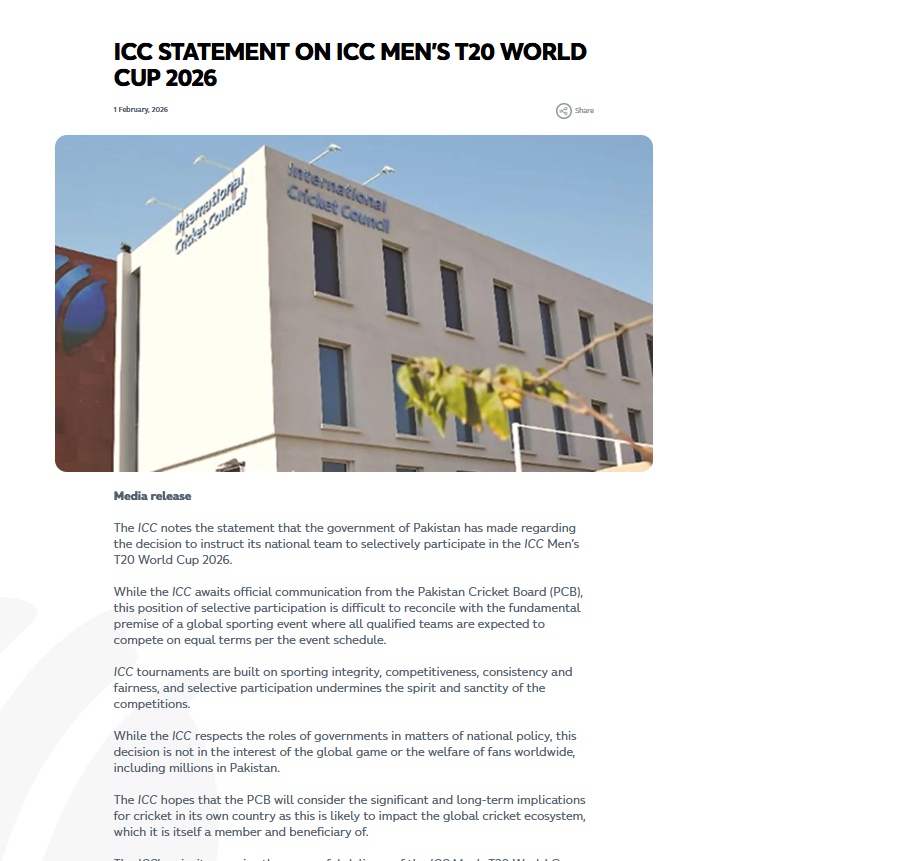
Notably, the official press release made no mention of any ban on Pakistan cricket, reduction in revenue share, suspension of the PSL, or restrictions on hosting ICC tournaments, contrary to the claims made in the viral letter. Further, the same official statement was found published on the ICC’s website on February 1, 2026. This release also did not mention any decision related to banning Pakistan cricket or barring the country from hosting ICC tournaments for the next 40 years.
Conclusion
CyberPeace concludes that the media release circulating on social media is fake. The ICC has not issued any official letter or statement announcing a one-year ban on Pakistan cricket, revenue cuts, or restrictions on hosting ICC tournaments.

Executive Summary:
A video currently circulating on social media falsely claims to show the aftermath of an Indian Navy attack on Karachi Port, allegedly involving the INS Vikrant. Upon verification, it has been confirmed that the video is unrelated to any naval activity and in fact depicts a plane crash that occurred in Philadelphia, USA. This misrepresentation underscores the importance of verifying information through credible sources before drawing conclusions or sharing content.
Claim:
Social media accounts shared a video claiming that the Indian Navy’s aircraft carrier, INS Vikrant, attacked Karachi Port amid rising India-Pakistan tensions. Captions such as “INDIAN NAVY HAS DESTROYED KARACHI PORT” accompanied the footage, which shows a crash site with debris and small fires.

Fact Check:
After reverse image search we found that the viral video to earlier uploads on Facebook and X (formerly Twitter) dated February 2, 2025. The footage is from a plane crash in Philadelphia, USA, involving a Mexican-registered Learjet 55 (tail number XA-UCI) that crashed near Roosevelt Mall.

Major American news outlets, including ABC7, reported the incident on February 1, 2025. According to NBC10 Philadelphia, the crash resulted in the deaths of seven individuals, including one child.

Conclusion:
The viral video claiming to show an Indian Navy strike on Karachi Port involving INS Vikrant is entirely misleading. The footage is from a civilian plane crash that occurred in Philadelphia, USA, and has no connection to any military activity or recent developments involving the Indian Navy. Verified news reports confirm the incident involved a Mexican-registered Learjet and resulted in civilian casualties. This case highlights the ongoing issue of misinformation on social media and emphasizes the need to rely on credible sources and verified facts before accepting or sharing sensitive content, especially on matters of national security or international relations.
- Claim: INS Vikrant, attacked Karachi Port amid rising India-Pakistan tensions
- Claimed On: Social Media
- Fact Check: False and Misleading

Introduction
On 27 July 2026, Bank of Baroda admitted to experiencing a cybersecurity attack, officially confirming many hours of chatter and speculation amongst Bank of Baroda customers and information security professionals. According to a statement by the bank issued through regulatory filing, the breach came about due to unauthorised access into some of its data via compromise of an employee’s email account; however, not much beyond these details was disclosed. In the meantime, allegations of a major large-scale data leak flooded into various platforms and forums of the cybersecurity world along with mainstream news outlets and, eventually, mainstream social networks. It’s now critically important for us to attempt to differentiate factual from unverified details about Bank of Baroda’s recent cybersecurity incident.
We will analyse and list what the bank has released, what our community research has discovered and also what questions are still left unanswered.
The bank's version
Bank of Baroda said the breach traced back to a single compromised employee email account, which gave an unknown party unauthorised access to "certain data". Crucially, the bank maintains that its core banking systems, that is, the infrastructure that actually moves customer money, were never touched. It says the incident was detected and contained quickly and that it is working with law enforcement and regulators while a forensic investigation continues. That's a fairly narrow admission compared with what had already surfaced on the dark web.
What the hackers claim
Days before the bank's statement, a relatively new ransomware and data-extortion group calling itself ‘TripleX’ listed Bank of Baroda on its dark web leak site, dated July 24. The group claimed to have pulled roughly 1 terabyte of data and, unusually, released the entire cache for free rather than holding it for ransom, framing the move on its leak page as punishment for the bank's weak passwords and security lapses.
Independent researcher Srikanth Lakshmanan, founder of the digital-rights group 'CashlessConsumer', examined samples of the leaked material before alerting the bank and authorities. He told India Today Tech that what he reviewed included internal branch audit files, loan appraisal documents, vigilance investigation records, audit reports tied to the bank's bob World mobile app, and customer account-opening forms.
Several outlets also reported that sample files appeared to contain Aadhaar numbers, customer photographs, and NetBanking details, alongside corporate and NRI banking records. It's worth being precise here, though: Reuters and other outlets have emphasised that the exact contents and true scale of the leak haven't been independently verified, and Bank of Baroda itself hasn't confirmed which specific data categories were exposed. Estimates of the dataset's size have also varied anywhere from around 700 gigabytes to a full terabyte, depending on the source.
A repeat offender
TripleX isn't new to targeting state-owned banks. The gang first appeared in May 2026, and only weeks before targeting Bank of Baroda, it claimed responsibility for hacking PT Bank Negara Indonesia – the largest of Indonesia's state-owned banks, which stole nearly 2 terabytes of documents, including contracts, IDs and transaction histories. Both compromises follow a familiar pattern. Identify one point of entry, extract widely, and instead of working in the background to negotiate for a ransom, publish everything for the largest damage possible.
This represents a notable break from typical ransomware attacks. Groups such as TripleX forego encryption, simply relying solely on the public pressure of (or actuality of) imminent disclosure to extort victims. It is the extortion component of "double extortion" with little incentive to pursue payment.
The regulatory clock
India's banking sector doesn't get much slack when something like this happens. The Reserve Bank of India's Cyber Security Framework for Banks requires an initial incident report within two to six hours of detection, and India's Computer Emergency Response Team (CERT-In) mandates reporting of specified incidents within six hours. Bank of Baroda has also reportedly filed a preliminary notice under a cyber-insurance programme arranged through National Insurance, offering total coverage of roughly $78 million, though it's far too early to know whether it will actually be paid out or how much will actually be paid out.
Looking ahead, India's Digital Personal Data Protection Rules are due to take effect in May 2027, which will tighten breach-notification obligations further. This incident lands right at the edge of that regulatory transition, arguably a preview of what's at stake for the next bank that gets hit.
A History of Data Security Missteps
This is not the first time banks’ technology has raised a red flag. In 2023, an investigation by The Reporters’ Collective and Al Jazeera discovered that bank employees had inserted the mobile numbers of unauthorised agents (including those belonging to staff and security guards) and other businesses into their customers' profiles to drive enrolment on the bank’s app – BoB World. Several of the bank's customers were later victims of fraud due to the unauthorised association of mobile numbers, and the bank had its own internally reported data issues that later led to the RBI mandating an audit and then prohibiting the bank from onboarding new Bob World users temporarily. Even though the two issues are not related, it serves as context; in the case of banks handling more than $300 billion in their global operations through over 8,400 domestic locations, room for security errors is marginal, and the damage, both public and regulatory, escalates from there on.
What it means for customers
For those who bank with the Bank of Baroda, the common-sense approach is checking statements for any unfamiliar transactions; beware unsolicited calls/messages referencing account details (which typically follow after identity document leaks are being used as a basis for secondary scams); and as a security precaution, change your NetBanking password and app PIN while no core systems of the bank are reported to have been breached; even so, it is advisable to apply. Because Aadhaar, if it has been really compromised, cannot be reset like a password, which is why a compromised identity document is typically of longer-term risk than a stolen password.
Conclusion
The bigger story here isn't just one bank's bad week. It's a reminder that in a system where a single compromised employee inbox can cascade into hundreds of gigabytes of exposed customer data, "our core systems weren't affected" is true and reassuring and, for anyone whose loan documents or ID numbers may now be sitting on a dark web forum, somewhat beside the point.
Sources
- Bank of Baroda confirms cyber incident after hackers claim data theft — The Record (Recorded Future News): https://therecord.media/india-bank-of-baroda-reports-cybersecurity-incident
- Bank of Baroda Data Leak: What We Know So Far — Gulf News: https://gulfnews.com/business/banking/bank-of-baroda-data-leak-what-we-know-so-far-about-alleged-cyber-breach-1.500621898
- Bank of Baroda Breach Tests Disclosure Readiness — GovInfoSecurity (ISMG): https://www.govinfosecurity.com/bank-baroda-breach-tests-disclosure-readiness-a-32335
- India's Bank of Baroda Faces Alleged 1TB Data Leak on Dark Web — Yahoo Finance / India Today Tech: https://finance.yahoo.com/technology/ai/articles/india-bank-baroda-faces-alleged-113047992.html
- Bank of Baroda Data Breach Exposes Customer Records — The Asian Banker: https://www.theasianbanker.com/updates-and-articles/india-s-bank-of-baroda-data-breach-exposes-customer-records-after-employee-email-compromise
- India's Bank of Baroda Expose Worsens: Agents Steal Money From Accounts (2023 background) — Al Jazeera: https://www.aljazeera.com/economy/2023/10/12/indias-bank-of-baroda-expose-worsens-agents-steal-money-from-accounts
- 'Immediate Containment Measures Implemented': Bank of Baroda Issues Clarity on Alleged 1TB Data Leak — Republic World: https://www.republicworld.com/business/immediate-containment-measures-implemented-bank-of-baroda-issues-clarity-on-1tb-data-leak-2026-07-27-133590
