
#FactCheck - Bangladeshi Migrant’s Arrest Misrepresented as Indian in Viral Video!
Executive Summary:
An old video dated 2023 showing the arrest of a Bangladeshi migrant for murdering a Polish woman has been going viral massively on social media claiming that he is an Indian national. This viral video was fact checked and debunked.
Claim:
The video circulating on social media alleges that an Indian migrant was arrested in Greece for assaulting a young Christian girl. It has been shared with narratives maligning Indian migrants. The post was first shared on Facebook by an account known as “Voices of hope” and has been shared in the report as well.

Facts:
The CyberPeace Research team has utilized Google Image Search to find the original source of the claim. Upon searching we find the original news report published by Greek City Times in June 2023.


The person arrested in the video clip is a Bangladeshi migrant and not of Indian origin. CyberPeace Research Team assessed the available police reports and other verifiable sources to confirm that the arrested person is Bangladeshi.
The video has been dated 2023, relating to a case that occurred in Poland and relates to absolutely nothing about India migrants.
Neither the Polish government nor authorized news agency outlets reported Indian citizens for the controversy in question.

Conclusion:
The viral video falsely implicating an Indian migrant in a Polish woman’s murder is misleading. The accused is a Bangladeshi migrant, and the incident has been misrepresented to spread misinformation. This highlights the importance of verifying such claims to prevent the spread of xenophobia and false narratives.
- Claim: Video shows an Indian immigrant being arrested in Greece for allegedly assaulting a young Christian girl.
- Claimed On: X (Formerly Known As Twitter) and Facebook.
- Fact Check: Misleading.

Related Blogs

Executive Summary:
In the age of virtuality, misinformation and misleading techniques shape the macula of the internet, and these threaten human safety and well-being. Recently, an alarming fake information has surfaced, intended to provide a fake Government subsidy scheme with the name of Indian Post. This serves criminals, who attack people's weaknesses, laying them off with proposals of receiving help in exchange for info. In this informative blog, we take a deep dive into one of the common schemes of fraud during this time. We will go through the stages involved which illustrates how one is deceived and offer practical tips to avoid the fall.
Introduction:
Digital communication reaches individuals faster, and as a result, misinformation and mails have accelerated their spread globally. People, therefore, are susceptible to online scams as they add credibility to phenomena. In India, the recently increased fake news draws its target with the deceptive claims of being a subsidy from the Government mainly through the Indian post. These fraudulent schemes frequently are spread via social networks and messaging platforms, influence trust of the individual’s in respectable establishments to establish fraud and collect private data.
Understanding the Claim:
There is a claim circulating on the behalf of the Government at the national level of a great subsidy of $1066 for deserving residents. The individual will be benefited with the subsidy when they complete the questionnaire they have received through social media. The questionnaire may have been designed to steal the individual’s confidential information by way of taking advantage of naivety and carelessness.
The Deceptive Journey Unveiled:
Bogus Offer Presentation: The scheme often appeals to people, by providing a misleading message or a commercial purposely targeted at convincing them to act immediately by instilling the sense of an urgent need. Such messages usually combine the mood of persuasion and highly evaluative material to create an illusion of being authentic.
Questionnaire Requirement: After the visitors land on attractive content material they are directed to fill in the questionnaire which is supposedly required for processing the economic assistance. This questionnaire requests for non private information in their nature.
False Sense of Urgency: Simultaneously, in addition to the stress-causing factor of it being a fake news, even the false deadline may be brought out to push in the technique of compliance. This data collection is intended to put people under pressure and influence them to make the information transfer that immediate without thorough examination.
Data Harvesting Tactics: Despite the financial help actually serving, you might be unaware but lies beneath it is a vile motive, data harvesting. The collection of facts through questionnaires may become something priceless for scammers that they can use for a good while to profit from identity theft, financial crimes and other malicious means.
Analysis Highlights:
- It is important to note that at this particular point, there has not been any official declaration or a proper confirmation of an offer made by the India Post or from the Government. So, people must be very careful when encountering such messages because they are often employed as lures in phishing attacks or misinformation campaigns. Before engaging or transmitting such claims, it is always advisable to authenticate the information from trustworthy sources in order to protect oneself online and prevent the spread of wrongful information
- The campaign is hosted on a third party domain instead of any official Government Website, this raised suspicion. Also the domain has been registered in very recent times.

- Domain Name: ccn-web[.]buzz
- Registry Domain ID: D6073D14AF8D9418BBB6ADE18009D6866-GDREG
- Registrar WHOIS Server: whois[.]namesilo[.]com
- Registrar URL: www[.]namesilo[.]com
- Updated Date: 2024-02-27T06:17:21Z
- Creation Date: 2024-02-11T03:23:08Z
- Registry Expiry Date: 2025-02-11T03:23:08Z
- Registrar: NameSilo, LLC
- Name Server: tegan[.]ns[.]cloudflare[.]com
- Name Server: nikon[.]ns[.]cloudflare[.]com
Note: Cybercriminal used Cloudflare technology to mask the actual IP address of the fraudulent website.
CyberPeace Advisory:
Verification and Vigilance: It makes complete sense in this case that you should be cautious and skeptical. Do not fall prey to this criminal act. Examine the arguments made and the facts provided by either party and consult credible sources before disclosures are made.
Official Channels: Governments usually invoke the use of reliable channels which can as well be by disseminating subsidies and assistance programs through official websites and the legal channels. Take caution for schemes that are not following the protocols previously established.
Educational Awareness: Providing awareness through education and consciousness about on-line scams and the approaches which are fraudulent has to be considered a primary requirement. Through empowering individuals with capabilities and targets we, as a collective, can be armed with information that will prevent erroneous scheme spreading.
Reporting and Action: In a case of mission suspicious and fraudulent images, let them understand immediately by making the authorities and necessary organizations alert. Your swift actions do not only protect yourself but also help others avoid the costs of related security compromises.
Conclusion:
The rise of the ‘Indian Post Countrywide - government subsidy fake news’ poses a stern warning of the present time that the dangers within the virtual ecosystem are. The art of being wise and sharp in terms of scams always reminds us to show a quick reaction to the hacks and try to do the things that we should identify as per the CyberPeace advisories; thereby, we will contribute to a safer Cyberspace for everyone. Likewise, the ability to critically judge, and remain alert, is important to help defeat the variety of tricks offenders use to mislead you online.

Introduction
The advent of Electronic Vehicles (EVs) represents a transformative leap towards a more sustainable and environmentally conscious transportation future by nations. However, as these vehicles become increasingly connected and reliant on advanced technological systems, a parallel concern emerges—data privacy. Integrating sophisticated technologies in EVs, such as GPS tracking, biometric authentication, and in-car connectivity, raises substantial questions about the collection, storage, and potential misuse of sensitive personal information. This intersection of automotive innovation and data privacy underscores the need for comprehensive solutions and regulatory frameworks to ensure that the benefits of electric vehicles are realised without compromising the privacy and security of their users.
Electronic vehicles primarily record three types of data;
- Driving behaviour and patterns: The e-vehicle records braking and driving patterns, including acceleration, speed, and swerve. Some vehicles even track air conditioning usage and airbag deployment to determine the point of failure in the event of a crash.
- Location data: The e-vehicles also track GPS systems to gauge the speed and direction of the vehicle.
- EV functions and use of telematic services: Monitoring of EV functions includes battery use management, battery charging history, battery deterioration, electrical system functions and software version information.
Data Privacy requirements of companies
Companies manufacturing e-vehicles are saddled with several data privacy requirements as concerns about consumer safety. Data collected by e-vehicles may be sensitive in nature. Location tracking is a key issue that has garnered attention. The constant recording of a driver's whereabouts can lead to the creation of detailed profiles, raising questions about the potential misuse or unauthorised access to this sensitive information. The risk of surveillance, stalking, or even theft of valuable personal data is a genuine concern for EV owners.
Moreover, integrating smart features, such as voice recognition, biometric authentication, and in-car personal assistants, adds another layer of complexity. These features require the collection and processing of personal data. If not handled securely, they may become vulnerable to hacking or unauthorised access, leading to identity theft or other malicious activities. Additionally, Smart charging systems offer convenience by allowing remote monitoring and control of charging, but they also gather extensive data. The geographical data collected during charging may raise concerns about location privacy.
Striking a delicate balance between leveraging this data for enhancing vehicle performance and user experience while safeguarding the privacy of EV owners is paramount. Transparent privacy policies, secure data storage practices, and stringent encryption protocols are essential components of a comprehensive approach to data protection. If a company is eyeing the international market or utilising cloud-based software with decentralised global data storage, it must also navigate international privacy and data protection laws. A prime example is the General Data Protection Regulation (GDPR), a globally recognised and stringent data protection law applicable to both European-based companies and international entities providing goods, services, or monitoring activities of residents within Europe.
Manufacturers of these vehicles are subjected to compliance with this comprehensive legal framework. Obligations on companies are levied by them being data fiduciaries; dual liability may also emanate since some data fiduciaries may also qualify as data processors. Special care must be taken when data is being transferred to third parties.
Further, compliance with consumer safety laws is also an important consideration. In India, the Consumer Protection Act of 2019 safeguards the rights of consumers, holding manufacturers, sellers, and service providers responsible for any harm resulting from faulty or defective products. This extends the Act's coverage to include manufacturers and sellers of internet and technology-based products. When read with the Digital Personal Data Protection Act of 2023 (DPDP Act), the Consumer Protection Act of 2019 takes on additional significance. The DPDP Act, focusing on the security of an individual's digital personal data, introduces provisions such as mandatory consent, purpose limitation, data minimisation, obligatory security measures by organisations, data localisation, and enforcing accountability and compliance. These provisions apply to information generated by and for consumers, offering a comprehensive framework for protecting digital personal data.
Conclusion
The intersection of e-vehicles and data privacy necessitates a careful and comprehensive approach to ensure the coexistence of automotive innovation and user security. As electric vehicles record intricate data related to driving behaviour, location, and telematic services, companies manufacturing these vehicles must navigate a complex landscape of data privacy requirements. The potential risks associated with location tracking, smart features, and the extensive data collected during charging underscore the importance of transparent privacy policies, secure data storage practices, and stringent encryption protocols. Moreover, as companies expand globally, compliance with international privacy laws like the GDPR becomes imperative. Balancing the enhancement of vehicle performance and user experience with the safeguarding of privacy is paramount. Manufacturers, deemed as data fiduciaries, must exercise diligence, especially when transferring data to third parties. Additionally, adherence to consumer safety laws, such as the Consumer Protection Act of 2019, further emphasises the need for a holistic and vigilant approach to ensure the responsible use of data in the evolving landscape of e-vehicles.
References
- https://digitalcommons.law.scu.edu/cgi/viewcontent.cgi?article=1556&context=chtlj
- https://cyberswitching.com/electric-car-charging-and-data-privacy/#:~:text=Smart%20charging%20systems%20provide%20convenience,in%20safeguarding%20EV%20user%20privacy

Amid protests against rising inflation in Iran, a video is being widely shared on social media showing people gathering on streets at night while using mobile phone flashlights. The video is being circulated with the claim that it shows recent protests in Iran. Cyber Peace Foundation’s research found that the video being shared as visuals from the ongoing protests in Iran is not real. Our investigation revealed that the viral video is AI-generated and has no connection with actual events on the ground.
Claim
On January 11, 2026, an Instagram user shared the video with a caption written in Spanish. The Hindi translation of the caption reads: “The Iranian government shut down the lights of protesters, but that did not stop them from remaining on the streets demanding that the Ayatollahs step down from power.”The post link, its archived version, and screenshots can be seen below: https://www.instagram.com/p/DTXqzayjqFz/

FactCheck:
To verify the claim, we extracted keyframes from the viral video and conducted a Google reverse image search.During this process, we found the same video uploaded on Instagram on January 11, 2026. In that post, the user explicitly stated that the video was created using AI. The caption reads that the streetlights were turned off to hide the scale of protesters, but people used their phone lights to show their presence, adding:
“I created this video using AI, inspired by tonight’s protests (January 10, 2026) in Tehran, Iran.” Link to the post and screenshot can be seen below: https://www.instagram.com/p/DTWXsHajNvl/

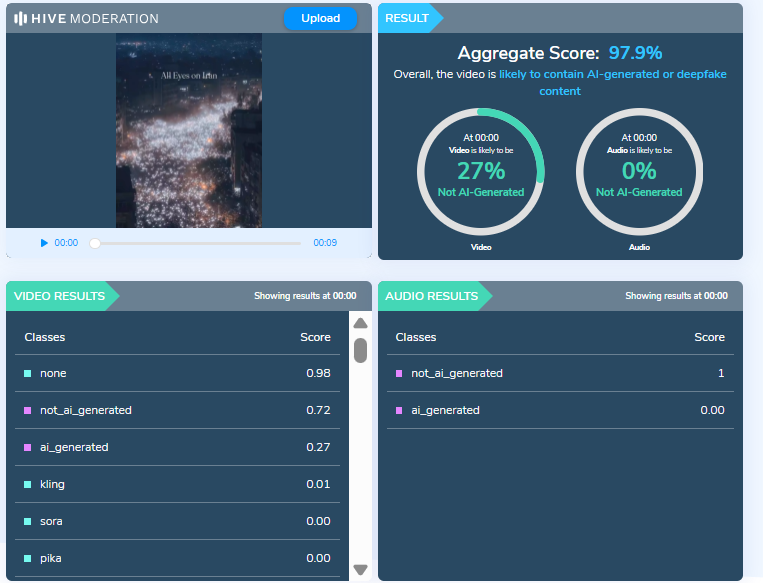
To further verify the authenticity of the video, we scanned it using multiple AI detection tools.Hive Moderation flagged the video as 97 percent AI-generated.
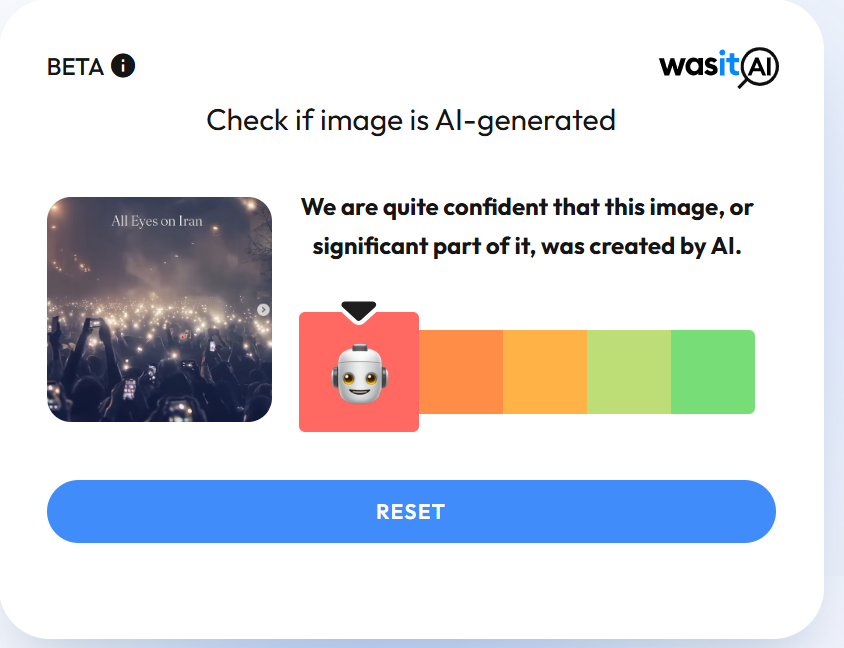
We also scanned the video using another AI detection tool, Wasitai, which likewise identified the video as AI-generated.
Conclusion
Our investigation confirms that the video being shared as footage from protests in Iran is not real. The viral video has been created using artificial intelligence and is being falsely linked to the ongoing protests. The claim circulating on social media is false and misleading.
