
#FactCheck: AI-Manipulated Video Falsely Shows Ravish Kumar Criticising CJP, AAP Leaders
Executive Summary
A video of journalist Ravish Kumar is being widely shared on social media. The video is being circulated with the claim that Kumar criticised Abhijeet Deepak, the CJP and Aam Aadmi Party (AAP) leaders over the CJP’s alleged absence from the ongoing student protest in Jharkhand. The CyberPeace Research Wing found the claim to be false. The research established that the original video of Ravish Kumar was digitally manipulated using artificial intelligence (AI), and altered audio was added before it was shared with a misleading claim.
Claim
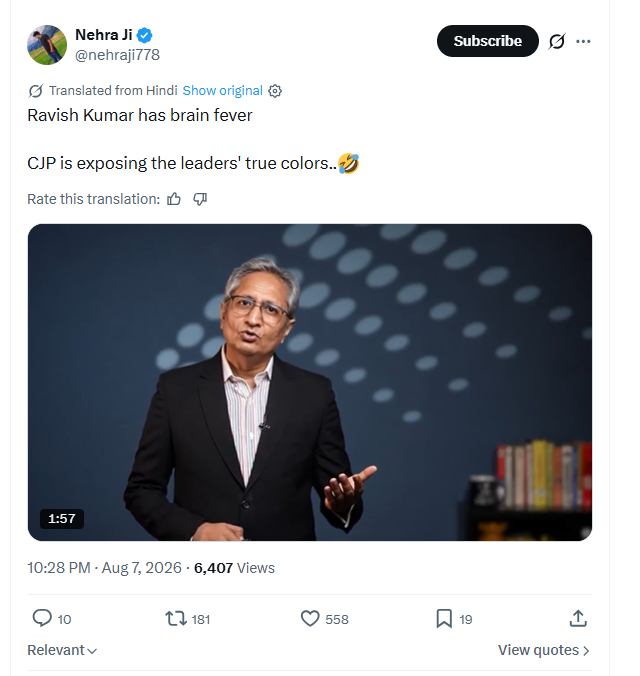
A user on X (formerly Twitter) shared the viral video on August 7, 2026, with the caption: “Ravish Kumar has brain fever. CJP is exposing the leaders’ true colors.”
https://x.com/nehraji778/status/2085772474915164506
Factcheck
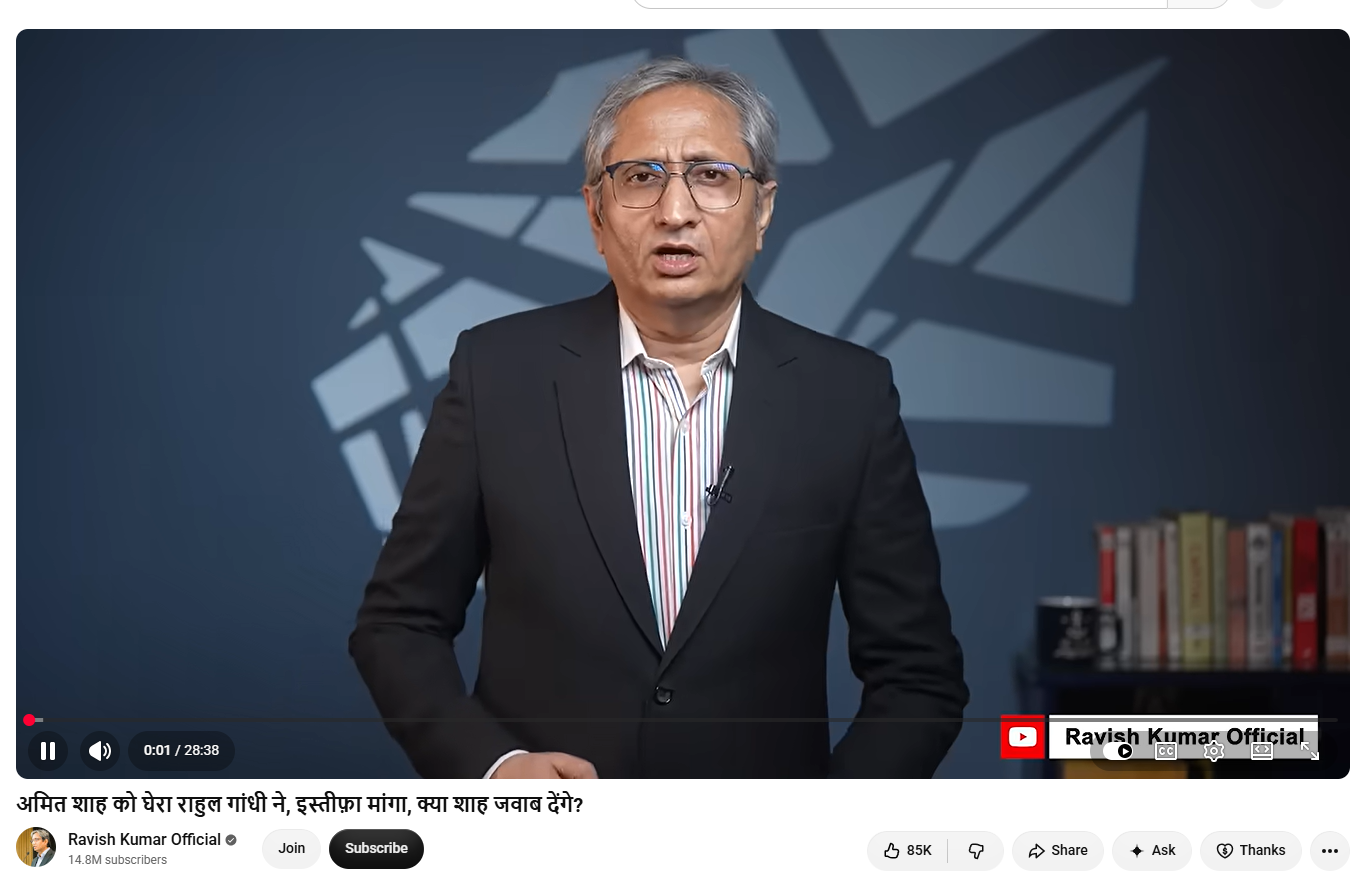
To verify the claim, we extracted several keyframes from the viral video and conducted a reverse image search using Google Lens. During the search, we found a video uploaded on Ravish Kumar’s official YouTube channel on July 29, 2026.
The visuals in the original video match those seen in the viral clip. Ravish Kumar can be seen wearing the same clothes and appearing in almost the same frame as in the viral video.
https://www.youtube.com/watch?v=Rdn_hfyZVRM
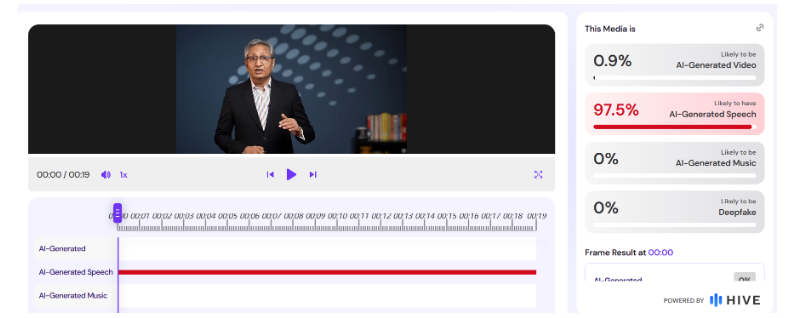
In the next step, we analysed the viral video using Hive Moderation. The tool indicated a 97 per cent probability that the video was AI-generated.
Conclusion
The research found that the viral claim is false. The visuals are taken from a genuine video of Ravish Kumar, but the original footage has been digitally manipulated and altered audio has been added using AI. The modified video is being circulated with a misleading claim that Kumar criticised Abhijeet Deepak, CJP and AAP leaders over the Jharkhand student protest.

Related Blogs

Introduction
The United Nations General Assembly (UNGA) has unanimously adopted the first global resolution on Artificial Intelligence (AI), encouraging countries to take into consideration human rights, keeping personal data safe, and further monitoring the threats associated with AI. This non-binding resolution proposed by the United States and co-sponsored by China and over 120 other nations advocates the strengthening of privacy policies. This step is crucial for governments across the world to shape how AI grows because of the dangers it carries that could undermine the protection, promotion, and right to human dignity and fundamental freedoms. The resolution emphasizes the importance of respecting human rights and fundamental freedoms throughout the life cycle of AI systems, highlighting the benefits of digital transformation and safe AI systems.
Key highlights
● This is indeed a landmark move by the UNGA, which adopted the first global resolution on AI. This resolution encourages member countries to safeguard human rights, protect personal data, and monitor AI for risks.
● Global leaders have shown their consensus for safe, secure, trustworthy AI systems that advance sustainable development and respect fundamental freedom.
● Resolution is the latest in a series of initiatives by governments around the world to shape AI. Therefore, AI will have to be created and deployed through the lens of humanity and dignity, Safety and Security, human rights and fundamental freedoms throughout the life cycle of AI systems.
● UN resolution encourages global cooperation, warns against improper AI use, and emphasizes the issues of human rights.
● The resolution aims to protect from potential harm and ensure that everyone can enjoy its benefits. The United States has worked with over 120 countries at the United Nations, including Russia, China, and Cuba, to negotiate the text of the resolution adopted.
Brief Analysis
AI has become increasingly prevalent in recent years, with chatbots such as the Chat GPT taking the world by storm. AI has been steadily attempting to replicate human-like thinking and solve problems. Furthermore, machine learning, a key aspect of AI, involves learning from experience and identifying patterns to solve problems autonomously. The contemporary emergence of AI has, however, raised questions about its ethical implications, potential negative impact on society, and whether it is too late to control it.
While AI is capable of solving problems quickly and performing various tasks with ease, it also has its own set of problems. As AI continues to grow, global leaders have called for regulations to prevent significant harm due to the unregulated AI landscape to the world and encourage the use of trustworthy AI. The European Union (EU) has come up with an AI act called the “European AI Act”. Recently, a Senate bill called “The AI Consent Bill” was introduced in the US. Similarly, India is also proactively working towards setting the stage for a more regulated Al landscape by fostering dialogues and taking significant measures. Recently, the Ministry of Electronics and Information Technology (MeitY) issued an advisory on AI, which requires explicit permission to deploy under-testing or unreliable AI models related to India's Internet. The following advisory also indicates measures advocating to combat deepfakes or misinformation.
AI has thus become a powerful tool that has raised concerns about its ethical implications and the potential negative influence on society. Governments worldwide are taking action to regulate AI and ensure that it remains safe and effective. Now, the groundbreaking move of the UNGA, which adopted the global resolution on AI, with the support of all 193 U.N. member nations, shows the true potential of efforts by countries to regulate AI and promote safe and responsible use globally.
New AI tools have emerged in the public sphere, which may threaten humanity in an unexpected direction. AI is able to learn by itself through machine learning to improve itself, and developers often are surprised by the emergent abilities and qualities of these tools. The ability to manipulate and generate language, whether with words, images, or sounds, is the most important aspect of the current phase of the ongoing AI Revolution. In the future, AI can have several implications. Hence, it is high time to regulate AI and promote the safe, secure and responsible use of it.
Conclusion
The UNGA has approved its global resolution on AI, marking significant progress towards creating global standards for the responsible development and employment of AI. The resolution underscores the critical need to protect human rights, safeguard personal data, and closely monitor AI technologies for potential hazards. It calls for more robust privacy regulations and recognises the dangers associated with improper AI systems. This profound resolution reflects a unified stance among UN member countries on overseeing AI to prevent possible negative effects and promote safe, secure and trustworthy AI.
References

Introduction
Misinformation spreads faster than a pimple before your best friend's wedding, and these viral skincare hacks on social media can do more harm than good if smeared on without a second thought. The unverified skin care tips, exaggerated results, and product endorsements lacking proper dermatological backing can often lead to breakouts and serious damage.
The Allure and Risks of Online Skincare Trends
In the age of social media, beauty advice is easily accessible, but not all trending skincare hacks are beneficial. Influencers lacking professional dermatological knowledge often endorse "medical grade" skincare products, which may not be suitable for all skin types. The viral DIY skincare hacks, such as natural remedies like multani mitti (Fuller's earth), have found a new audience online. However, suppose such skincare tips are approached without due care and caution regarding their suitability for different skin types, or without the proper formulation of ingredients. In that case, they can result in skin problems. It is crucial to approach online skincare advice with a critical eye, as not all trends are backed by scientific research.
CyberPeace Recommendations
- Influencer Responsibility and Ethical Endorsements in Skincare
Influencers play a crucial role in shaping public perception in the skincare and lifestyle industries. However, they must exercise due diligence before endorsing skincare products or practices, as misinformation can lead to financial loss and health consequences. Influencers should only promote products they have personally tested or vetted by dermatologists or skincare professionals. They should also research the brand's credibility, check ingredients for safety, and understand the product's target audience.
- Strengthening Digital Literacy in Skincare Spaces
CyberPeace highlights that improving digital literacy is one of the best strategies to stop the spread of false information about skincare. Users nowadays, particularly young people, are continuously exposed to a deluge of wellness and beauty-related content. Many people are duped by overstated claims, pseudoscientific cures, and influencer-driven marketing masquerading as sound advice if they lack the necessary digital literacy. We recommend supporting digital literacy initiatives that teach users how to evaluate sources, think critically, and comprehend how algorithms promote content. Long-term impact is thought to be achieved through influencer partnerships, gamified learning modules, and community workshops that promote media literacy.
- Recommendation for Users to Prioritise Research and Critical Thinking
Users should prioritise research and critical thinking when engaging with skincare content online. It's crucial to distinguish between valid advice and misinformation. Thorough research, including expert reviews, ingredient checks, and scientific sources, is essential. Questioning endorsements and relying on trusted platforms and dermatologists can help ensure a skincare routine based on sound practices.
- Mandating Transparency from Influencers and Brands
Enforcing stronger transparency laws for influencers and skincare companies is a key suggestion. Social media influencers frequently neglect to reveal sponsored collaborations or paid advertisements, giving followers the impression that the skincare advice is based on the creators' own experience and objective judgment. This dishonest practice frequently promotes goods with little to no scientific support and feeds false information. The social media companies need to be proactive in identifying and removing content that violates disclosure and advertising guidelines.
- Creating a Verified Registry for Skincare Professionals
Increasing the voices of real experts is one of the most important strategies to build credibility and trust online. The establishment of a publicly available, validated registry of certified dermatologists, cosmetologists, and skincare scientists is suggested by cybersecurity experts and medical professionals. These experts could then receive a "verified expert" badge from social media companies, making it easier for users to discern between content created by unqualified people and genuine, evidence-based advice. Algorithms that promote such verified content would inevitably limit the dissemination of false information.
- Enforcing Platform Accountability and Reporting System
There needs to be platform-level accountability and safeguard mechanisms in case of any false information about skincare. Platforms should monitor repeat offenders and implement a tiered penalty system that includes content removal and temporary or permanent bans on such malicious user profiles.
References
Executive Summary:
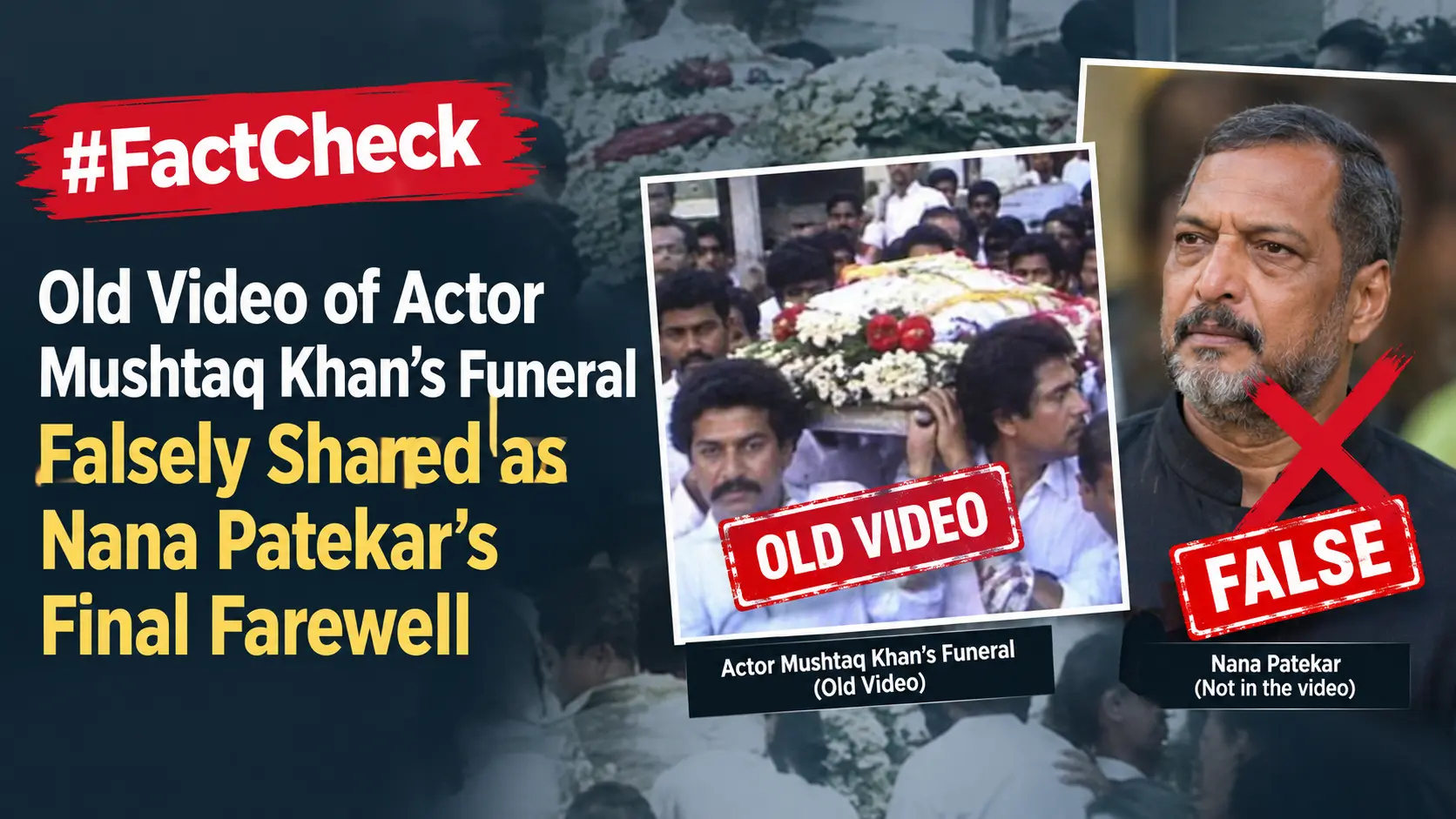
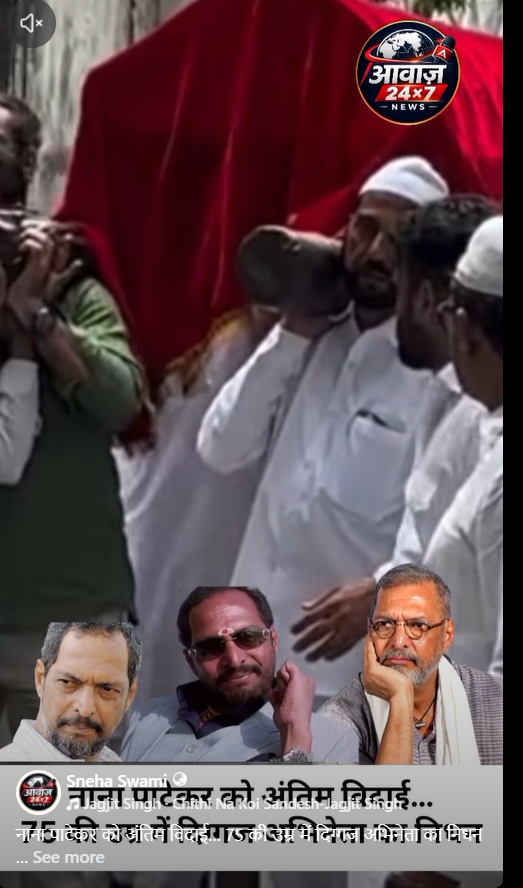
Veteran Indian actor Nana Patekar reportedly passed away early on October 8, 2026, at his residence in Goa. The 75-year-old actor allegedly suffered a sudden cardiac arrest at his home and was rushed to Manipal Hospital. According to reports, doctors attempted to revive him by administering CPR for around 45 minutes, but he was declared dead at 5:20 a.m. His family reportedly said that his last rites would be performed the same day at his farmhouse near Pune. Meanwhile, a social media post is circulating with the claim that the video shows Nana Patekar’s final farewell. CyberPeace Research found that the video actually shows the funeral of actor Mushtaq Khan.
Claim:
A Facebook user shared the viral video with the caption: “Final farewell to Nana Patekar… Veteran actor passes away at the age of 75.”
https://www.facebook.com/reel/1848305192964558
Fact Check:
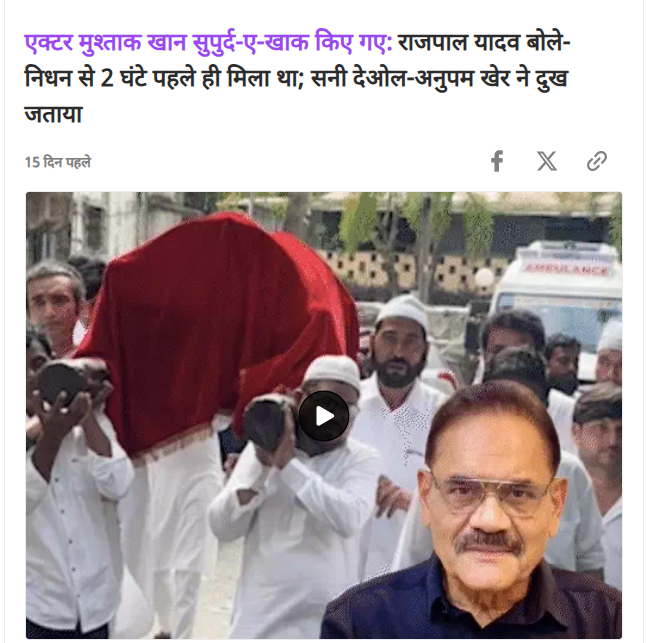
To verify the authenticity of the video, we conducted a reverse image search of its keyframes using Google Lens. During the search, we found a video report uploaded to Zoom TV’s Facebook page on September 25, 2026, which contained visuals from the viral clip.The report stated that veteran Bollywood actor Mushtaq Khan had been laid to rest in Mumbai, marking the end of the final journey of an actor who had entertained audiences for more than four decades. According to the report, the actor’s funeral rites were performed at the Yari Road cemetery in Mumbai after Friday prayers. During the funeral procession, his son and other family members were seen carrying his mortal remains.It is worth noting that actor Mushtaq Khan passed away on September 24 following a prolonged illness.
https://www.facebook.com/watch/?v=1922049222512573

During a search using relevant keywords, we found a report published on the Dainik Bhaskar website on September 25, 2026. The report also featured visuals from the video being shared with the claim that it shows Nana Patekar’s final farewell.The report stated that the video shows the funeral of actor Mushtaq Khan, who was laid to rest at the Yari Road cemetery after Friday prayers on September 25.
Conclusion:
The evidence gathered during our research establishes that the viral video does not show the final farewell of actor Nana Patekar. Instead, the video shows the funeral procession of actor Mushtaq Khan, who passed away on September 24, 2026.
