#FactCheck-AI-Generated Image Falsely Shows Iranian Soldiers Near Downed Helicopter
Executive Summary
Our research confirms that the viral image showing Iranian soldiers standing near a crashed helicopter is AI-generated and has no connection to any real-world event. It is being misleadingly shared online amid geopolitical tensions. Amid rising tensions between Iran, the United States, and Israel, a dramatic image is being widely shared on social media. The picture shows soldiers standing near the wreckage of a crashed helicopter in a desert, holding an Iranian flag. Users claim that Iranian forces shot down the aircraft. Research by CyberPeace Research Wing found that the viral image is fake and was created using AI tools.
Claim
A Facebook page named “Official Salman 09” shared the image on May 1, 2026, portraying it as a powerful symbol of victory in an ongoing conflict. The post suggested that the image reflected Iran’s military success and carried a broader political message amid regional tensions.
- https://www.facebook.com/photo/?fbid=909905332099201&set=a.522993370790401
- https://perma.cc/KCL8-7UDN

Fact Check
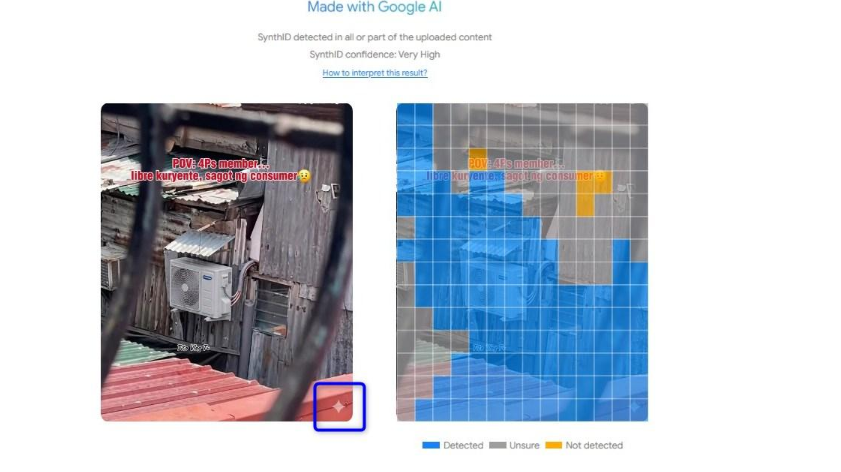
To verify the claim, we first conducted a reverse image search using Google Lens. The image did not appear on any credible news platforms, although it was widely circulating across social media—raising suspicion about its authenticity. We then analyzed the image using Google’s SynthID detector, which confirmed with high confidence that the image was generated using Google’s AI tools. SynthID is a technology designed to watermark and identify AI-generated content.

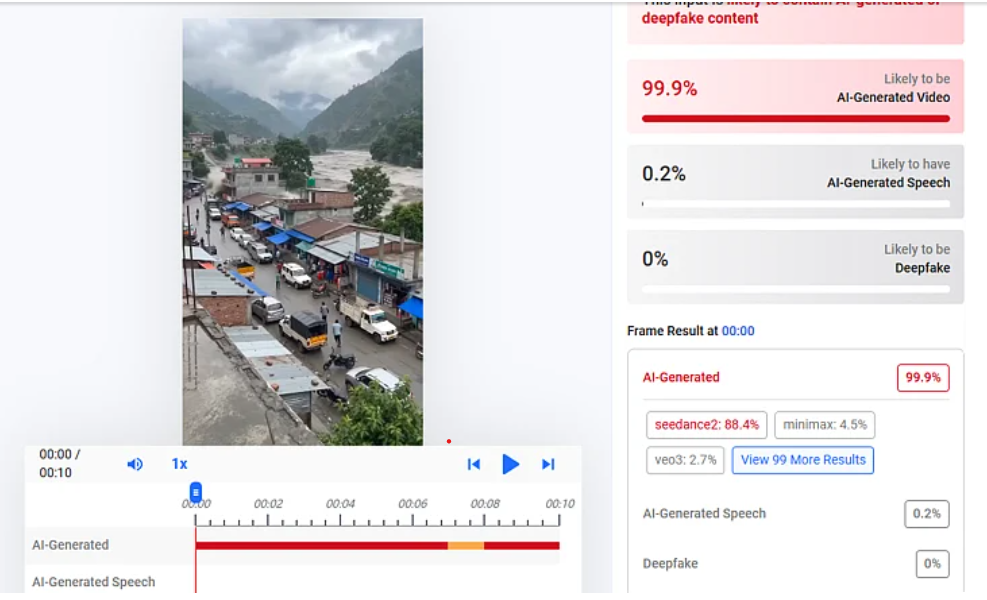
Further verification using AI detection tool Hive Moderation indicated a very high likelihood (up to 99.9%) that the image was AI-generated, with strong probability that it was created using Google’s Gemini.

Conclusion
Our research confirms that the viral image showing Iranian soldiers standing near a crashed helicopter is AI-generated and has no connection to any real-world event. It is being misleadingly shared online amid geopolitical tensions.
Related Blogs

Today, let us talk about one of the key features of our digital lives – security. The safer their online habits are, the safer their data and devices will be. A branded security will make their devices and Internet connections secure, but their carelessness or ignorance can make them targets for cybercrimes. On the other hand, they can themselves unwittingly get involved in dubious activities online. With children being very smart about passwords and browsing history clearing, parents are often left in the dark about their digital lives.
Fret not, parental controls are there at your service. These are digital tools often included with your OS or security software package, which helps you to remotely monitor and control your child’s online activities.
Where Can I find them?
Many devices come with pre-installed PC tools that you have to set up and run. Go to Settings-> Parental controls or Screentime and proceed from there. As I mentioned, they are also offered as a part of your comprehensive security software package.
Why and How to Use Parental Controls
Parental controls help monitor and limit your children's smartphone usage, ensuring they access only age-appropriate content. If your child is a minor, use of this tool is recommended, with the full knowledge of your child/ren. Let them know that just as you supervise them in public places for their safety, and guide them on rights and wrongs, you will use the tool to monitor and mentor them online, for their safety. Emphasize that you love them and trust them but are concerned about the various dubious and fake characters online as well as unsafe websites and only intend to supervise them. As they grow older and display greater responsibility and maturity levels, you may slowly reduce the levels of monitoring. This will help build a relationship of mutual trust and respect.
Step 1: Enable Parental Controls
- iOS: If your child has an iPhone, to set up the controls, go to Settings, select Screen Time, then select Content & Privacy Restrictions.
- Android: If the child has an Android phone, you can use the Google Family Link to manage apps, set screen time limits, and track device usage.
- Third-party apps: Consider security tools like McAfee, Kaspersky, Bark, Qustodio, or Norton Family for advanced features.
Check out what some of the security software apps have on offer:


If you prefer Norton, here are the details:

McAfee Parental Controls suite offers the following features:

McAfee also outlines why Parental Controls matter:

Lastly, let us take a look at what Quick Heal has on offer:

STEP 2: Set up Admin Login
Needless to say, a parent should be the admin login, and it is a wise idea to set up a strong and unique password. You do not want your kids to outsmart you and change their accessibility settings, do you? Remember to create a password you will remember, for children are clever and will soon discover where you have jotted it down.
STEP 3: Create Individual accounts for all users of the device
Let us say two minor kids, a grandparent and you, will be using the device. You will have to create separate accounts for each user. You can allow the children to choose their own passwords, it will give them a sense of privacy. The children or you may (or may not) need to help any Seniors set up their accounts.
Done? Good. Now let us proceed to the next step.
STEP 4: Set up access permissions by age
Let us first get grandparents and other seniors out of the way by giving them full access. when you enter their ages; your device will identify them as adults and guide you accordingly.
Now for each child, follow the instructions to set up filters and blocks. This will again vary with age – more filters for the younger ones, while you can remove controls gradually as they grow older, and hence more mature and responsible. Set up screen Time (daily and weekends), game filtering and playtime, content filtering and blocking by words (e.g. block websites that contain violence/sex/abuse). Ask for activity reports on your device so that you can monitor them remotely This will help you to receive alerts if children connect with strangers or get involved in abusive actions.
Save the data and it has done! Simple, wasn’t it?
Additional Security
For further security, you may want to set up parental controls on the Home Wi-Fi Router, Gaming devices, and online streaming services you subscribe to.
Follow the same steps. Select settings, Admin sign-in, and find out what controls or screen time protection they offer. Choose the ones you wish to activate, especially for the time when adults are not at home.
Conclusion
Congratulations. You have successfully secured your child’s digital space and sanitized it. Discuss unsafe practices as a family, and make any digital rule breaches and irresponsible actions, or concerns, learning points for them. Let their takeaway be that parents will monitor and mentor them, but they too have to take ownership of their actions.

Executive Summary:
A viral claim alleges that following the Supreme Court of India’s August 11, 2025 order on relocating stray dogs, authorities in Delhi NCR have begun mass culling. However, verification reveals the claim to be false and misleading. A reverse image search of the viral video traced it to older posts from outside India, probably linked to Haiti or Vietnam, as indicated by the use of Haitian Creole and Vietnamese language respectively. While the exact location cannot be independently verified, it is confirmed that the video is not from Delhi NCR and has no connection to the Supreme Court’s directive. Therefore, the claim lacks authenticity and is misleading
Claim:
There have been several claims circulating after the Supreme Court of India on 11th August 2025 ordered the relocation of stray dogs to shelters. The primary claim suggests that authorities, following the order, have begun mass killing or culling of stray dogs, particularly in areas like Delhi and the National Capital Region. This narrative intensified after several videos purporting to show dead or mistreated dogs allegedly linked to the Supreme Court’s directive—began circulating online.

Fact Check:
After conducting a reverse image search using a keyframe from the viral video, we found similar videos circulating on Facebook. Upon analyzing the language used in one of the posts, it appears to be Haitian Creole (Kreyòl Ayisyen), which is primarily spoken in Haiti. Another similar video was also found on Facebook, where the language used is Vietnamese, suggesting that the post associates the incident with Vietnam.
However, it is important to note that while these posts point towards different locations, the exact origin of the video cannot be independently verified. What can be established with certainty is that the video is not from Delhi NCR, India, as is being claimed. Therefore, the viral claim is misleading and lacks authenticity.


Conclusion:
The viral claim linking the Supreme Court’s August 11, 2025 order on stray dogs to mass culling in Delhi NCR is false and misleading. Reverse image search confirms the video originated outside India, with evidence of Haitian Creole and Vietnamese captions. While the exact source remains unverified, it is clear the video is not from Delhi NCR and has no relation to the Court’s directive. Hence, the claim lacks credibility and authenticity.
Claim: Viral fake claim of Delhi Authority culling dogs after the Supreme Court directive on the ban of stray dogs as on 11th August 2025
Claimed On: Social Media
Fact Check: False and Misleading

Executive Summary:
Microsoft rolled out a set of major security updates in August, 2024 that fixed 90 cracks in the MS operating systems and the office suite; 10 of these had been exploited in actual hacker attacks and were zero-days. In the following discussion, these vulnerabilities are first outlined and then a general analysis of the contemporary cyber security threats is also undertaken in this blog. This blog seeks to give an acquainted and non-acquainted audience about these updates, the threat that these exploits pose, and prevent measures concerning such dangers.
1. Introduction
Nowadays, people and organisations face the problem of cybersecurity as technologies develop and more and more actions take place online. These cyber threats have not ceased to mutate and hence safeguarding organisations’ digital assets requires a proactive stand. This report is concerned with the vulnerabilities fixed by Microsoft in August 2024 that comprised a cumulative of 90 security weaknesses where six of them were zero-day exploits. All these make a terrible risk pose and thus, it is important to understand them as we seek to safeguard virtual properties.
2. Overview of Microsoft’s August 2024 Security Updates
August 2024 security update provided by Microsoft to its products involved 90 vulnerabilities for Windows, Office, and well known programs and applications. These updates are of the latest type which are released by Microsoft under its Patch Tuesday program, a regular cum monthly release of all Patch updates.
- Critical Flaws: As expected, seven of the 90 were categorised as Critical, meaning that these are flaws that could be leveraged by hackers to compromise the targeted systems or bring operations to a halt.
- Zero-Day Exploits: A zero-day attack can be defined as exploits, which are as of now being exploited by attackers while the software vendor has not yet developed a patch for the same. It had managed 10 zero-days with the August update, which underlines that Microsoft and its ecosystems remain at risk.
- Broader Impact: These are not isolated to the products of Microsoft only They still persist Despite this, these vulnerabilities are not exclusive to the Microsoft products only. Other vendors such as Adobe, Cisco, Google, and others also released security advisories to fix a variety of issues which proves today’s security world is highly connected.
3. Detailed Analysis of Key Vulnerabilities
This section provides an in-depth analysis of some of the most critical vulnerabilities patched in August 2024. Each vulnerability is explained in layman’s terms to ensure accessibility for all readers.
3. 1 CVE-2024-38189: Microsoft Project Remote Code Execution Vulnerability (CVSS score:8. 8) :
The problem is in programs that belong to the Microsoft Project family which is known to be a popular project management system. The vulnerability enables an attacker to produce a file to entice an user into opening it and in the process execute code on the affected system. This could possibly get the attacker full control of the user’s system as mentioned in the following section.
Explanation for Non-Technical Readers: Let us assume that one day you received a file which appears to be a normal word document. When it is opened, it is in a format that it secretly downloads a problematic program in the computer and this goes unnoticed. This is what could happen with this vulnerability, that is why it is very dangerous.
3. 2 CVE-2024-38178: Windows Scripting Engine Memory Corruption Vulnerability (CVSS score: 7.5):
Some of the risks relate to a feature known as the Windows Scripting Engine, which is an important system allowing a browser or an application to run scripts in a web page or an application. The weak point can result in corruption of memory space and an attacker can perform remote code execution with the possibility to affect the entire system.
Explanation for Non-Technical Readers: For the purpose of understanding how your computer memory works, imagine if your computer’s memory is a library. This vulnerability corrupts the structure of the library so that an intruder can inject malicious books (programs) which you may read (execute) on your computer and create havoc.
3. 3 CVE-2024-38193: WinSock Elevation of Privilege Vulnerability (CVSS score: 7. 8 )
It opens up a security weakness in the Windows Ancillary Function Driver for WinSock, which is an essential model that masks the communication between the two. It enables the attacker to gain new privileges on the particular system they have attacked, in this case they gain some more privileges on the attacked system and can access other higher activities or details.
Explanation for Non-Technical Readers: This flaw is like somebody gaining access to the key to your house master bedroom. They can also steal all your valuable items that were earlier locked and could only be accessed by you. It lets the attacker cause more havoc as soon as he gets inside your computer.
3. 4 CVE-2024-38106: Windows Kernel Elevation of Privilege Vulnerability (CVSS score: 7. 0)
This vulnerability targets what is known as the Windows Kernel which forms the heart or main frameworks of the operating system that controls and oversees the functions of the computer components. This particular weakness can be exploited and an opponent will be able to get high-level access and ownership of the system.
Explanation for Non-Technical Readers: The kernel can be compared to the brain of your computer. It is especially dangerous that if someone can control the brain he can control all the rest, which makes it a severe weakness.
3. 5 CVE-2024-38213: Windows Mark of the Web Security Feature Bypass Vulnerability (CVSS score: 6.5).
This vulnerability enables the attackers to evade the SmartScreen component of Windows which is used to safeguard users from accessing unsafe files. This weakness can be easily used by the attackers to influence the users to open files that are otherwise malicious.
Explanation for Non-Technical Readers: Usually, before opening a file your computer would ask you in advance that opening the file may harm your computer. This weak point makes your computer believe that this dangerous file is good and then no warning will be given to you.
4. Implications of the Vulnerabilities
These vulnerabilities, importantly the zero-day exploits, have significant implications on all users.
- Data Breaches: These weaknesses can therefore be manipulated to cause exposures of various data, occasioning data leaks that put individual and corporate information and wealth.
- System Compromise: The bad guys could end up fully compromising the impacted systems meaning that they can put in malware, pilfer data or simply shut down a program.
- Financial Loss: The organisations that do not patch these vulnerabilities on the shortest notice may end up experiencing a lot of losses because of having to deal with a lot of downtimes on their systems, having to incur the costs of remediating the systems that have been breached and also dealing with legal repercussions.
- Reputation Damage: Security breaches and IT system corruptions can result in loss of customer and partner confidence in an organisation’s ability to protect their information affecting its reputation and its position in the market.
5. Recommendations for Mitigating Risks
Immediate measures should be taken regarding the risks linked to these issues since such weaknesses pose a rather high threat. The following are recommendations suitable for both technical and non-technical users.
5. 1 Regular Software Updates
Make it a point that all the software, particularly operating systems and all Microsoft applications are updated. Any system out there needs to update it from Microsoft, and its Patch Tuesday release is crucial.
For Non-Technical Users: As much as possible, reply ‘yes’ to updates whenever your computer or smartphone prompts for it. These updates correct security matters and secure your instruments.
5. 2 Realisation of Phishing Attacks
Most of the risks are normally realised through phishing techniques. People should be taught diversifiable actions that come with crazy emails like clicking on links and opening attachments.
For Non-Technical Users: Do not respond to emails from unknown people and if they make you follow a link or download a file, do not do it. If it looks like spam, do not click on it.
5. 3 Security Software
Strong and reliable antivirus and anti-malware software can be used to identify and avoid the attacks that might have high chances of using these vulnerabilities.
For Non-Technical Users: Ensure you download a quality antivirus and always update it. This works like a security guard to your computer by preventing bad programs.
5. 4 Introduce Multi Factor Authentication (MFA)
MFA works in a way to enforce a second factor of authentication before the account can be accessed; for instance, a user will be asked to input a text message or an authentication application.
For Non-Technical Users: NS is to make use of two-factor authentication on your accounts. It is like increasing the security measures that a man who has to burgle a house has to undergo by having to hammer an additional lock on the door.
5. 5 Network segmentations and Privileges management
Network segmentation should be adopted by organisations to prevent the spread of attacks while users should only be granted the privileges required to do their activities.
For Non- Technical Users: Perform the assessments of user privileges and the networks frequently and alter them in an effort of reducing the extent of the attacks.
6. Global Cybersecurity Landscape and Vendor Patches
The other major vendors have also released patches to address security vulnerabilities in their products. The interdependent nature of technology has the effect on the entire digital ecosystem.
- Adobe, Cisco, Google, and Others: These companies have released updates to address the weaknesses in their products that are applied in different sectors. These patches should be applied promptly to enhance cybersecurity.
- Collaboration and Information Sharing:Security vendors as well as researchers and experts in the cybersecurity domain, need to remain vigilant and keep on sharing information on emerging threats in cyberspace.
7. Conclusion
The security updates companies such as Microsoft and other vendors illustrate the present day fight between cybersecurity experts and cybercriminals. All the vulnerabilities addressed in this August 2024 update cycle are a call for prudence and constant protection of digital platforms. These vulnerabilities explain the importance of maintaining up-to-date systems, being aware of potential threats, and implementing robust security practices. Therefore, it is important to fortify our shield in this ever expanding threat domain, in order to be safe from attackers who use this weakness for their malicious purposes.