
#FactCheck: AI Generated audio of CDS admitting that Pakistan Army is superior than Indian Army.
Executive Summary:
A viral social media claim alleges that India’s Chief of Defence Staff (CDS), General Anil Chauhan, praised Pakistan’s Army as superior during “Operation Sindoor.” Fact-checking confirms the claim is false. The original video, available on The Hindu’s official channel, shows General Chauhan inaugurating Ran-Samwad 2025 in Mhow, Madhya Pradesh. At the 1:22:12 mark, the genuine segment appears, proving the viral clip was altered. Additionally, analysis using Hiya AI Audio identified voice manipulation, flagging the segment as a deepfake with an authenticity score of 1/100. The fabricated statement was: “never mess with Pakistan because their army appears to be far more superior.” Thus, the viral video is doctored and misleading.
Claim:
A viral claim is being shared on social media (archived link) falsely claiming that India’s Chief of Defence Staff (CDS), General Anil Chauhan described Pakistan’s Army as superior and more advanced during Operation Sindoor.

Fact Check:
After performing a reverse image search we found a full clip on the official channel of The Hindu in which Chief of Defence Staff Anil Chauhan inaugurated ‘Ran-Samwad’ 2025 in Mhow, Madhya Pradesh.

In the clip on the time stamp of 1:22:12 we can see the actual part of the video segment which was manipulated in the viral video.
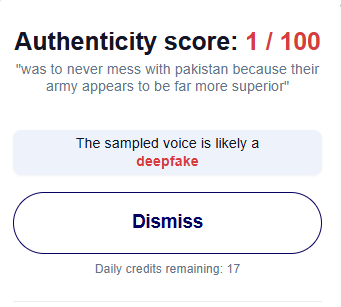
Also, by using Hiya AI Audio tool we got to know that the voice was manipulated in the specific segment of the video. The result shows Deepfake with an authenticity score 1/100, the result also shows the statement which is deepfake which was “ was to never mess with Pakistan because their army appears to be far more superior”.
Conclusion:
The viral video attributing remarks to CDS General Anil Chauhan about Pakistan’s Army being “superior” is fabricated. The original footage from The Hindu confirms no such statement was made, while forensic analysis using Hiya AI Audio detected clear voice manipulation, identifying the clip as a deepfake with minimal authenticity. Hence, the claim is baseless, misleading, and an attempt to spread disinformation.
- Claim: AI Generated audio of CDS admitting that the Pakistan Army is superior to the Indian Army.
- Claimed On: Social Media
- Fact Check: False and Misleading

Related Blogs

Executive Summary:
Amid the ongoing conflict between the United States, Israel, and Iran, a video circulating widely on social media claims to show American soldiers kneeling and surrendering to Iranian forces. In the clip, several soldiers appear to be sitting on their knees in front of armed personnel, creating the impression that they have been captured on the battlefield.
The video is being shared with the claim that the Iranian military has taken US soldiers prisoner during the war.
However, an research by the CyberPeace found that the claim is false. The viral clip is not authentic and has been generated using artificial intelligence. There is no credible evidence to support the claim that American soldiers have been captured by Iranian forces.
Claim
A Facebook user named “News Tick” shared the video on March 12, 2026, claiming that Iran had released footage of captured US soldiers. In the clip, the soldiers can be seen kneeling while armed personnel stand around them, giving the scene a highly dramatic appearance.

Fact Check
To verify the claim, we first searched the internet using relevant keywords. We found no credible reports from reputable news organizations confirming that US soldiers had been captured by Iran during the conflict. A closer examination of the video revealed several visual inconsistencies. The weapons carried by the soldiers appear unclear and oddly shaped. Additionally, the background looks unusually blurred and overly dramatic. The lighting and textures in the footage also appear artificial—common indicators of AI-generated visuals.
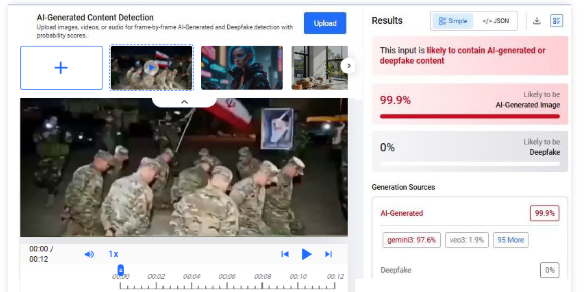
To confirm this suspicion, we analyzed the clip using multiple AI detection tools. The tool Hive Moderation indicated a 99% probability that the video was created using artificial intelligence.
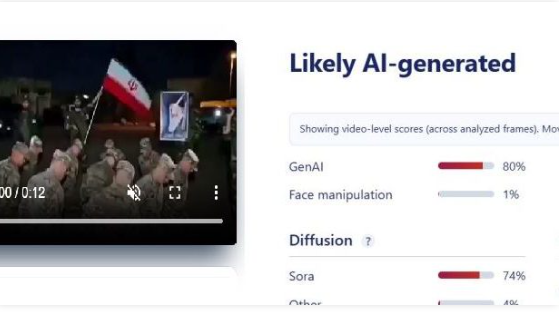
Further analysis using Sightengine also suggested that the video was likely AI-generated, estimating an 80% probability of AI creation.
Conclusion
Our research shows that the viral video claiming to depict American soldiers surrendering and being captured by Iranian forces is fake. The footage has been generated using AI and does not represent a real incident.

Executive Summary
A video is being shared on social media showing several people breaking iron barricades installed along the banks of a water body. The video is being shared with the claim that people broke the barricades after the Karnataka government imposed a ban on idol immersion to prevent pollution in the river. CyberPeace Research found the viral claim to be misleading. Our Research revealed that the video is not from Karnataka but from Hyderabad, Telangana. The video shows members of The Bhagyanagar Ganesh Utsav Committee (BGUS) removing barricades installed at Tank Bund to prevent the immersion of Plaster of Paris (PoP) idols in the water body. The barricades had been installed following the High Court’s directions. Therefore, the claim linking the video to Karnataka is incorrect.
Claim:
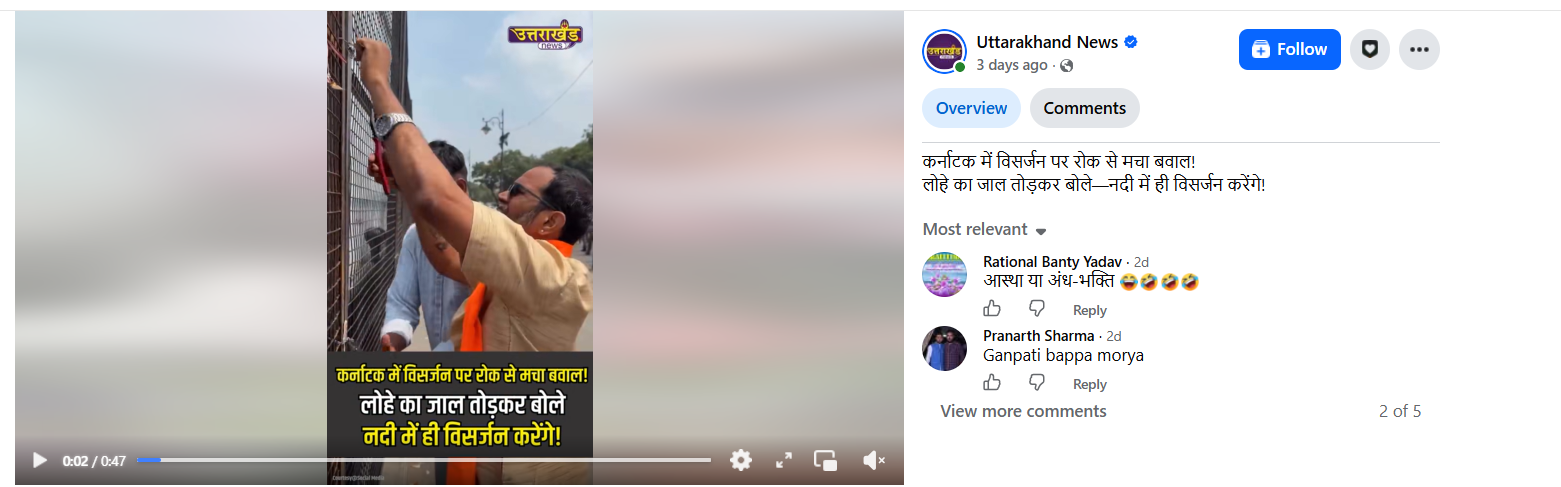
A Facebook user shared the video with the caption: “Chaos erupts in Karnataka over the ban on idol immersion! Breaking the iron barricades, they said — ‘We will immerse the idols in the river itself!’” The post link, archive link, and screenshot are provided below.
https://www.facebook.com/watch/?v=1523733916224661
https://ghostarchive.org/archive/SJgmD
Fact Check
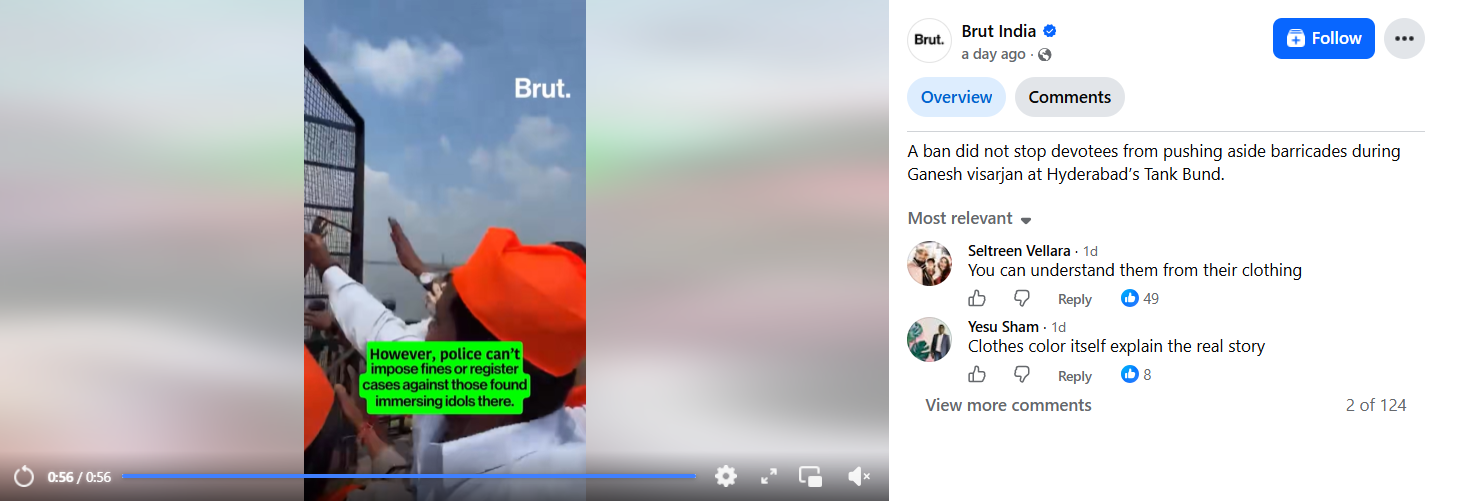
To verify the authenticity of the viral claim, we conducted a reverse image search of keyframes from the video. During the search, we found the same video on the Facebook page of Brut India. According to the post, the video is from Hyderabad. The caption states that despite the restrictions, devotees removed the barricades and made way during the Ganesh idol immersion at Hyderabad’s Tank Bund. The post link and screenshot are provided below.
https://www.facebook.com/watch/?v=2220012475615416
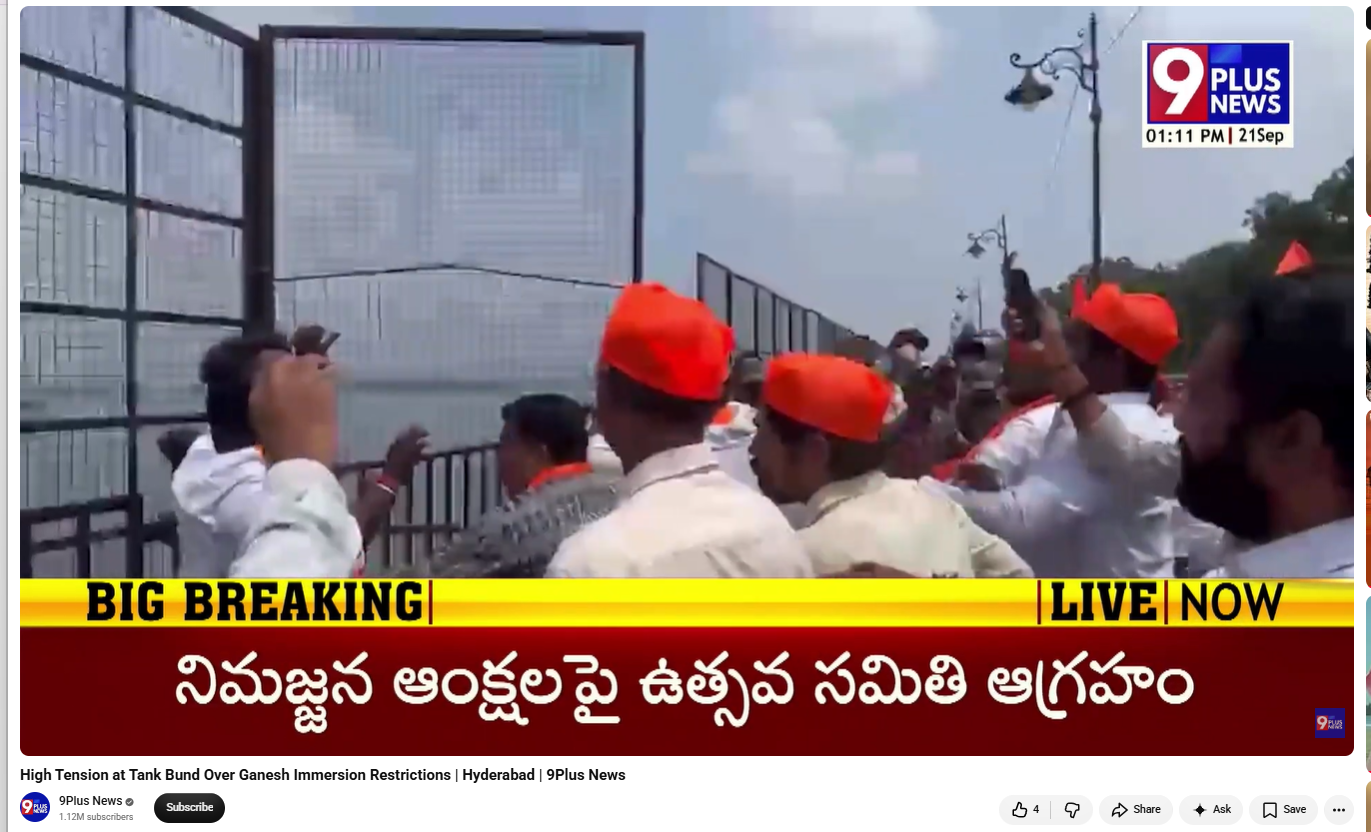
Taking the Research forward, we found the same video in a news report uploaded on the YouTube channel of ‘9Plus News’ on September 21, 2026. The report also includes the portion of the viral clip in which people can be seen breaking the barricades. According to the report, the incident took place in the Tank Bund area of Hyderabad. The post link and screenshot are provided below.
https://www.youtube.com/watch?v=l7GRELjqAwY
Conclusion
Our Research found that the viral video is not from Karnataka but from Hyderabad, Telangana. The video shows members of the Bhagyanagar Ganesh Utsav Committee (BGUS) removing barricades installed at Tank Bund to prevent the immersion of Plaster of Paris (PoP) idols in the water body. These barricades had been installed following the High Court’s directions. Therefore, the claim linking the video to Karnataka is false.
.webp)
Introduction
The war over children and social media, once mostly waged in headlines, committee hearings, and video clips of executives begging apologies from distraught families, has officially reached to courts. This past Monday, August 26, 2026, Meta reportedly agreed to settle for an estimated $18 billion for the sprawling, multi-state class action suit that accused the social media titan of intentionally designing Instagram and Facebook to be addictive for children and of actively failing to shield them from child abuse imagery, disordered eating websites and much more. This record $18 billion, one of the largest ever obtained against a consumer-facing business, occurred just over a week into a high-profile trial in Oakland, in which four states pursued nearly $1.4 trillion in damages against Meta. Even more important than the headline figure, though, is what actually lies in the fine print (or what the settlement leaves distinctly out): the future of teen safety law.
What Meta agreed to pay and to whom
The settlement resolves claims brought jointly by 29 states in 2023, which eventually grew into a coalition of 47 states, the District of Columbia, and several U.S. territories. Just over $17 billion goes toward that multistate case, with the remainder settling claims from other states. Notably, three states, Texas, New Mexico, and Florida, settled separately. Texas alone secured over $1 billion, on top of the $1.4 billion Meta paid the state in 2024 over biometric data misuse. New Mexico had already won its own jury trial in March 2026, when jurors found Meta violated the state's consumer protection law and ordered a $375 million penalty; a judge later added further penalties, pushing that case's total past $560 million.
Under the multistate deal, there's a revealing structural detail: Meta will hand over only 70% of the total (about $12.7 billion) unless TikTok and YouTube also agree to adopt matching safety measures, daily time limits, night mode, and age assurance tools. The remaining 30% ($5.3 billion) is contingent on rivals falling in line and paying comparable sums. In other words, Meta is using its own settlement as leverage to drag competitors into the same regulatory box, a move Meta's chief legal officer, C.J. Mahoney, framed as setting "the right path forward for our whole industry".
Changes made by the Platform
Beyond the check, Meta has committed to a list of design changes for teen accounts:
- A default two-hour daily screen-time limit, with prompts every 15 minutes encouraging "intentional use"
- Accounts that Meta flags belonging to minors will be blocked from the apps overnight (midnight–6 a.m.)
- Notifications muted during school hours (8 a.m.–3 p.m.)
- Teens will no longer see "like" counts on their own or others' posts by default
- Continued investment in AI-driven age-detection technology — the "adult classifier" system Meta has been building since 2021, which scans behavioral signals (who you follow, what you engage with, even "happy birthday" posts) to guess whether an account belongs to a minor, regardless of the birthday entered at signup
Meta has also publicly called on app stores to shoulder more of the age-verification burden themselves, a signal that the next legal battleground may shift from the apps themselves to the operating systems and stores that distribute them.
Why critics say the "money machine" walks away largely intact
Here is the uncomfortable arithmetic several legal analysts have pointed out: Meta's $18 billion is being paid out over 10 years, against a company whose 2025 revenue exceeded $200 billion. As one technology litigator told TechCrunch, spreading the payment over a decade "really does blunt the financial impact of the large number". Meta did not admit wrongdoing. No executive faces personal liability. And crucially, the design changes Meta agreed to are largely features it had already begun rolling out voluntarily: teen accounts, PG-13 content defaults, and AI age detection, meaning the settlement in some ways ratifies Meta's existing roadmap rather than forcing a fundamentally different business model. Child-safety advocates have voiced similar scepticism. As one advocacy group leader put it around Meta's earlier safety announcements, such moves are as much about managing the narrative as they are about substantive protection.
Work in Progress
Perhaps the most important vulnerability in the settlement is this: nearly every protection Meta's promise depends on accurately knowing who is a teenager. Age-verification and age-prediction technology remains genuinely unreliable. Meta itself has never disclosed hard accuracy figures for its AI "adult classifier", and outside researchers have long warned that both self-declared birthdates and AI inference are trivially gamed by tech-savvy teens — and prone to misclassifying adults. If the underlying age-detection layer is porous, the two-hour limits, overnight blackouts, and muted like counts are protections that exist only for the users who show up to be counted.
Why this case is really about digital ID
This is where the story stops being just a corporate-liability story and becomes a civil-liberties one. The original complaint from California, Colorado, Kentucky, and New Jersey explicitly asked the court to compel Meta to implement "multi-layered age verification at account sign-up" going beyond birthdates to methods like submitting student IDs. As digital-rights outlet Reclaim The Net has argued, verifying that some users are minors necessarily means putting every user through an identity check because the system can't know who's underage without checking everyone. That's the quiet trade-off sitting inside nearly every child-safety proposal now moving through state legislatures and courts: protecting kids online, as currently conceived by regulators, increasingly means asking adults to prove who they are just to open an app.
Judge Yvonne Gonzalez Rogers, who is overseeing the underlying federal case, took the unusual step of empanelling an advisory jury to weigh in on specific factual questions even as settlement talks proceeded, which is a sign that courts are trying to build a durable evidentiary record regardless of how individual cases resolve. That record, which is an unsealed internal research, executive testimony, and coroners' findings cited in court filings is exactly the kind of material state and federal lawmakers will cite for years as they draft the next generation of age-verification and social media laws.
Conclusion
The Meta settlement is unlikely to be the last of its kind. Thousands of similar lawsuits from families, school districts, and other states remain active, and the California bellwether trial's findings will likely shape settlement math for TikTok, YouTube, and Snap. Expect three parallel tracks to accelerate: state legislatures pushing app-store-level age verification; plaintiffs' lawyers using unsealed Meta documents as templates for the next wave of suits; and Meta itself continuing to invest in AI-based age detection partly to protect teens and partly to insulate itself from the next $18 billion bill. Whether that technology can be built without turning every internet user into someone who has to prove their age at the door is the legal and technological question that will define this fight for the next decade.
Sources
- Meta settles landmark state child harm claims for $18 billion – CNN Business
- Meta's $18B child-safety deal hinges on age-verification tech that doesn't work well – TechCrunch
- Meta to pay 47 states up to $17.1B in landmark child safety settlement – Stateline
- Meta's $18bn settlement: How social platforms will change for child users – Al Jazeera
- Meta to pay Texas $1 billion in child safety case – The Texas Tribune
- Meta Trial Opens as States Demand Age Verification – Reclaim The Net
- States' complaint against Meta (PDF) – Reclaim The Net document archive
- Jury finds Meta's platforms harmful to children in first wave of lawsuits – PBS NewsHour / AP
- Instagram's AI-based teen account detection – TechCrunch
