
#FactCheck- Viral Kapil Mishra Video on 50% Attendance Not Recent
Executive Summary
A video of Delhi government cabinet minister Kapil Mishra is being shared on social media. In the clip, he can be heard saying that from the next day, only 50 percent attendance will be allowed in offices, while the remaining 50 percent employees will work from home. He also states that all institutions must comply with this. Users are sharing the video as a recent development. However, a study by the CyberPeace found the viral claim to be misleading. Our research revealed that the video is not recent but dates back to December 2025.
Claim:
An Instagram user shared the viral video on March 24, 2026. The link to the post is given below.

Fact Check:
To verify the claim, we conducted a keyword search on Google. During this process, we found a report published on December 17, 2025, on NDTV Hindi. According to the report, the Delhi government had made 50 percent work-from-home mandatory in government offices due to severe air pollution. Additional restrictions were also imposed under GRAP Stage IV.

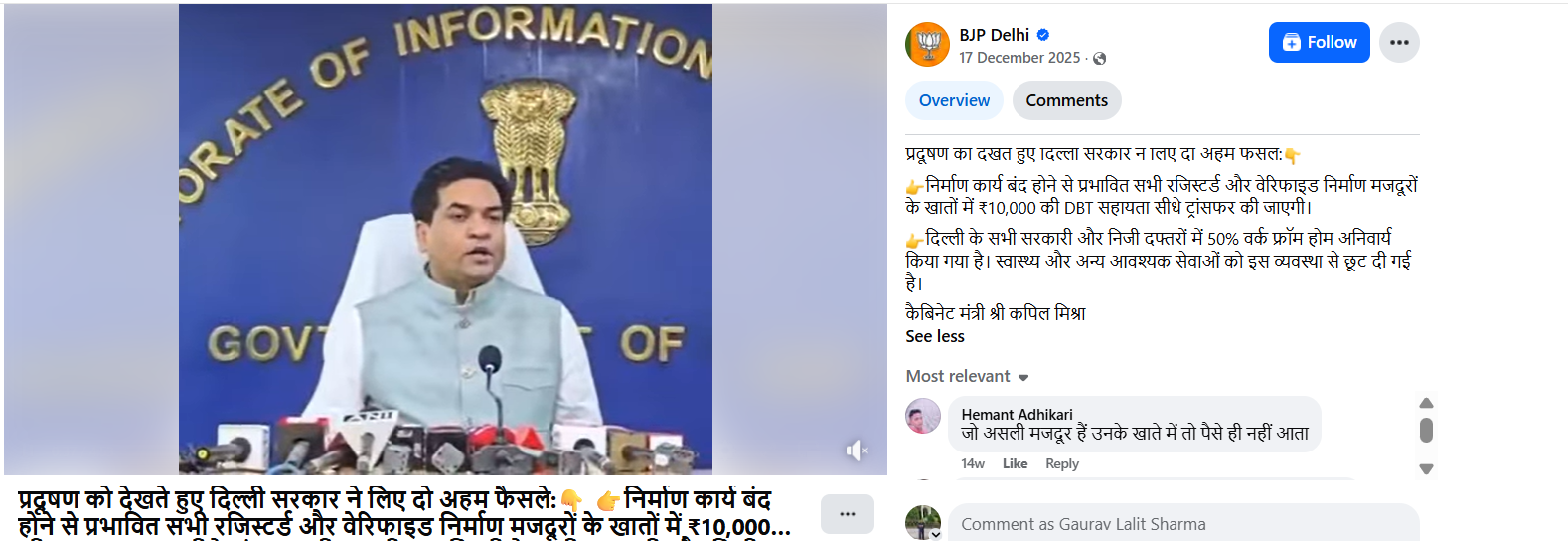
Further, we found the original video on the official social media handle of BJP Delhi. In this video, Kapil Mishra can be heard stating that 50 percent work-from-home has been made mandatory in all government and private offices in Delhi, while health and other essential services have been exempted from this arrangement.
Conclusion:
Our research found that the viral video is not recent. It is from December 2025 and is being shared with a misleading claim.

Related Blogs

Executive Summary
A video widely circulated on social media claims to show a confrontation between a Zee News journalist and Chief of Army Staff (COAS) General Upendra Dwivedi during the Indian Army’s Annual Press Briefing 2026. The video alleges that General Dwivedi made sensitive remarks regarding ‘Operation Sindoor’, including claims that the operation was still ongoing and that diplomatic intervention by former US President Donald Trump had restricted India’s military response. Several social media users shared the clip while questioning the Indian Army’s operational decisions and demanding accountability over the alleged remarks. The CyberPeace concludes that the viral video claiming to show a discussion between a Zee News journalist and Chief of Army Staff General Upendra Dwivedi on ‘Operation Sindoor’ is misleading and digitally manipulated. Although the visuals were sourced from the Indian Army’s Annual Press Briefing 2026, the audio was artificially created and added later to misinform viewers. The Army Chief did not make any remarks regarding diplomatic interference or limitations on military action during the briefing.
Claim:
An X (formerly Twitter) user, Abbas Chandio (@AbbasChandio__), shared the video on January 14, asserting that it showed a Zee News journalist questioning the Army Chief about the status and outcomes of ‘Operation Sindoor’ during a recent press conference. In the clip, the journalist is purportedly heard challenging the Army Chief over his earlier statement that the operation was “still ongoing,” while the COAS is allegedly heard responding that diplomatic intervention during the conflict limited the Army’s ability to pursue further military action. Here is the link and archive link to the post, along with a screenshot.
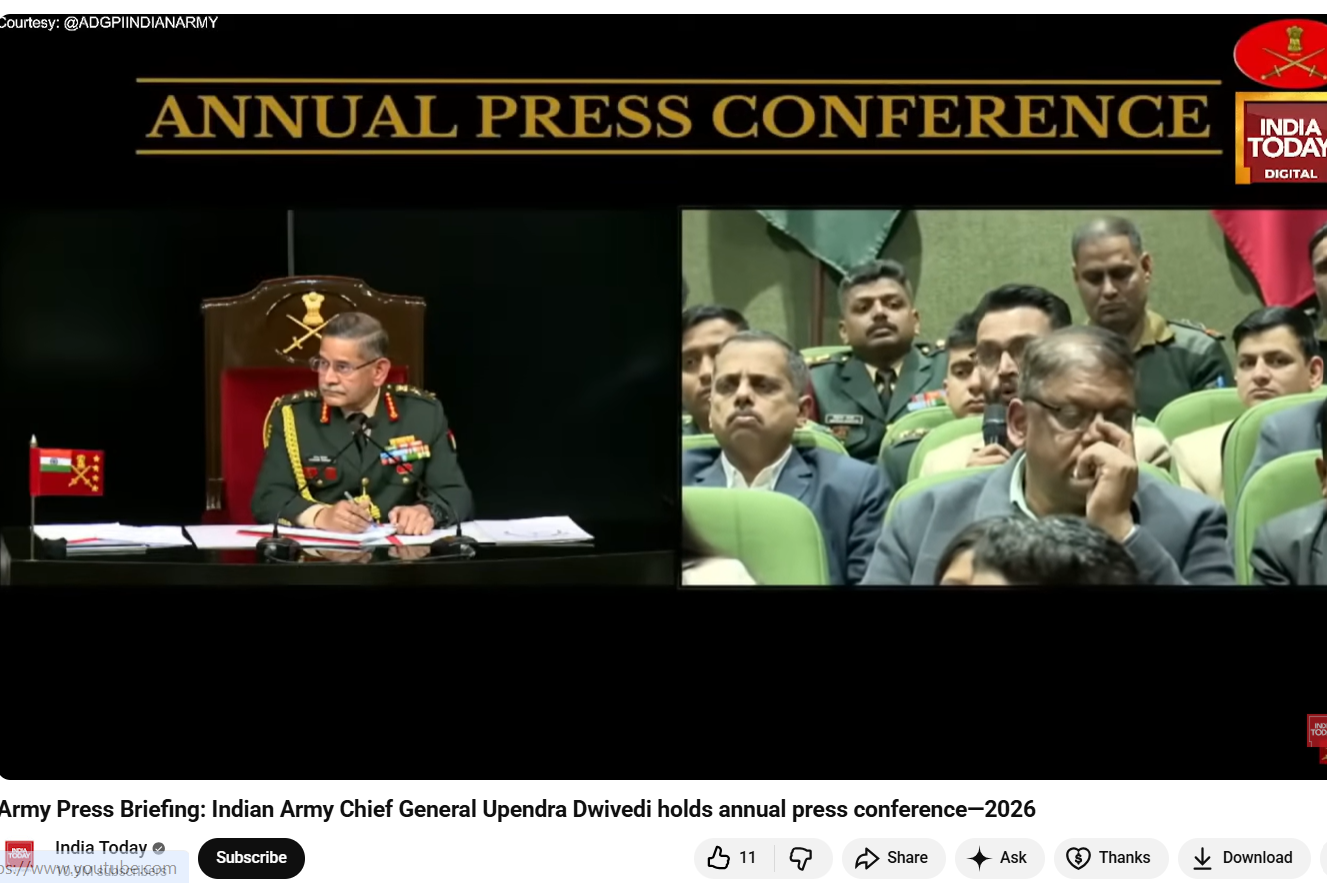
The reverse image search also directed to an extended version of the footage uploaded on the official YouTube channel of India Today. The original video was identified as coverage from the Indian Army’s Annual Press Conference 2026, held on January 13 in New Delhi and addressed by COAS General Upendra Dwivedi. Upon reviewing the original press briefing footage, CyberPeace found no instance where a Zee News journalist questioned the Army Chief about ‘Operation Sindoor’. There was also no mention of the statements attributed to General Dwivedi in the viral clip.
In the authentic footage, journalist Anuvesh Rath was seen raising questions related to defence procurement and modernization, not military operations or diplomatic interventions. Here is the link to the original video, along with a screenshot.
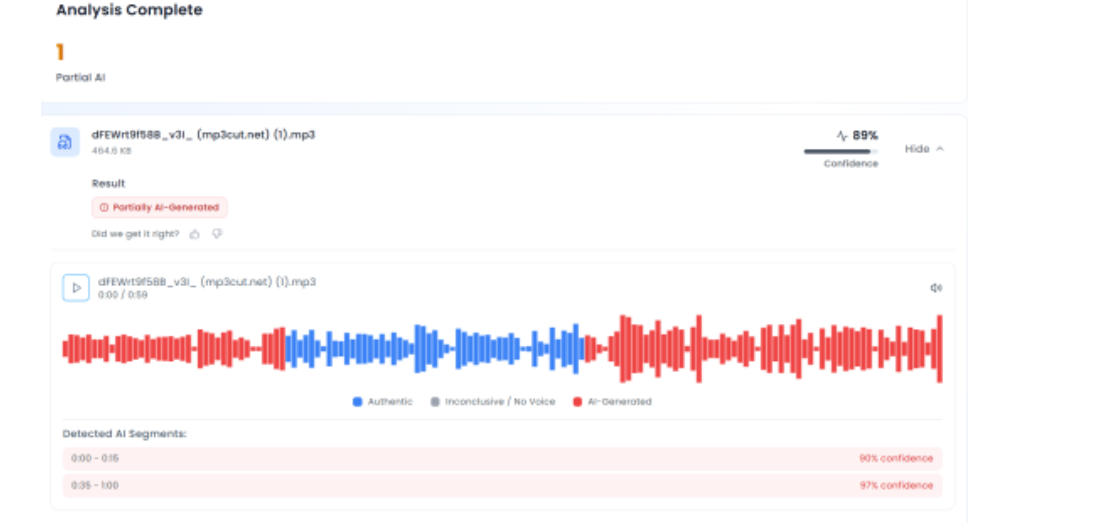
To further verify the claim, CyberPeace extracted the audio track from the viral video and analysed it using the AI-based voice detection tool Aurigin. The analysis revealed that the voice heard in the clip was artificially generated, indicating the use of synthetic or manipulated audio. This confirmed that while genuine visuals from the Army’s official press briefing were used, a fabricated audio track had been overlaid to falsely attribute controversial statements to the Army Chief and a Zee News journalist.
Conclusion
The CyberPeace concludes that the viral video claiming to show a discussion between a Zee News journalist and Chief of Army Staff General Upendra Dwivedi on ‘Operation Sindoor’ is misleading and digitally manipulated. Although the visuals were sourced from the Indian Army’s Annual Press Briefing 2026, the audio was artificially created and added later to misinform viewers. The Army Chief did not make any remarks regarding diplomatic interference or limitations on military action during the briefing. The video is a clear case of digital manipulation and misinformation, aimed at creating confusion and casting doubts over the Indian Army’s official position.

Introduction
In the hyperconnected world, cyber incidents can no longer be treated as sporadic disruptions; such incidents have become an everyday occurrence. The attack landscape today is very consequential and shows significant multiplication in its frequency, with ransomware attacks incapacitating a health system, phishing attacks hitting a financial institution, or state-sponsored attacks on critical infrastructures. Towards counteracting such threats, traditional ways alone are not enough, they gravely rely on manual research and human intellect. Attackers exercise speed, scale, and stealth, and defenders are always four steps behind. With such a widening gap, it is deemed necessary to facilitate incident response and crisis management with the intervention of automation and artificial intelligence (AI) for faster detection, context-driven decision-making, and collaborative response beyond human capabilities.
Incident Response and Crisis Management
Incident response is the structured way in which organisations deal with responding to detecting, segregating, and recovering from security incidents. Crisis management takes this even further, dealing not only with the technical fallout of a breach but also its business, reputation, and regulatory implications. Echelon used to depend on manual teams of people sorting through logs, cross-correlating alarms, and generating responses, a paradigm effective for small numbers but quickly inadequate in today's threat climate. Today's opponents attack at machine speed, employing automation to launch attacks. Under such circumstances, responding with slow, manual methods means delay and draconian consequences. The AI and automation introduction is a paradigm change that allows organisations to equate the pace and precision with which attackers initiate attacks in responding to incidents.
How Automation Reinvents Response
Cybercrime automation liberates cybercrime analysts from boring and repetitive tasks that consume time. An analyst manually detects potential threats from a list of hundreds each day, while automated systems sift through noise and focus only on genuine threats. Malware can automatically cause infected computers to be disconnected from the network to avoid spreading or may automatically have its suspicious account permissions removed without human intervention. The security orchestration systems move further by introducing playbooks, predefined steps describing how incidents of a certain type (e.g., phishing attempts or malware infections) should be handled. This ensures fast containment while ensuring consistency and minimising human error amid the urgency of dealing with thousands of alerts.
Automation takes care of threat detection, prioritisation, and containment, allowing human analysts to refocus on more complex decision-making. Instead of drowning in the sea of trivial alerts, security teams can now devote their efforts to more strategic areas: threat hunting and longer-term resilience. Automation is a strong tool of defence, cutting response times down from hours to minutes.
The Intelligence Layer: AI in Action
If automation provides speed, then AI is what allows the brain to be intelligent and flexible. Working with old and fixed-rule systems, AI-enabled solutions learn from experiences, adapt to changes in threats, and discover hidden patterns of which human analysts themselves would be unaware. For instance, machine learning algorithms identify normal behaviour on a corporate network and raise alerts on any anomalies that could indicate an insider attack or an advanced persistent threat. Similarly, AI systems sift through global threat intelligence to predict likely attack vectors so organisations can have their vulnerabilities fixed before they are exploited.
AI also boosts forensic analysis. Instead of searching forever for clues, analysts let AI-driven systems trace back to the origin of an event, identify vulnerabilities exploited by attackers, and flag systems that are still under attack. During a crisis, AI is a decision support that predicts outcomes of different scenarios and recommends the best response. In response to a ransomware attack, for example, based on context, AI might advise separating a single network segment or restoring from backup or alerting law enforcement.
Real-World Applications and Case Studies
Already, this mitigation has been provided in the form of real-world applications of automation and AI. Consider, for example, IBM Watson for Cybersecurity, which has been applied in analysing unstructured threat intelligence and providing analysts with actionable results in minutes, rather than days. Like this, systems driven by AI in DARPA's Cyber Grand Challenge demonstrated the ability to automatically identify an instant vulnerability, patch it, and reveal the potential of a self-healing system. AI-powered fraud detection systems stop suspicious transactions in the middle of their execution and work all night to prevent losses. What is common in all these examples is that automation and AI lessen human effort, increase accuracy, and in the event of a cyberattack, buy precious time.
Challenges and Limitations
While promising, the technology is still not fully mature. The quality of an AI system is highly dependent on the training data provided; poor training can generate false positives that drown teams or worse false negatives that allow attackers to proceed unabated. Attackers have also started targeting AI itself by poisoning datasets or designing malware that does not get detected. Aside from risks that are more technical, the operational and financial costs involved in implementing advanced AI-based systems present expensive threats to any company. Organisations will have to make expenditures not only on technology but also for the training of staff to best utilise these tools. There are some ethical and privacy issues to consider as well because systems may be processing sensitive personal data, so global data protection laws such as the GDPR or India's DPDP Act could come into conflict.
Creating a Human-AI Collaboration
The future is not going to be one of substitution by machines but of creating human-AI synergy. Automation can do the drudgery, AI can provide smarts, and human professionals can use judgment, imagination, and ethical decisions. One would want to build AI-fuelled Security Operations Centres where technology and human experts work in tandem. Continuous training must be provided to AI models to reduce false alarms and make them most resistant against adversarial attacks. Regular conduct of crisis drills that combine AI tools and human teams can ensure preparedness for real-time events. Likewise, it is worth integrating ethical AI guidelines into security frameworks to ensure a stronger defence while respecting privacy and regulatory compliance.
Conclusion
Cyber-attacks are an eventuality in this modern time, but the actual impact need not be so harsh. The organisations can maintain the programmatic method of integrating automation and AI into incident response and crisis management so that the response against the very threat can be shifted from reactive firefighting to proactive resilience. Automation gives speed and efficiency while AI gives intelligence and foresight, hence putting the defenders on par and possibly exceeding the speed and sophistication of the attackers. But an utmost system without human inquisitiveness, ethical reasoning, and strategic foresight would remain imperfect. The best defence is in that human-machine relationship symbiotic system wherein automation and AI take care of how fast and how many cyber threats come in, whereas human intellect ensures that every response is aligned with larger organizational goals. This synergy is where cybersecurity resiliency will reside in the future-the defenders won't just be reacting to emergencies but will rather be driving the way.
References
- https://www.sisainfosec.com/blogs/incident-response-automation/
- https://stratpilot.ai/role-of-ai-in-crisis-management-and-its-critical-importance/
- https://www.juvare.com/integrating-artificial-intelligence-into-crisis-management/
- https://www.motadata.com/blog/role-of-automation-in-incident-management/

Executive Summary
A video is being widely shared on social media claiming that a leopard dragged away a passenger from a moving train. Several users are circulating the clip as a real incident. However, CyberPeace Research Wing research found the claim to be false. Our research revealed that the viral video is not real and was generated using Artificial Intelligence (AI).
Claim
An X user (formerly Twitter) shared the viral clip with the caption:“A leopard snatched a man from a moving train.”The link, archived version, and screenshot of the post are provided below.

Fact Check
On closely examining the video, several visual inconsistencies were noticed. The leopard’s body appears distorted at multiple points in the clip. In some frames, parts of the animal’s body seem to merge into the background, while in others, sections appear incomplete or disappear entirely — something not typically seen in authentic footage. In the final part of the video, where the leopard is allegedly shown attacking a passenger, the person’s hands, limbs, and body also appear blurred and distorted. Additionally, unusual and selective blurring can be observed throughout the video, indicating possible editing or AI manipulation.
To further verify the clip, we scanned the viral video using the AI detection tool Sightengine. According to the results, the video showed an 86 percent probability of being AI-generated.

As part of the research , we also analysed the clip using another AI detection platform, UndetectableTM AI, which likewise indicated that the viral video was AI-generated.

Conclusion
Our research found that the viral video claiming to show a leopard dragging away a passenger from a moving train is fake. The clip is AI-generated and does not depict a real incident.
