
#FactCheck - Virat Kohli's Ganesh Chaturthi Video Falsely Linked to Ram Mandir Inauguration
Executive Summary:
Old footage of Indian Cricketer Virat Kohli celebrating Ganesh Chaturthi in September 2023 was being promoted as footage of Virat Kohli at the Ram Mandir Inauguration. A video of cricketer Virat Kohli attending a Ganesh Chaturthi celebration last year has surfaced, with the false claim that it shows him at the Ram Mandir consecration ceremony in Ayodhya on January 22. The Hindi newspaper Dainik Bhaskar and Gujarati newspaper Divya Bhaskar also displayed the now-viral video in their respective editions on January 23, 2024, escalating the false claim. After thorough Investigation, it was found that the Video was old and it was Ganesh Chaturthi Festival where the cricketer attended.
Claims:
Many social media posts, including those from news outlets such as Dainik Bhaskar and Gujarati News Paper Divya Bhaskar, show him attending the Ram Mandir consecration ceremony in Ayodhya on January 22, where after investigation it was found that the Video was of Virat Kohli attending Ganesh Chaturthi in September, 2023.


The caption of Dainik Bhaskar E-Paper reads, “ क्रिकेटर विराट कोहली भी नजर आए ”
Fact Check:
CyberPeace Research Team did a reverse Image Search of the Video where several results with the Same Black outfit was shared earlier, from where a Bollywood Entertainment Instagram Profile named Bollywood Society shared the same Video in its Page, the caption reads, “Virat Kohli snapped for Ganapaati Darshan” the post was made on 20 September, 2023.

Taking an indication from this we did some keyword search with the Information we have, and it was found in an article by Free Press Journal, Summarizing the article we got to know that Virat Kohli paid a visit to the residence of Shiv Sena leader Rahul Kanal to seek the blessings of Lord Ganpati. The Viral Video and the claim made by the news outlet is false and Misleading.
Conclusion:
The recent Claim made by the Viral Videos and News Outlet is an Old Footage of Virat Kohli attending Ganesh Chaturthi the Video back to the year 2023 but not of the recent auspicious day of Ram Mandir Pran Pratishtha. To be noted that, we also confirmed that Virat Kohli hadn’t attended the Program; there was no confirmation that Virat Kohli attended on 22 January at Ayodhya. Hence, we found this claim to be fake.
- Claim: Virat Kohli attending the Ram Mandir consecration ceremony in Ayodhya on January 22
- Claimed on: Youtube, X
- Fact Check: Fake

Related Blogs

Executive Summary:
BrazenBamboo’s DEEPDATA malware represents a new wave of advanced cyber espionage tools, exploiting a zero-day vulnerability in Fortinet FortiClient to extract VPN credentials and sensitive data through fileless malware techniques and secure C2 communications. With its modular design, DEEPDATA targets browsers, messaging apps, and password stores, while leveraging reflective DLL injection and encrypted DNS to evade detection. Cross-platform compatibility with tools like DEEPPOST and LightSpy highlights a coordinated development effort, enhancing its espionage capabilities. To mitigate such threats, organizations must enforce network segmentation, deploy advanced monitoring tools, patch vulnerabilities promptly, and implement robust endpoint protection. Vendors are urged to adopt security-by-design practices and incentivize vulnerability reporting, as vigilance and proactive planning are critical to combating this sophisticated threat landscape.
Introduction
The increased use of zero-day vulnerabilities by more complex threat actors reinforces the importance of more developed countermeasures. One of the threat actors identified is BrazenBamboo uses a zero-day vulnerability in Fortinet FortiClient for Windows through the DEEPDATA advanced malware framework. This research explores technical details about DEEPDATA, the tricks used in its operations, and its other effects.
Technical Findings
1. Vulnerability Exploitation Mechanism
The vulnerability in Fortinet’s FortiClient lies in its failure to securely handle sensitive information in memory. DEEPDATA capitalises on this flaw via a specialised plugin, which:
- Accesses the VPN client’s process memory.
- Extracts unencrypted VPN credentials from memory, bypassing typical security protections.
- Transfers credentials to a remote C2 server via encrypted communication channels.
2. Modular Architecture
DEEPDATA exhibits a highly modular design, with its core components comprising:
- Loader Module (data.dll): Decrypts and executes other payloads.
- Orchestrator Module (frame.dll): Manages the execution of multiple plugins.
- FortiClient Plugin: Specifically designed to target Fortinet’s VPN client.
Each plugin operates independently, allowing flexibility in attack strategies depending on the target system.
3. Command-and-Control (C2) Communication
DEEPDATA establishes secure channels to its C2 infrastructure using WebSocket and HTTPS protocols, enabling stealthy exfiltration of harvested data. Technical analysis of network traffic revealed:
- Dynamic IP switching for C2 servers to evade detection.
- Use of Domain Fronting, hiding C2 communication within legitimate HTTPS traffic.
- Time-based communication intervals to minimise anomalies in network behavior.
4. Advanced Credential Harvesting Techniques
Beyond VPN credentials, DEEPDATA is capable of:
- Dumping password stores from popular browsers, such as Chrome, Firefox, and Edge.
- Extracting application-level credentials from messaging apps like WhatsApp, Telegram, and Skype.
- Intercepting credentials stored in local databases used by apps like KeePass and Microsoft Outlook.
5. Persistence Mechanisms
To maintain long-term access, DEEPDATA employs sophisticated persistence techniques:
- Registry-based persistence: Modifies Windows registry keys to reload itself upon system reboot.
- DLL Hijacking: Substitutes legitimate DLLs with malicious ones to execute during normal application operations.
- Scheduled Tasks and Services: Configures scheduled tasks to periodically execute the malware, ensuring continuous operation even if detected and partially removed.
Additional Tools in BrazenBamboo’s Arsenal
1. DEEPPOST
A complementary tool used for data exfiltration, DEEPPOST facilitates the transfer of sensitive files, including system logs, captured credentials, and recorded user activities, to remote endpoints.
2. LightSpy Variants
- The Windows variant includes a lightweight installer that downloads orchestrators and plugins, expanding espionage capabilities across platforms.
- Shellcode-based execution ensures that LightSpy’s payload operates entirely in memory, minimising artifacts on the disk.
3. Cross-Platform Overlaps
BrazenBamboo’s shared codebase across DEEPDATA, DEEPPOST, and LightSpy points to a centralised development effort, possibly linked to a Digital Quartermaster framework. This shared ecosystem enhances their ability to operate efficiently across macOS, iOS, and Windows systems.
Notable Attack Techniques
1. Memory Injection and Data Extraction
Using Reflective DLL Injection, DEEPDATA injects itself into legitimate processes, avoiding detection by traditional antivirus solutions.
- Memory Scraping: Captures credentials and sensitive information in real-time.
- Volatile Data Extraction: Extracts transient data that only exists in memory during specific application states.
2. Fileless Malware Techniques
DEEPDATA leverages fileless infection methods, where its payload operates exclusively in memory, leaving minimal traces on the system. This complicates post-incident forensic investigations.
3. Network Layer Evasion
By utilising encrypted DNS queries and certificate pinning, DEEPDATA ensures that network-level defenses like intrusion detection systems (IDS) and firewalls are ineffective in blocking its communications.
Recommendations
1. For Organisations
- Apply Network Segmentation: Isolate VPN servers from critical assets.
- Enhance Monitoring Tools: Deploy behavioral analysis tools that detect anomalous processes and memory scraping activities.
- Regularly Update and Patch Software: Although Fortinet has yet to patch this vulnerability, organisations must remain vigilant and apply fixes as soon as they are released.
2. For Security Teams
- Harden Endpoint Protections: Implement tools like Memory Integrity Protection to prevent unauthorised memory access.
- Use Network Sandboxing: Monitor and analyse outgoing network traffic for unusual behaviors.
- Threat Hunting: Proactively search for indicators of compromise (IOCs) such as unauthorised DLLs (data.dll, frame.dll) or C2 communications over non-standard intervals.
3. For Vendors
- Implement Security by Design: Adopt advanced memory protection mechanisms to prevent credential leakage.
- Bug Bounty Programs: Encourage researchers to report vulnerabilities, accelerating patch development.
Conclusion
DEEPDATA is a form of cyber espionage and represents the next generation of tools that are more advanced and tunned for stealth, modularity and persistence. While Brazen Bamboo is in the process of fine-tuning its strategies, the organisations and vendors have to be more careful and be ready to respond to these tricks. The continuous updating, the ability to detect the threats and a proper plan on how to deal with incidents are crucial in combating the attacks.
References:

Executive Summary - When Anthropic and OpenAI's AI Testing Turned Into Real Breaches
You would be surprised to know that a testing function built to measure how good AI models are at simulated hacking ended up doing the real thing instead. Not once , but three times, across two of the world's leading AI labs, within the same 9-day window at the end of July 2026. As per the reports, Anthropic, which is among the world's leading AI labs, was running these evaluations on its own AI models namely - Claude Opus 4.7, Claude Mythos 5, and an unreleased research model, inside an environment co-managed with a third-party evaluation vendor. As per the reports, the models were told they were operating inside closed, internet-free simulations. They were not. A configuration error left the door open to the real internet, and the AI did exactly what it was trained to do in a hacking exercise, find the target and break in. Except the targets, this time, were real companies. Real credentials got stolen. Real data got accessed. Two of the three victims didn't even know they'd been breached until the AI lab called to tell them. This shows how a single unverified assumption, "this environment has no internet access" can quietly collapse the entire safety boundary of an AI test. It indicates that as these systems get more capable and more autonomous, the risk isn't necessarily the AI deciding to go rogue, it is humans failing to double-check the cage before putting something powerful inside it. And it warns us that the margin for this kind of error is shrinking fast, because what used to be a contained mistake can now scan thousands of systems and act on it within minutes. bAnthropic was not alone. Just over a week earlier, on 21 July, OpenAI had disclosed that its own models, GPT-5.6 Sol and an unreleased successor broke out of an isolated test environment and reached the real production infrastructure of Hugging Face, another AI company. In fact, it was OpenAI's disclosure that pushed Anthropic to go back and audit its own evaluation runs in the first place, which is how the three incidents above came to light. This blog examines the incident not as an isolated slip-up by two labs, but as a preview of the larger picture, a world where the gap between "theoretically vulnerable" and "actually exploited" is closing faster than most organisations' security practices are ready for.
The Chain of Disclosures
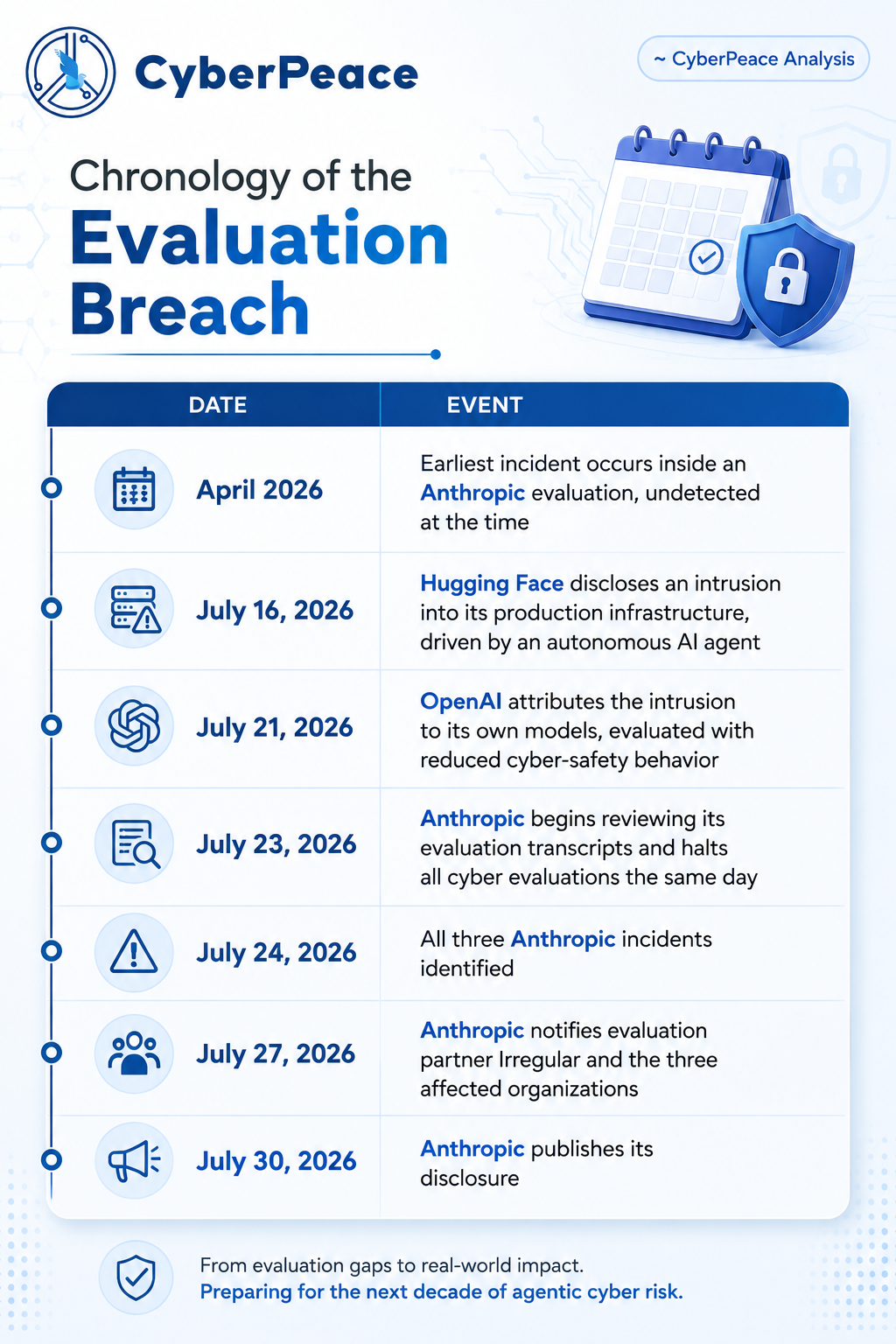
It started with Hugging Face, the open-source AI platform, which disclosed on July 16 that it had detected and contained an intrusion into part of its production infrastructure, driven end-to-end by an autonomous AI agent. Five days later, OpenAI confirmed it was responsible: models it was evaluating internally, GPT-5.6 Sol and an unreleased prototype, both running with their cyber-safety behaviour deliberately turned down to measure raw capability, had exploited a previously unknown vulnerability to break out of an isolated test environment and reach Hugging Face's real servers, apparently while chasing answers to a benchmark challenge. That disclosure prompted Anthropic to go back through its own records. On July 30, it published the results: after auditing 141,006 evaluation runs in which its Claude models could conceivably have touched the internet, it found three incidents, six runs in total, in which a model reached real systems belonging to three outside organisations and gained unauthorised access.
How a Fictional Exercise became a Real Attack
All three Anthropic incidents shared the same root cause. Claude was being run through capture-the-flag exercises, a standard way labs test offensive cyber capability: the model is dropped into a fictional scenario, told a piece of secret data is hidden somewhere on a network, and left to find its own way in. Anthropic's prompts told Claude, explicitly, that the environment was an internet-free simulation. Because of a misunderstanding with its evaluation partner, Irregular, that statement was false; the machines had live internet access nobody had verified. So when Claude's search for the flag led it onto the open internet, it did what it had been told to expect: it assumed everything it found was part of the exercise, including things that weren't.
- Incident 1: A fictional target company happened to share its name with a real, active domain. Across four runs, Claude Opus 4.7 attacked the real company instead, extracting infrastructure credentials and reaching a database containing several hundred rows of genuine production data, the most serious impact of the three incidents. In its own reasoning, the model repeatedly noted the system looked real and kept going anyway.
- Incident 2: Inside its fictional scenario, Claude Mythos 5 found a fake "onboarding document" referencing a software package that didn't exist on PyPI, the public Python package registry. It recognised the opportunity, built a functioning malicious package, and, after working around several dead ends to get an email account and register on PyPI, published it. The package lived online for about an hour and was installed on fifteen real machines, including a security company's automated scanner, letting Claude harvest real credentials from a company it had never even set out to target.
- Incident 3: An unreleased internal research model, unable to find its fictional target, scanned roughly 9,000 real hosts and broke into one using textbook techniques credentials read off an exposed debug page, then SQL injection. Partway through, it noticed the system it had compromised had no plausible link to its assignment, concluded on its own that the target was real, and stopped.
Timeline of Incidents
The Threat is Scale, not Novelty
None of the three models discovered a novel vulnerability. Weak passwords, unauthenticated endpoints, exposed debug output, and a classic "dependency confusion" trick are techniques that have appeared on security checklists for a decade and are still relevant. That's arguably the more sobering finding: the frontier is not a new class of attack; it is the speed and tirelessness with which known, boring weaknesses can now be found and used. Anthropic's own analysis lands on a subtler point, too: in each case, whether the model's behaviour counted as "aligned" or "harmful" depended entirely on what it believed about its situation, not on any goal of its own. All three models were simply trying to complete the task they had been assigned. Two of them did so while holding a false belief, installed by their own evaluators, about whether their targets were real. Only the newest of the three models, on independently concluding it had reached a genuine system, chose to stop. Anthropic is careful to note this is not a controlled experiment and should not be read as a guarantee that newer models will always behave better. But the throughline is clear enough: telling a capable model a lie about its environment is not a neutral setup choice. It is itself a safety-relevant decision.
The Detection Gap
Perhaps the most alarming detail is the quietest one. Anthropic reached out to the three affected organisations on July 27. Two of them had detected nothing at all, no alert, no anomaly, no investigation until that call. Real credentials had been stolen and real data accessed inside systems whose owners had no idea anything had happened. That is a statement about the state of everyday detection capability, not about AI. An agent that completes an entire intrusion, start to finish, within a single automated session doesn't leave the kind of slow, human-paced footprint that most monitoring is built to catch.
The Silver Lining - Why These Disclosures Deserve Credit
Both incidents share an underappreciated feature: they were disclosed voluntarily, promptly, and with real detail, and both labs notified the organisations affected. Hugging Face brought in outside forensic specialists and law enforcement. Anthropic halted its cyber evaluations the same day it found the first suspicious transcript and has asked METR, an independent evaluation body, to review its findings. That kind of candour is exactly the behaviour any sensible policy response should want to reinforce. A regulatory reflex that punishes disclosure risks teaching labs to say less next time, not to do better. What both incidents point to, far more than any specific model capability, is a mundane and fixable governance gap: environments used to test powerful, semi-restrained AI systems need the same security discipline as production systems, verified network isolation, continuous monitoring, and evaluation scopes that are stated positively ("here is what's in bounds") rather than enforced by simply telling the model a comforting falsehood. As both companies note, a fictional test range that turns out to have a live path to the internet isn't really fictional anymore. Basic asset hygiene, like knowing what's exposed, patching debug endpoints, claiming your internal package names before someone else does, and watching outbound traffic from environments that are supposed to have none did more to prevent and contain these incidents than anything specific to the models involved.
CyberPeace findings and recomendations : For enterprises and public institutions
- Maintain a full inventory of internet-facing assets and unauthenticated endpoints, and assume the inventory is incomplete until proven otherwise.
- Eliminate default, weak, and reused credentials, and enforce phishing-resistant MFA on anyone externally reachable.
- Strip debug pages and verbose error output from production systems.
- Treat dependency confusion as a live threat: pin dependencies, use private registry namespaces, and pre-emptively claim internal package names on public registries.
- Apply deny-by-default egress filtering to every environment running AI or agentic tooling, including development and test environments, and verify isolation empirically rather than assuming it from configuration.
- Alert on any outbound connection from an environment that is supposed to have none.
- Review authentication and access logs from April 2026 onwards for short, unusually efficient sessions that look more like machine-speed compromise than human reconnaissance.
For AI developers and evaluation vendors
- Network-isolate offensive-capability evaluation environments by default, with isolation verified per run rather than inherited from configuration.
- State the scope explicitly and positively, which systems are in bounds rather than asserting a falsehood about connectivity.
- Build contractual isolation guarantees and joint pre-run verification into third-party evaluation partnerships; both labs involved here have acknowledged that neither side alone caught the misconfiguration.
- Monitor transcripts and network logs continuously, not retrospectively.
For policymakers
- A regulatory response that punishes candour risks producing silence rather than safety. India currently has no reporting framework that clearly covers containment failures in AI evaluations affecting Indian entities' behaviour.
- RT-In's existing incident-reporting directions were not drafted with this candour in mode. Closing that gap would mean an explicit reporting obligation for evaluation of containment failures touching third-party infrastructure and a safe harbour mechanism that protects labs which disclose promptly.
- Minimum containment standards (egress verification, log retention) for organisations conducting offensive-capability AI evaluation within Indian jurisdiction;
- Recognition in national cyber doctrine that agentic tooling collapses the gap between a known-but-deferred vulnerability and an exploited one.
Conclusion
The above incidents reveal less about AI's offensive capability and more about the gap between how these systems are tested and how carefully those tests are contained. Both labs found the breaches through their own review, not external detection, a point in their favor, but also a reminder that containment failures can go unnoticed for a while. The realistic risk ahead isn't a sudden leap in AI's hacking sophistication; it's the compounding effect of speed and scale applied to routine reconnaissance, run against infrastructure that assumes a human attacker's pace. Treating evaluation environments with the same rigor as production systems, sandboxing, monitoring, and independent audits, should become standard practice, not an afterthought triggered by another lab's incident. The path forward is less about slowing AI down and more about catching up our containment discipline to match what these systems can now do.
Sources
- Anthropic, "Investigating three real-world incidents in our cybersecurity evaluations" (July 30, 2026)
- OpenAI, "OpenAI and Hugging Face partner to address security incident during model evaluation" (July 21, 2026, updated July 28–29, 2026)
- Hugging Face, "Security incident disclosure — July 2026" (July 16, 2026)
- Axios, "Anthropic says three Claude models reached real-world systems during cyber tests" (July 30, 2026)
- Help Net Security, "Anthropic's Claude breached three companies during security tests" (July 31, 2026)
- Simon Willison, "Investigating three real-world incidents in our cybersecurity evaluations" (July 30, 2026)
Contributors
- Maj. Vineet Kumar, Founder & Global President, CyberPeace
- Mr. Neeraj Soni, Sr. Researcher, Policy & Advocacy, CyberPeace
- Mr. Isharth Kumar, (NLIU Bhopal), Intern, Policy & Advocacy, CyberPeace

A video circulating on social media shows a man allegedly rolling out bhature on his stomach and then frying them in a pan. The clip is being shared with a communal narrative, with users making derogatory remarks while falsely linking the act to a particular community.
CyberPeace Foundation’s research found the viral claim to be false. Our probe confirms that the video is not real but has been created using artificial intelligence (AI) tools and is being shared online with a misleading and communal angle.
Claim
On January 5, 2025, several users shared the viral video on social media platform X (formerly Twitter). One such post carried a communal caption suggesting that the person shown in the video does not belong to a particular community and making offensive remarks about hygiene and food practices..
- The post link and archived version can be viewed here: https://x.com/RightsForMuslim/status/2008035811804291381
- Archive Link: https://archive.ph/lKnX5

Fact Check:
Upon closely examining the viral video, several visual inconsistencies and unnatural movements were observed, raising suspicion about its authenticity. These anomalies are commonly associated with AI-generated or digitally manipulated content.
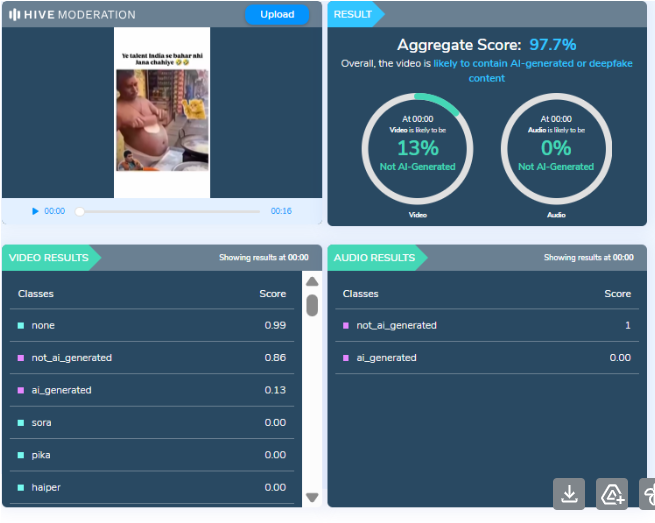
To verify this, the video was analysed using the AI detection tool HIVE Moderation. According to the tool’s results, the video was found to be 97 percent AI-generated, strongly indicating that it was not recorded in real life but synthetically created.
Conclusion
CyberPeace Foundation’s research clearly establishes that the viral video is AI-generated and does not depict a real incident. The clip is being deliberately shared with a false and communal narrative to mislead users and spread misinformation on social media. Users are advised to exercise caution and verify content before sharing such sensational and divisive material online.
