
#FactCheck - Old Video Misleadingly Claimed as Footage of Iranian President Before Crash
Executive Summary:
A video that circulated on social media to show Iranian President Ebrahim Raisi inside a helicopter moments before the tragic crash on May 20, 2024, has equally been proven to be fake. The validation of information leaves no doubt, that the video was shot in January 2024, which showed Raisi’s visiting Nemroud Reservoir Dam project. As a means of verifying the origin of the video, the CyberPeace Research Team conducted reverse image search and analyzed the information obtained from the Islamic Republic News Agency, Mehran News, and the Iranian Students’ News Agency. Further, the associated press pointed out inconsistencies between the part in the video that went viral and the segment that was shown by Iranian state television. The original video is old and it is not related to the tragic crash as there is incongruence between the snowy background and the green landscape with a river presented in the clip.

Claims:
A video circulating on social media claims to show Iranian President Ebrahim Raisi inside a helicopter an hour before his fatal crash.


Fact Check:
Upon receiving the posts, in some of the social media posts we found some similar watermarks of the IRNA News agency and Nouk-e-Qalam News.

Taking a cue from this, we performed a keyword search to find any credible source of the shared video, but we found no such video uploaded by the IRNA News agency on their website. Recently, they haven’t uploaded any video regarding the viral news.
We closely analyzed the video, it can be seen that President Ebrahim Raisi was watching outside the snow-covered mountain, but in the internet-available footage regarding the accident, there were no such snow-covered mountains that could be seen but green forest.
We then checked for any social media posts uploaded by IRNA News Agency and found that they had uploaded the same video on X on January 18, 2024. The post clearly indicates the President’s aerial visit to Nemroud Dam.

The viral video is old and does not contain scenes that appear before the tragic chopper crash involving President Raisi.
Conclusion:
The viral clip is not related to the fatal crash of Iranian President Ebrahim Raisi's helicopter and is actually from a January 2024 visit to the Nemroud Reservoir Dam project. The claim that the video shows visuals before the crash is false and misleading.
- Claim: Viral Video of Iranian President Raisi was shot before fatal chopper crash.
- Claimed on: X (Formerly known as Twitter), YouTube, Instagram
- Fact Check: Fake & Misleading

Related Blogs
Executive Summary
A video is going viral on social media in which Defence Minister Rajnath Singh is seen allegedly saying, “During Operation Sindoor, we initially hid the losses of jets and soldiers so that Pakistan could not use them for propaganda. Later, a documentary was made to reveal the truth.” Research by the CyberPeace Research Wing found that the video is completely fake and was created using artificial intelligence (AI). Defence Minister Rajnath Singh never made any such statement. The video has primarily been circulated by Pakistani accounts.
Claim:
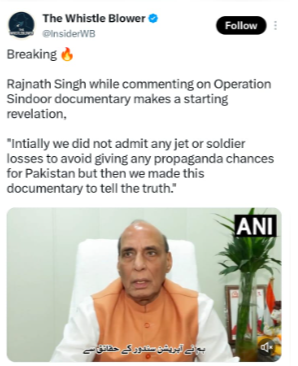
A video of Rajnath Singh has been shared by a Pakistani user on the social media platform X, with the caption: “Rajnath Singh while commenting on Operation Sindoor documentary makes a starting revelation, Initially we did not admit any jet or soldier losses to avoid giving any propaganda chances for Pakistan but then we made this documentary to tell the truth.” The post link and screenshot are provided below.
https://x.com/i/status/2091095915021193252
Fact Check:
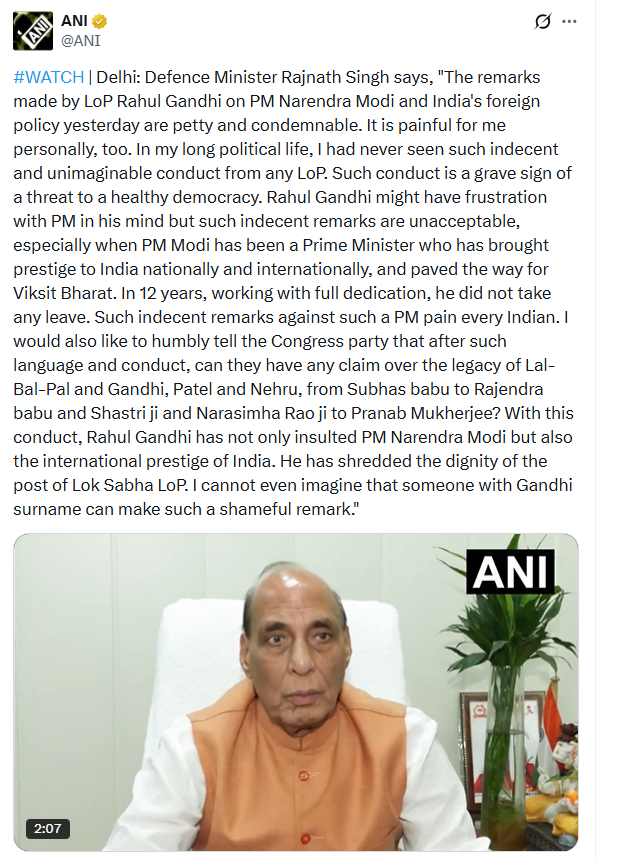
To investigate the viral claim, we first extracted keyframes from the video and conducted a reverse image search using Google Lens. During this process, we found the original video on ANI’s X account, in which Defense Minister Rajnath Singh can be seen saying: Defense Minister Rajnath Singh said, “The remarks made yesterday in the Lok Sabha by Leader of Opposition Rahul Gandhi regarding Prime Minister Narendra Modi and India’s foreign policy are extremely cheap and condemnable. Personally, this is painful for me as well. In my long political life, I have never seen such unbecoming and unthinkable behavior from any Leader of Opposition. Such conduct poses a serious threat to a healthy democracy. Rahul Gandhi may feel disappointment toward the Prime Minister, but such improper remarks are unacceptable—especially when PM Modi has elevated India’s national and international prestige and paved the way for a ‘Viksit Bharat’.
Working with complete dedication for 12 years, he has not taken a single day off. Such unbecoming remarks against such a Prime Minister pain every Indian I would also humbly like to ask the Congress Party: after such language and conduct, can it still claim the legacy of great stalwarts ranging from Lal-Bal-Pal and Gandhi, Patel, Nehru to Subhas Babu, Rajendra Babu, Shastri Ji, Narasimha Rao Ji, and Pranab Mukherjee? Through this behavior, Rahul Gandhi has not only insulted Prime Minister Narendra Modi but also damaged India’s international reputation. He has tarnished the dignity of the post of Leader of Opposition in the Lok Sabha. I cannot even imagine that anyone carrying the surname 'Gandhi' could make such a shameful remark.” Throughout the entire video, he never made the statement attributed to him in the viral claim. The post link and screenshot are provided below.
https://x.com/ANI/status/2088230045102002466
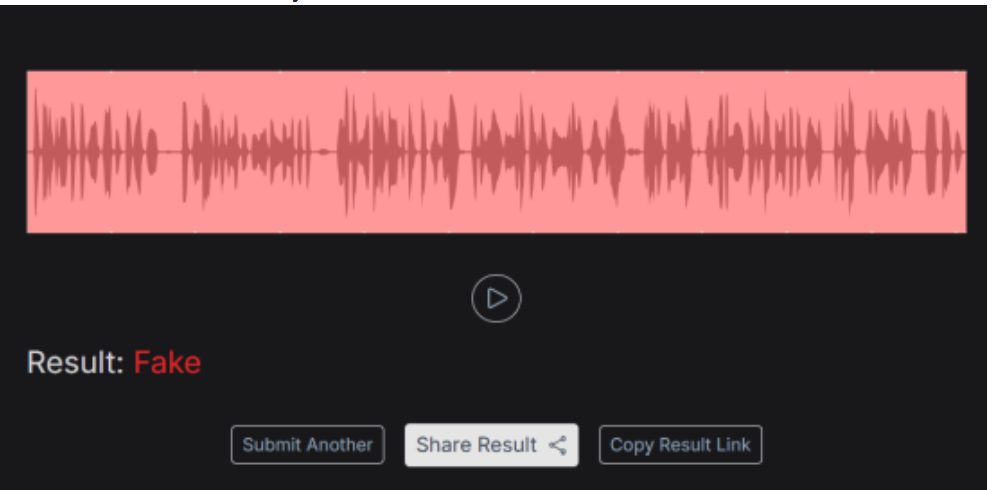
We scanned the audio on the AI detection tool Resemble AI, where the results confirmed that the voice is AI-generated.
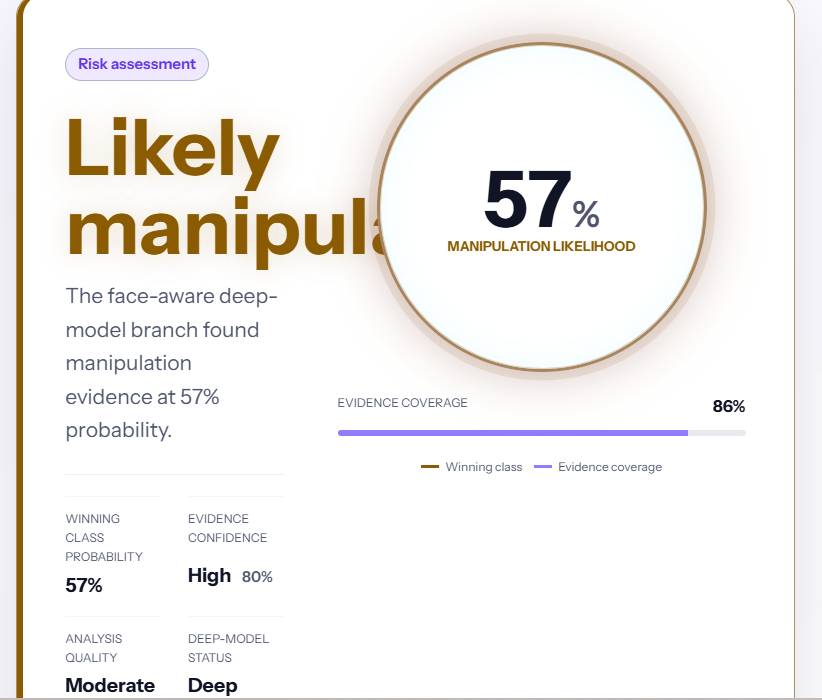
We also scanned the clip on another AI detection tool, Detect Video AI, where the results indicated that the viral video is 57 percent AI-generated.
Conclusion:
Our research revealed that the viral video is completely fake and was created using Artificial Intelligence (AI). The research confirmed that Defense Minister Rajnath Singh made no such statement. It was also revealed during the fact-check that this fake video is being primarily circulated on social media through Pakistani accounts.

A video circulating on social media claims that British Prime Minister Keir Starmer was forcibly thrown out of a pub by its owner. The clip has been widely shared by users, many of whom are drawing political comparisons and questioning democratic norms. However, research conducted by Cyber Peace Foundation has found that the viral claim is misleading. Our research reveals that the video dates back to 2021, a time when Keir Starmer was not the Prime Minister of the United Kingdom, but the leader of the opposition Labour Party.
Claim
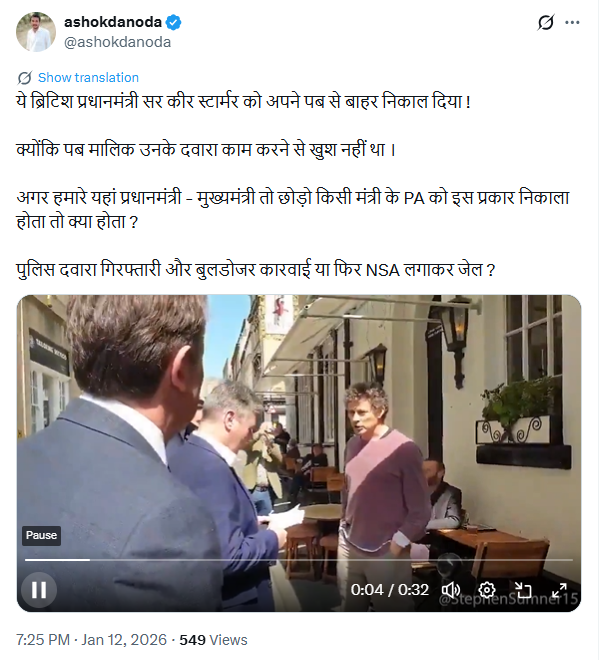
On January 12, 2026, a video was shared on social media platform X (formerly Twitter) with the claim that British Prime Minister Sir Keir Starmer was asked to leave a pub by its owner. The post suggests that the pub owner was unhappy with Starmer’s performance and contrasts the incident with how political dissent is allegedly handled in India. The viral video, approximately 32 seconds long, shows a man angrily confronting Keir Starmer in English, stating that he had supported the Labour Party all his life but was disappointed with Starmer’s leadership. The man is then heard asking Starmer to leave the pub.
Links to the viral post and its archived version were reviewed as part of the research.
Fact Check
To verify the claim, we extracted key frames from the viral video and conducted a Google reverse image search. During this process, we found the same video posted on an X account on April 19, 2021.The visuals in the 2021 post matched the viral video exactly, clearly indicating that the footage is not recent.The original post described the incident as an event involving Labour Party leader Keir Starmer during his visit to the Raven pub in Bath, and included a warning about strong language used by the pub owner, Rod Humphries. Here is the link to the original video, along with a screenshot:

Further keyword searches led us to a report published by NBC News on April 19, 2021. According to the report, Keir Starmer, then the leader of the UK’s opposition Labour Party, was confronted and asked to leave a pub in the city of Bath. The pub owner reportedly accused Starmer of failing to oppose COVID-19 lockdown measures strongly enough at a time when strict restrictions were in place across the UK.
- https://www.nbcnews.com/video/anti-lockdown-pub-landlord-screams-at-u-k-labour-party-leader-to-get-out-of-his-pub-110466117702

We also verified who held the office of British Prime Minister in 2021. Official UK government records confirm that Boris Johnson was the Prime Minister at that time, while Keir Starmer served as the Leader of the Opposition.

Conclusion
Our research confirms that the viral video is old and misleadingly presented. The footage is from 2021, when Keir Starmer was not the Prime Minister of the United Kingdom, but the opposition Labour Party leader. Sharing the video with the claim that it shows a current British Prime Minister being thrown out of a pub is factually incorrect.
%20(1).webp)
Digitisation in Agriculture
The traditional way of doing agriculture has undergone massive digitization in recent years, whereby several agricultural processes have been linked to the Internet. This globally prevalent transformation, driven by smart technology, encompasses the use of sensors, IoT devices, and data analytics to optimize and automate labour-intensive farming practices. Smart farmers in the country and abroad now leverage real-time data to monitor soil conditions, weather patterns, and crop health, enabling precise resource management and improved yields. The integration of smart technology in agriculture not only enhances productivity but also promotes sustainable practices by reducing waste and conserving resources. As a result, the agricultural sector is becoming more efficient, resilient, and capable of meeting the growing global demand for food.
Digitisation of Food Supply Chains
There has also been an increase in the digitisation of food supply chains across the globe since it enables both suppliers and consumers to keep track of the stage of food processing from farm to table and ensures the authenticity of the food product. The latest generation of agricultural robots is being tested to minimise human intervention. It is thought that AI-run processes can mitigate labour shortage, improve warehousing and storage and make transportation more efficient by running continuous evaluations and adjusting the conditions real-time while increasing yield. The company Muddy Machines is currently trialling an autonomous asparagus-harvesting robot called Sprout that not only addresses labour shortages but also selectively harvests green asparagus, which traditionally requires careful picking. However, Chris Chavasse, co-founder of Muddy Machines, highlights that hackers and malicious actors could potentially hack into the robot's servers and prevent it from operating by driving it into a ditch or a hedge, thereby impending core crop activities like seeding and harvesting. Hacking agricultural pieces of machinery also implies damaging a farmer’s produce and in turn profitability for the season.
Case Study: Muddy Machines and Cybersecurity Risks
A cyber attack on digitised agricultural processes has a cascading impact on online food supply chains. Risks are non-exhaustive and spill over to poor protection of cargo in transit, increased manufacturing of counterfeit products, manipulation of data, poor warehousing facilities and product-specific fraud, amongst others. Additional impacts on suppliers are also seen, whereby suppliers have supplied the food products but fail to receive their payments. These cyber-threats may include malware(primarily ransomware) that accounts for 38% of attacks, Internet of Things (IoT) attacks that comprise 29%, Distributed Denial of Service (DDoS) attacks, SQL Injections, phishing attacks etc.
Prominent Cyber Attacks and Their Impacts
Ransomware attacks are the most popular form of cyber threats to food supply chains and may include malicious contaminations, deliberate damage and destruction of tangible assets (like infrastructure) or intangible assets (like reputation and brand). In 2017, NotPetya malware disrupted the world’s largest logistics giant Maersk and destroyed all end-user devices in more than 60 countries. Interestingly, NotPetya was also linked to the malfunction of freezers connected to control systems. The attack led to these control systems being compromised, resulting in freezer failures and potential spoilage of food, highlighting the vulnerability of industrial control systems to cyber threats.
Further Case Studies
NotPetya also impacted Mondelez, the maker of Oreos but disrupting its email systems, file access and logistics for weeks. Mondelez’s insurance claim was also denied since NotPetya malware was described as a “war-like” action, falling outside the purview of the insurance coverage. In April 2021, over the Easter weekend, Bakker Logistiek, a logistics company based in the Netherlands that offers air-conditioned warehousing and food transportation for Dutch supermarkets, experienced a ransomware attack. This incident disrupted their supply chain for several days, resulting in empty shelves at Albert Heijn supermarkets, particularly for products such as packed and grated cheese. Despite the severity of the attack, the company successfully restored their operations within a week by utilizing backups. JBS, one of the world’s biggest meat processing companies, also had to pay $11 million in ransom via Bitcoin to resolve a cyber attack in the same year, whereby computer networks at JBS were hacked, temporarily shutting down their operations and endangering consumer data. The disruption threatened food supplies and risked higher food prices for consumers. Additional cascading impacts also include low food security and hindrances in processing payments at retail stores.
Credible Threat Agents and Their Targets
Any cyber-attack is usually carried out by credible threat agents that can be classified as either internal or external threat agents. Internal threat agents may include contractors, visitors to business sites, former/current employees, and individuals who work for suppliers. External threat agents may include activists, cyber-criminals, terror cells etc. These threat agents target large organisations owing to their larger ransom-paying capacity, but may also target small companies due to their vulnerability and low experience, especially when such companies are migrating from analogous methods to digitised processes.
The Federal Bureau of Investigation warns that the food and agricultural systems are most vulnerable to cyber-security threats during critical planting and harvesting seasons. It noted an increase in cyber-attacks against six agricultural co-operatives in 2021, with ancillary core functions such as food supply and distribution being impacted. Resultantly, cyber-attacks may lead to a mass shortage of food not only meant for human consumption but also for animals.
Policy Recommendations
To safeguard against digital food supply chains, Food defence emerges as one of the top countermeasures to prevent and mitigate the effects of intentional incidents and threats to the food chain. While earlier, food defence vulnerability assessments focused on product adulteration and food fraud, including vulnerability assessments of agriculture technology now be more relevant.
Food supply organisations must prioritise regular backups of data using air-gapped and password-protected offline copies, and ensure critical data copies are not modifiable or deletable from the main system. For this, blockchain-based food supply chain solutions may be deployed, which are not only resilient to hacking, but also allow suppliers and even consumers to track produce. Companies like Ripe.io, Walmart Global Tech, Nestle and Wholechain deploy blockchain for food supply management since it provides overall process transparency, improves trust issues in the transactions, enables traceable and tamper-resistant records and allows accessibility and visibility of data provenance. Extensive recovery plans with multiple copies of essential data and servers in secure, physically separated locations, such as hard drives, storage devices, cloud or distributed ledgers should be adopted in addition to deploying operations plans for critical functions in case of system outages. For core processes which are not labour-intensive, including manual operation methods may be used to reduce digital dependence. Network segmentation, updates or patches for operating systems, software, and firmware are additional steps which can be taken to secure smart agricultural technologies.
References
- Muddy Machines website, Accessed 26 July 2024. https://www.muddymachines.com/
- “Meat giant JBS pays $11m in ransom to resolve cyber-attack”, BBC, 10 June 2021. https://www.bbc.com/news/business-57423008
- Marshall, Claire & Prior, Malcolm, “Cyber security: Global food supply chain at risk from malicious hackers.”, BBC, 20 May 2022. https://www.bbc.com/news/science-environment-61336659
- “Ransomware Attacks on Agricultural Cooperatives Potentially Timed to Critical Seasons.”, Private Industry Notification, Federal Bureau of Investigation, 20 April https://www.ic3.gov/Media/News/2022/220420-2.pdf.
- Manning, Louise & Kowalska, Aleksandra. (2023). “The threat of ransomware in the food supply chain: a challenge for food defence”, Trends in Organized Crime. https://doi.org/10.1007/s12117-023-09516-y
- “NotPetya: the cyberattack that shook the world”, Economic Times, 5 March 2022. https://economictimes.indiatimes.com/tech/newsletters/ettech-unwrapped/notpetya-the-cyberattack-that-shook-the-world/articleshow/89997076.cms?from=mdr
- Abrams, Lawrence, “Dutch supermarkets run out of cheese after ransomware attack.”, Bleeping Computer, 12 April 2021. https://www.bleepingcomputer.com/news/security/dutch-supermarkets-run-out-of-cheese-after-ransomware-attack/
- Pandey, Shipra; Gunasekaran, Angappa; Kumar Singh, Rajesh & Kaushik, Anjali, “Cyber security risks in globalised supply chains: conceptual framework”, Journal of Global Operations and Strategic Sourcing, January 2020. https://www.researchgate.net/profile/Shipra-Pandey/publication/338668641_Cyber_security_risks_in_globalized_supply_chains_conceptual_framework/links/5e2678ae92851c89c9b5ac66/Cyber-security-risks-in-globalized-supply-chains-conceptual-framework.pdf
- Daley, Sam, “Blockchain for Food: 10 examples to know”, Builin, 22 March 2023 https://builtin.com/blockchain/food-safety-supply-chain
