#FactCheck-Deepfake Video Falsely Claims Indian Army JCO Criticised Govt, Resigned
Executive Summary
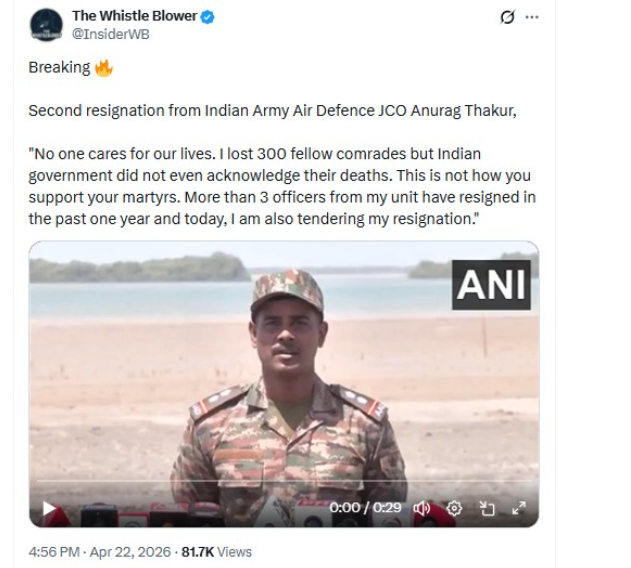
A video circulating on social media allegedly shows an Indian Army Air Defence JCO, identified as “Anurag Thakur,” criticising the Central government and announcing his resignation. In the clip, the individual is purportedly heard expressing disappointment with the government’s support for soldiers and claiming heavy casualties within his unit. However, an investigation by the CyberPeace Research Wing has found the claim to be false and the video manipulated.
Claim:
The viral post alleges that an Indian Army Air Defence JCO criticised the Centre and resigned, citing lack of support for soldiers and unacknowledged casualties.
Fact Check:
A keyword search using terms such as “Indian Army Air Defence JCO,” “Anurag Thakur,” and “resignation” did not yield any credible news reports supporting the claim. A reverse image search of the viral clip led to an original video posted by ANI on April 22, 2026. The ANI watermark is also visible in the viral footage, confirming that the clip has been sourced from this original video.
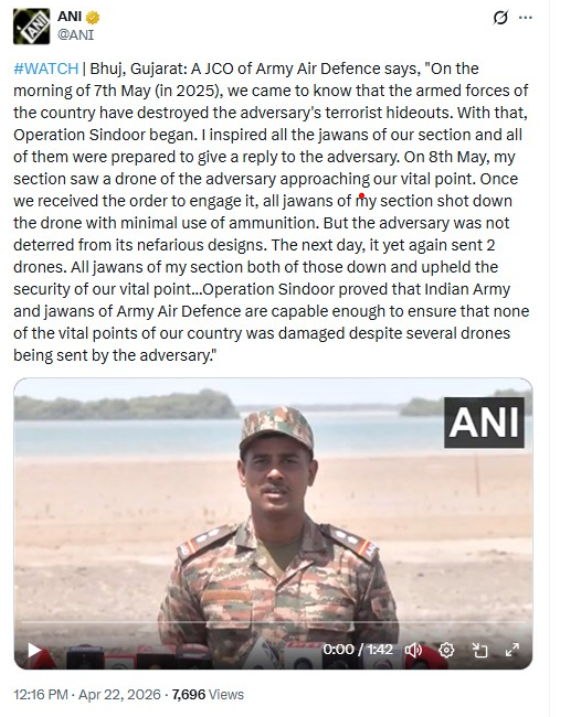
In the authentic version, the same personnel appears in the same setting, but he is speaking in Hindi about operations against adversary drones during “Operation Sindoor” in May 2025. He explains how his unit detected and neutralised multiple drones, successfully safeguarding a critical installation. Importantly, the original video does not identify the individual as Anurag Thakur, nor does it contain any reference to resignation, casualties, or criticism of the government.
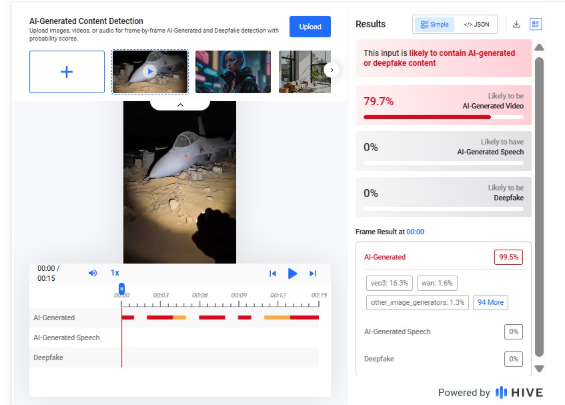
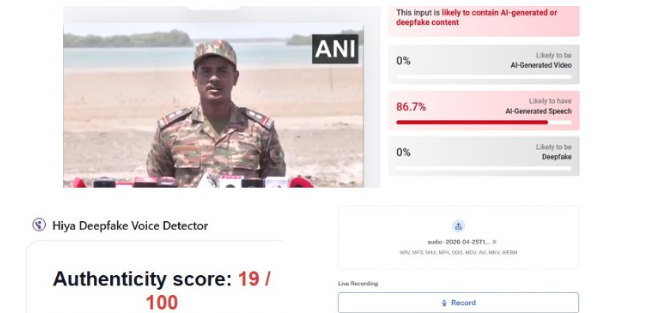
Further technical analysis using the AI detection tool Hive Moderation indicated that the audio in the viral clip has an 86 percent likelihood of being artificially generated.
Conclusion:
The viral video has been altered with fabricated audio to falsely claim that an Indian Army officer criticised the government and resigned. The claim is baseless and the clip is a clear case of a deepfake created to mislead viewers.
Related Blogs

Executive Summary
A collage of two images circulating on social media is falsely claiming that the street vendor who served jhalmuri to Prime Minister Narendra Modi during an election campaign in Jhargram was actually a personnel from the Special Protection Group (SPG). Research by the CyberPeace Research Wing found the claim to be false and misleading, indicating that it is being shared as part of election-related misinformation. The vendor and the SPG personnel seen in the viral collage are two different individuals.
Claim
An X (formerly Twitter) user, “@Jeetuburdak,” shared the viral collage on April 21, 2026, with the caption: “Another scam! The jhalmuri seller turned out to be an SPG commando.” The post quickly gained traction online.

Fact Check
A close examination of the two images used in the collage shows clear visual differences between the individuals. The person seen in SPG uniform does not match the street vendor who served food to the prime minister. Reverse image searches were conducted using multiple tools to trace the origin of the images. While no verifiable source was found linking the SPG personnel’s image to the vendor, several credible reports and videos featured the actual jhalmuri seller from the campaign event.
- https://x.com/ANI/status/2045859146508177911?s=20
- https://news24online.com/cities/kolkata/who-is-the-man-that-served-jhalmuri-to-pm-modi-know-his-daily-income-and-what-he-talked-about-with-pm/811123/


According to media reports, the prime minister briefly stopped at a roadside stall during the campaign in Jhargram and interacted with the vendor while enjoying jhalmuri. The vendor was later interviewed by multiple outlets, further confirming his identity as a local seller. Additionally, technical facial comparison analysis using online tools also indicated that the two individuals in the viral collage are not the same person.

Conclusion
The claim that the jhalmuri vendor was an SPG commando is false and misleading. The viral collage shows two different individuals, and there is no evidence to support the allegation.

Introduction
Since users are now constantly retrieving critical data on their mobile devices, fraudsters are now focusing on these devices. App-based, network-based, and device-based vulnerabilities are the three main ways of attacking that Mobile Endpoint Security names as mobile threats. Composed of the following features: program monitoring and risk, connection privacy and safety, psychological anomaly and reconfiguration recognition, and evaluation of vulnerabilities and management, this is how Gartner describes Mobile Threat Defense (MTD).
The widespread adoption and prevalence of cell phones among consumers worldwide have significantly increased in recent years. Users of these operating system-specific devices can install a wide range of software, or "apps," from online marketplaces like Google Play and the Apple App Store. The applications described above are the lifeblood of cell phones; they improve users' daily lives and augment the devices' performance. The app marketplaces let users quickly search for and install new programs, but certain malicious apps/links/websites can also be the origin of malware hidden among legitimate apps. These days, there are many different security issues and malevolent attacks that might affect mobile devices.
Unveiling Malware Landscape
The word "malware" refers to a comprehensive category of spyware intended to infiltrate networks, steal confidential data, cause disruptions, or grant illegal access. Malware can take many forms, such as Trojan horses, worms, ransomware, infections, spyware, and adware. Because each type has distinct goals and features, security specialists face a complex problem. Malware is a serious risk to both people and businesses. Security incidents, monetary losses, harm to one's credibility, and legal repercussions are possible outcomes. Understanding malware's inner workings is essential to defend against it effectively. Malware analysis is helpful in this situation. The practice of deconstructing and analysing dangerous software to comprehend its behaviour, operation, and consequences is known as malware analysis.Major threats targeting mobile phones
Viruses: Viruses are self-renewing programs that can steal data, launch denial of service assaults, or enact ransomware strikes. They spread by altering other software applications, adding malicious code, and running it on the target's device. Computer systems all over the world are still infected with viruses, which attack different operating systems like Mac and Microsoft Windows, even though there is a wealth of antiviral programs obtainable to mitigate their impacts.
Worms: Infections are independent apps that propagate quickly and carry out payloads—such as file deletion or the creation of botnets—to harm computers. Worms, in contrast to viruses, usually harm a computer system, even if it's just through bandwidth use. By taking advantage of holes in security or other vulnerabilities on the target computer, they spread throughout computer networks.
Ransomware: It causes serious commercial and organisational harm to people and businesses by encrypting data and demanding payment to unlock it. The daily operations of the victim organisation are somewhat disrupted, and they need to pay a ransom to get them back. It is not certain, though, that the financial transaction will be successful or that they will receive a working translation key.
Adware: It can be controlled via notification restrictions or ad-blockers, tracks user activities and delivers unsolicited advertisements. Adware poses concerns to users' privacy even though it's not always malevolent since the information it collects is frequently combined with information gathered from other places and used to build user profiles without their permission or knowledge.
Spyware: It can proliferate via malicious software or authentic software downloads, taking advantage of confidential data. This kind of spyware gathers data on users' actions without their authorisation or agreement, including:Internet activityBanking login credentialsPasswordsPersonally Identifiable Information (PII)
Navigating the Mobile Security Landscape
App-Centric Development: Regarding mobile security, app-centric protections are a crucial area of focus. Application authorisations should be regularly reviewed and adjusted to guarantee that applications only access the knowledge that is essential and to lower the probability of data misuse. Users can limit hazards and have greater oversight over their confidentiality by closely monitoring these settings. Installing trustworthy mobile security apps also adds another line of protection. With capabilities like app analysis, real-time protection, and antivirus scanning, these speciality apps strengthen your gadget's protection against malware and other harmful activity.
Network Security: Setting priorities for secure communication procedures is crucial for safeguarding confidential data and thwarting conceivable dangers in mobile security. Avoiding unprotected public Wi-Fi networks is essential since they may be vulnerable to cyberattacks. To lessen the chance of unwelcome entry and data surveillance, promote the usage of reliable, password-protected networks instead. Furthermore, by encrypting data transfer, Virtual Private Networks (VPNs) provide additional protection and make it more difficult for malevolent actors to corrupt information. To further improve security, avoid using public Wi-Fi for essential transactions and hold off until a secure network is available. Users can strengthen their handheld gadgets against possible privacy breaches by implementing these practices, which can dramatically lower the risk of data eavesdropping and illegal access.
Constant development: Maintaining a robust mobile security approach requires a dedication to constant development. Adopt a proactive stance by continuously improving and modifying your security protocols. By following up on recurring outreach and awareness campaigns, you can stay updated about new hazards. Because cybersecurity is a dynamic field, maintaining one step ahead and utilising emerging technologies is essential. Stay updated with security changes, implement the newest safeguards, and incorporate new industry standard procedures into your plan. This dedication to ongoing development creates a flexible barrier, strengthening your resistance to constantly evolving mobile security threats.
Threat emergency preparedness: To start, familiarise yourself with the ever-changing terrain associated with mobile dangers to security. Keep updated on new threats including malware, phishing, and illegal access.
Sturdy Device Management: Put in place a thorough approach to device management. This includes frequent upgrades, safe locking systems, and additional safeguarding capabilities like remote surveillance and erasing.
Customer Alertness: Emphasise proper online conduct and acquaint yourself and your team with potential hazards, such as phishing efforts.
Dynamic Measures for a Robust Wireless Safety Plan
In the dynamic field of mobile assurances, taking a proactive strategy is critical. To strengthen safeguards, thoroughly research common risks like malware, phishing, and illegal access. Establish a strong device management strategy that includes frequent upgrades, safe locking mechanisms, and remote monitoring and deletion capabilities for added security.
Promoting user awareness by educating people so they can identify and block any hazards, especially regarding phishing attempts. Reduce the dangers of data eavesdropping and illegal access by emphasising safe communication practices, using Virtual Private Networks (VPNs), and avoiding public Wi-Fi for essential transactions.
Pay close attention to app-centric integrity by periodically checking and modifying entitlements. Downloading trustworthy mobile security apps skilled at thwarting malware and other unwanted activity will enhance your smartphone's defenses. Lastly, create an atmosphere of continuous development by keeping up with new threats and utilising developing technology to make your handheld security plan more resilient overall.
Conclusion
Mobile privacy threats grow as portable electronics become increasingly integrated into daily activities. Effective defense requires knowledge of the various types of malware, such as worms, ransomware, adware, and spyware. Tools for Mobile Threat Defense, which prioritise vulnerability assessment, management, anomaly detection, connection privacy, and program monitoring, are essential. App-centric development, secure networking procedures, ongoing enhancement, threat readiness, strong device control, and user comprehension are all components of a complete mobile security strategy. People, as well as organisations, can strengthen their defenses against changing mobile security threats by implementing dynamic measures and maintaining vigilance, thereby guaranteeing safe and resilient mobile surrounding.
References
https://www.titanfile.com/blog/types-of-computer-malware/
https://www.simplilearn.com/what-is-a-trojan-malware-article
https://www.linkedin.com/pulse/latest-anti-analysis-tactics-guloader-malware-revealed-ukhxc/?trk=article-ssr-frontend-pulse_more-articles_related-content-card

Introduction:
This report examines ongoing phishing scams targeting "State Bank of India (SBI)" customers, India's biggest public bank using fake SelfKYC APKs to trick people. The image plays a part in a phishing plan to get users to download bogus APK files by claiming they need to update or confirm their "Know Your Customer (KYC)" info.
Fake Claim:
A picture making the rounds on social media comes with an APK file. It shows a phishing message that says the user's SBI YONO account will stop working because of their "Old PAN card." It then tells the user to install the "WBI APK" APK (Android Application Package) to check documents and keep their account open. This message is fake and aims to get people to download a harmful app.
Key Characteristics of the Scam:
- The messages "URGENTLY REQUIRED" and "Your account will be blocked today" show how scammers try to scare people into acting fast without thinking.
- PAN Card Reference: Crooks often use PAN card verification and KYC updates as a trick because these are normal for Indian bank customers.
- Risky APK Downloads: The message pushes people to get APK files, which can be dangerous. APKs from places other than the Google Play Store often have harmful software.
- Copying the Brand: The message looks a lot like SBI's real words and logos to seem legit.
- Shady Source: You can't find the APK they mention on Google Play or SBI's website, which means you should ignore the app right away.
Modus Operandi:
- Delivery Mechanism: Typically, users of messaging services like "WhatsApp," "SMS," or "email" receive identical messages with an APK link, which is how the scam is distributed.
- APK Installation: The phony APK frequently asks for a lot of rights once it is installed, including access to "SMS," "contacts," "calls," and "banking apps."
- Data Theft: Once installed, the program may have the ability to steal card numbers, personal information, OTPs, and banking credentials.
- Remote Access: These APKs may occasionally allow cybercriminals to remotely take control of the victim's device in order to carry out fraudulent financial activities.
While the user installs the application on their device the following interface opens:


It asks the user to allow the following:
- SMS is used to send and receive info from the bank.
- User details such as Username, Password, Mobile Number, and Captcha.
Technical Findings of the Application:
Static Analysis:
- File Name: SBI SELF KYC_015850.apk
- Package Name: com.mark.dot.comsbione.krishn
- Scan Date: Sept. 25, 2024, 6:45 a.m.
- App Security Score: 52/100 (MEDIUM RISK)
- Grade: B
File Information:
- File Name: SBI SELF KYC_015850.apk
- Size: 2.88MB
- MD5: 55fdb5ff999656ddbfa0284d0707d9ef
- SHA1: 8821ee6475576beb86d271bc15882247f1e83630
- SHA256: 54bab6a7a0b111763c726e161aa8a6eb43d10b76bb1c19728ace50e5afa40448
App Information:
- App Name: SBl Bank
- Package Name:: com.mark.dot.comsbione.krishn
- Main Activity: com.mark.dot.comsbione.krishn.MainActivity
- Target SDK: 34
- Min SDK: 24
- Max SDK:
- Android Version Name:: 1.0
- Android Version Code:: 1
App Components:
- Activities: 8
- Services: 2
- Receivers: 2
- Providers: 1
- Exported Activities: 0
- Exported Services: 1
- Exported Receivers: 2
- Exported Providers:: 0
Certificate Information:
- Binary is signed
- v1 signature: False
- v2 signature: True
- v3 signature: False
- v4 signature: False
- X.509 Subject: CN=PANDEY, OU=PANDEY, O=PANDEY, L=NK, ST=NK, C=91
- Signature Algorithm: rsassa_pkcs1v15
- Valid From: 20240904 07:38:35+00:00
- Valid To: 20490829 07:38:35+00:00
- Issuer: CN=PANDEY, OU=PANDEY, O=PANDEY, L=NK, ST=NK, C=91
- Serial Number: 0x1
- Hash Algorithm: sha256
- md5: 4536ca31b69fb68a34c6440072fca8b5
- sha1: 6f8825341186f39cfb864ba0044c034efb7cb8f4
- sha256: 6bc865a3f1371978e512fa4545850826bc29fa1d79cdedf69723b1e44bf3e23f
- sha512:05254668e1c12a2455c3224ef49a585b599d00796fab91b6f94d0b85ab48ae4b14868dabf16aa609c3b6a4b7ac14c7c8f753111b4291c4f3efa49f4edf41123d
- PublicKey Algorithm: RSA
- Bit Size: 2048
- Fingerprint: a84f890d7dfbf1514fc69313bf99aa8a826bade3927236f447af63fbb18a8ea6
- Found 1 unique certificate
App Permission

1. Normal Permissions
- Access_network_state: Allows the App to View the Network Status of All Networks.
- Foreground_service: Enables Regular Apps to Use Foreground Services.
- Foreground_service_data_sync: Allows Data Synchronization With Foreground Services.
- Internet: Grants Full Internet Access.
2. Signature Permission:
- Broadcast_sms: Sends Sms Received Broadcasts. It Can Be Abused by Malicious Apps to Forge Incoming Sms Messages.
3. Dangerous Permissions:
- Read_phone_numbers: Grants Access to the Device’s Phone Number(S).
- Read_phone_state: Reads the Phone’s State and Identity, Including Phone Features and Data.
- Read_sms: Allows the App to Read Sms or Mms Messages Stored on the Device or Sim Card. Malicious Apps Could Use This to Read Confidential Messages.
- Receive_sms: Enables the App to Receive and Process Sms Messages. Malicious Apps Could Monitor or Delete Messages Without Showing Them to the User.
- Send_sms: Allows the App to Send Sms Messages. Malicious Apps Could Send Messages Without the User’s Confirmation, Potentially Leading to Financial Costs.
On further analysis on virustotal platform using md5 hash file, the following results were retrieved where there are 24 security vendors out of 68, marked this apk file as malicious and the graph represents the distribution of malicious file in the environment.


Key Takeaways:
- Normal Permissions: Generally Safe for Accessing Basic Functionalities (Network State, Internet).
- Signature Permissions: May Pose Risks When Misused, Especially Related to Sms Broadcasts.
- Dangerous Permissions: Provide Sensitive Data Access, Such as Phone Numbers and Device Identity, Which Can Be Exploited by Malicious Apps.
- The Dangerous Permissions Pose Risks Regarding the Reading, Receiving, and Sending of Sms, Which Can Lead to Privacy Breaches or Financial Consequences.
How to Identify the Scam:
- Official Statement: SBI never asks clients to download unauthorized APKs for upgrades related to KYC or other services. All formal correspondence takes place via the SBI YONO app, which may be found in reputable app shops.
- No Immediate Threats: Bank correspondence never employs menacing language or issues harsh deadlines, such as "your account will be blocked today."
- Email Domain and SMS Number: Verified email addresses or phone numbers are used for official SBI correspondence. Generic, unauthorized numbers or addresses are frequently used in scams.
- Links and APK Files: Steer clear of downloading APK files from unreliable sources at all times. For app downloads, visit the Apple App Store or Google Play Store instead.
CyberPeace Advisory:
- The Research team recommends that people should avoid opening such messages sent via social platforms. One must always think before clicking on such links, or downloading any attachments from unauthorised sources.
- Downloading any application from any third party sources instead of the official app store should be avoided. This will greatly reduce the risk of downloading a malicious app, as official app stores have strict guidelines for app developers and review each app before it gets published on the store.
- Even if you download the application from an authorised source, check the app's permissions before you install it. Some malicious apps may request access to sensitive information or resources on your device. If an app is asking for too many permissions, it's best to avoid it.
- Keep your device and the app-store app up to date. This will ensure that you have the latest security updates and bug fixes.
- Falling into such a trap could result in a complete compromise of the system, including access to sensitive information such as microphone recordings, camera footage, text messages, contacts, pictures, videos, and even banking applications and could lead users to financial loss.
- Do not share confidential details like credentials, banking information with such types of Phishing scams.
- Never share or forward fake messages containing links on any social platform without proper verification.
Conclusion:
Fake APK phishing scams target financial institutions more often. This report outlines safety steps for SBI customers and ways to spot and steer clear of these cons. Keep in mind that legitimate banks never ask you to get an APK from shady websites or threaten to close your account right away. To stay safe, use SBI's official YONO app on both systems and get apps from trusted places like Google Play or the Apple App Store. Check if the info is true before you do anything turn on 2FA for all your bank and money accounts, and tell SBI or your local cyber police about any scams you see.