
Advisory for APS School Students
Pretext
The Army Welfare Education Society has informed the Parents and students that a Scam is targeting the Army schools Students. The Scamster approaches the students by faking the voice of a female and a male. The scamster asks for the personal information and photos of the students by telling them they are taking details for the event, which is being organised by the Army welfare education society for the celebration of independence day. The Army welfare education society intimated that Parents to beware of these calls from scammers.
The students of Army Schools of Jammu & Kashmir, Noida, are getting calls from the scamster. The students were asked to share sensitive information. Students across the country are getting calls and WhatsApp messages from two numbers, which end with 1715 and 2167. The Scamster are posing to be teachers and asking for the students’ names on the pretext of adding them to the WhatsApp Groups. The scamster then sends forms links to the WhatsApp groups and asking students to fill out the form to seek more sensitive information.
Do’s
- Do Make sure to verify the caller.
- Do block the caller while finding it suspicious.
- Do be careful while sharing personal Information.
- Do inform the School Authorities while receiving these types of calls and messages posing to be teachers.
- Do Check the legitimacy of any agency and organisation while telling the details
- Do Record Calls asking for personal information.
- Do inform parents about scam calling.
- Do cross-check the caller and ask for crucial information.
- Do make others aware of the scam.
Don’ts
- Don’t answer anonymous calls or unknown calls from anyone.
- Don’t share personal information with anyone.
- Don’t Share OTP with anyone.
- Don’t open suspicious links.
- Don’t fill any forms, asking for personal information
- Don’t confirm your identity until you know the caller.
- Don’t Reply to messages asking for financial information.
- Don’t go to a fake website by following a prompt call.
- Don’t share bank Details and passwords.
- Don’t Make payment over a prompt fake call.

Related Blogs

Introduction
In the new age of technologies the internet and social media continue to witness a surge in deepfake videos a technological phenomenon that blurs the line between reality and fiction. The string of deepfake videos of Bollywood actors and other famous personalities has raised serious concerns. While Prime Minister Narendra Modi spoke against the risks of artificial intelligence at the G20 Virtual Summit. The central government has recently announced that it will soon set up dedicated regulations to tackle this Menace. This will include holding social media platforms and creators responsible for their actions against the rules and regulations. Very often most people shy away from initiating a legal process or taking action while being victims of misuse of fast-paced tech but the government has announced its big support to the victims and promised to stand by complaints against deepfake videos especially this includes helping individuals to report the incidents and any violations by platforms.
Social media platforms to realign their policies as per the Indian laws
The Ministry of Electronics and Information Technology (MeitY) announced on 24th November 2023 that it will be giving social media platforms seven days time period to align their terms of service and other policies with Indian laws and regulations in order to address the issue of hosting of deepfakes on these platforms. All platforms must align and transform their terms of use with their users to be consistent with the 12 areas that are prohibited under rule 3(1)(b) of the Information Technology (IT) Rules, 2021.
The platforms will ensure harmonization and alignment of their terms & policies so that every user on every platform is aware that when they use a platform the platform intends to be a safe and trusted platform and the platform will not tolerate these 12 types of content or information that have been prohibited under the IT Act and the IT rules. The government approach is to collectively advocate for responsible and safe use of the Internet. The government has taken a proactive step in partnership with these social media platforms to ensure an era where such platforms will be a lot more responsible and a lot more responsive to the expectations under the law and more compliant.
Officer to be appointed under rule 7
As Deepfake Videos continue to surface on social media, the Government has geared up to curb such content online. Mr. Rajeev Chandrasekhar Minister of State, (Meity), stated that the government will soon appoint an officer to take appropriate action against deepfake videos. This statement came after the government meeting with industry stakeholders and important players held on 24 Nov 2023. He added that Meity and the government of India will nominate an officer under rule 7 (IT rules 2021) and will ensure full compliance expectations from all the platforms. An officer appointed under Rule 7, will be entrusted with building a mechanism where users can put in their complaints regarding deepfakes and MeitY may also assist such aggrieved users with filing FIRs in such cases. Mr. Rajeev Chandrasekhar, Minister of State, (Meity) also added that we will also be creating a platform where it will be very easy for netizens to bring to the attention of the government of India and notices of allegations or reports of violation of law by the platforms and the rule 7 officer will take that digital platform information and respond accordingly.
The Information Technology (Intermediary Guidelines and Digital Media Ethics Code) Rules, 2021 (updated as on 6.4.2023)
Rule 3(1)(b) states that intermediaries shall inform its rules and regulations, privacy policy and user agreement to the user and shall make reasonable efforts to ‘restrict’ the users from hosting, displaying, uploading, modifying, publishing, transmitting, store, update or sharing any information that is prohibited under this rule which also includes deepfake, misinformation, CSAM(Child sexual abusive material) etc. As per rule 3(2)(b) Intermediaries shall remove or disable access within 24 hours of receipt of complaints of contents that expose the private areas of individuals, show such individuals in full or partial nudity or in a sexual act or is in the nature of impersonation including morphed images etc.
Ongoing Efforts Ahead of Crucial Meeting with Tech Giants
Ahead of the government meeting with online platforms such as Google, Facebook, and YouTube on Friday, 24th November 2023, Mr. Rajeev Chandrasekhar Minister of State, (Meity) added that way back from October 2022 the government of India had been alerting them to the threat of misinformation and deepfakes which are part of misinformation. He further added that the current IT rules under the IT Act provide for adequate compliance requirements on their part to deal with deepfake.
Deepfake Misinformation
Misinformation powered by AI becoming an even more potent force to disrupt and to mislead and to create chaos and confusion at a scale and of a type that is deeply detrimental. Deepfakes in a very simple basic way is misinformation which is powered by or enhanced by AI. Video-based deepfake misinformation is more dangerous since it has a greater reach as video consumption today is the preferred choice by users on the internet.
Way forward
The Honorable Prime Minister has raised the issue that deep fakes are deeply disruptive they can create divisions and all kinds of disruptions in communities, in families and therefore misuse of deepfake technology is a very clear present danger to the safe and trusted internet.
The Government is on its way to draft a dedicated legislation dedicated to tackling deepfakes.
Even as we speak to a future regulation and a future law which is certainly required given that our IT Act is 23 years old. However current IT rules provide for compliance requirements by the platforms on misinformation patently false information and deepfakes. Followed by the recent government advisory on misinformation and deepfake.
Conclusion
Prime Minister alerting of the dangers of deepfakes online. The government is now in the process of starting to look very seriously into this issue and also issued guidelines for intermediaries and in a finite period of time it is hoped that the threat of deep fakes would actually no longer exist in in our system. The government made it clear that apart from people spreading deepfake videos, the platforms making them spread and not taking action will also be liable they are currently liable and will be even more so in future after new rules and regulations are brought in.
References:
- https://www.moneycontrol.com/news/technology/deepfakes-meity-gives-social-media-platforms-7-day-ultimatum-to-align-their-policies-to-indian-laws-and-regulations-11805521.html
- https://www.azbpartners.com/bank/amendments-to-the-information-technology-intermediary-guidelines-and-digital-media-ethics-code-rules-2021/#:~:text=Prior%20to%20the%20amendment%2C%20under%20Rule%203(1)
- https://www.drishtiias.com/daily-updates/daily-news-analysis/amendments-to-the-it-rules-2021
- https://youtu.be/zmI2ml1d_Es?feature=shared
- https://pib.gov.in/PressReleaseIframePage.aspx?PRID=1975445

Executive Summary:
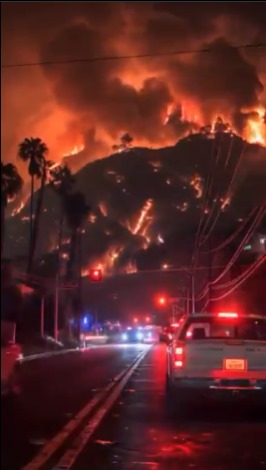
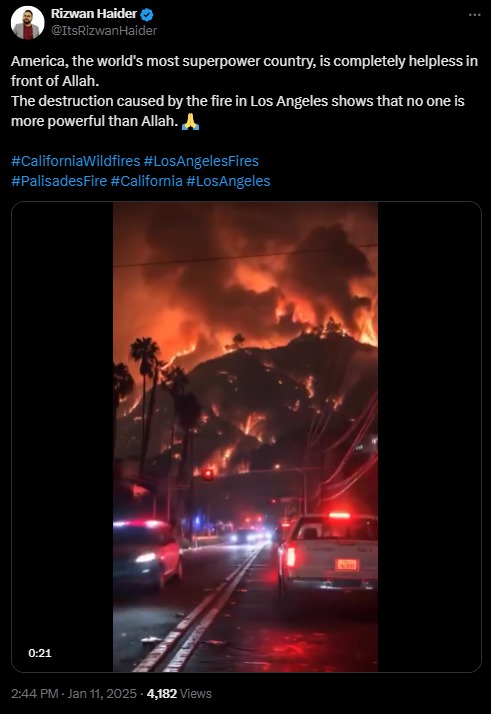
A viral post on X (formerly Twitter) has been spreading misleading captions about a video that falsely claims to depict severe wildfires in Los Angeles similar to the real wildfire happening in Los Angeles. Using AI Content Detection tools we confirmed that the footage shown is entirely AI-generated and not authentic. In this report, we’ll break down the claims, fact-check the information, and provide a clear summary of the misinformation that has emerged with this viral clip.
Claim:
A video shared across social media platforms and messaging apps alleges to show wildfires ravaging Los Angeles, suggesting an ongoing natural disaster.
Fact Check:
After taking a close look at the video, we noticed some discrepancy such as the flames seem unnatural, the lighting is off, some glitches etc. which are usually seen in any AI generated video. Further we checked the video with an online AI content detection tool hive moderation, which says the video is AI generated, meaning that the video was deliberately created to mislead viewers. It’s crucial to stay alert to such deceptions, especially concerning serious topics like wildfires. Being well-informed allows us to navigate the complex information landscape and distinguish between real events and falsehoods.

Conclusion:
This video claiming to display wildfires in Los Angeles is AI generated, the case again reflects the importance of taking a minute to check if the information given is correct or not, especially when the matter is of severe importance, for example, a natural disaster. By being careful and cross-checking of the sources, we are able to minimize the spreading of misinformation and ensure that proper information reaches those who need it most.
- Claim: The video shows real footage of the ongoing wildfires in Los Angeles, California
- Claimed On: X (Formerly Known As Twitter)
- Fact Check: Fake Video

Executive Summary:
Recently, we came upon some AI-generated deep fake videos that have gone viral on social media, purporting to show Indian political figures Prime Minister Narendra Modi, Home Minister Amit Shah, and External Affairs Minister Dr. S. Jaishankar apologizing in public for initiating "Operation Sindoor." The videos are fake and use artificial intelligence tools to mimic the leaders' voices and appearances, as concluded by our research. The purpose of this report is to provide a clear understanding of the facts and to reveal the truth behind these viral videos.
Claim:
Multiple videos circulating on social media claim to show Prime Minister Narendra Modi, Central Home Minister Amit Shah, and External Affairs Minister Dr. S. Jaishankar publicly apologised for launching "Operation Sindoor." The videos, which are being circulated to suggest a political and diplomatic failure, feature the leaders speaking passionately and expressing regret over the operation.


Fact Check:
Our research revealed that the widely shared videos were deepfakes made with artificial intelligence tools. Following the 22 April 2025 Pahalgam terror attack, after “Operation Sindoor”, which was held by the Indian Armed Forces, this video emerged, intending to spread false propaganda and misinformation.
Finding important frames and visual clues from the videos that seemed suspicious, such as strange lip movements, misaligned audio, and facial distortions, was the first step in the fact-checking process. By putting audio samples and video frames in Hive AI Content Moderation, a program for detecting AI-generated content. After examining audio, facial, and visual cues, Hive's deepfake detection system verified that all three of the videos were artificial intelligence (AI) produced.
Below are three Hive Moderator result screenshots that clearly flag the videos as synthetic content, confirming that none of them are authentic or released by any official government source.


Conclusion:
The artificial intelligence-generated videos that claim Prime Minister Narendra Modi, Home Minister Amit Shah, and External Affairs Minister Dr. S. Jaishankar apologized for the start of "Operation Sindoor" are completely untrue. A purposeful disinformation campaign to mislead the public and incite political unrest includes these deepfake videos. No such apology has been made by the Indian government, and the operation in question does not exist in any official or verified capacity. The public must exercise caution, avoid disseminating videos that have not been verified, and rely on reliable fact-checking websites. Such disinformation can seriously affect national discourse and security in addition to eroding public trust.
- Claim: India's top executives apologize publicly for Operation Sindoor blunder.
- Claimed On: Social Media
- Fact Check: AI Misleads
