
#FactCheck - Viral Video of ‘Hatha Yogi’ Meditating on Snowy Mountain Is AI-Generated
A video claiming to show a Hatha yogi performing extreme penance on a snow-covered mountain amid strong icy winds is going viral on social media. In the clip, the ascetic is seen balancing on one hand in a yoga posture, while users portray the visuals as a rare example of extraordinary spiritual endurance in harsh climatic conditions.
However, an investigation by the CyberPeace Foundation has found the claim to be false. Our analysis confirms that the viral video is AI-generated and does not depict a real person or an actual event.
Claim:
A Instagram user shared the video with the caption:
“Hatha yogi, what kind of soil are these people made of?” The post suggests that the visuals show a real yogi performing intense meditation on a frozen mountain.
- https://www.instagram.com/reels/DTK32TvDGIJ/
- (Archive link as provided) https://perma.cc/H84M-MGXZ

Fact Check:
To verify the claim, the CyberPeace Foundation conducted a detailed examination of the viral video.No credible or verifiable news reports were found to support the claim that such an incident ever occurred.
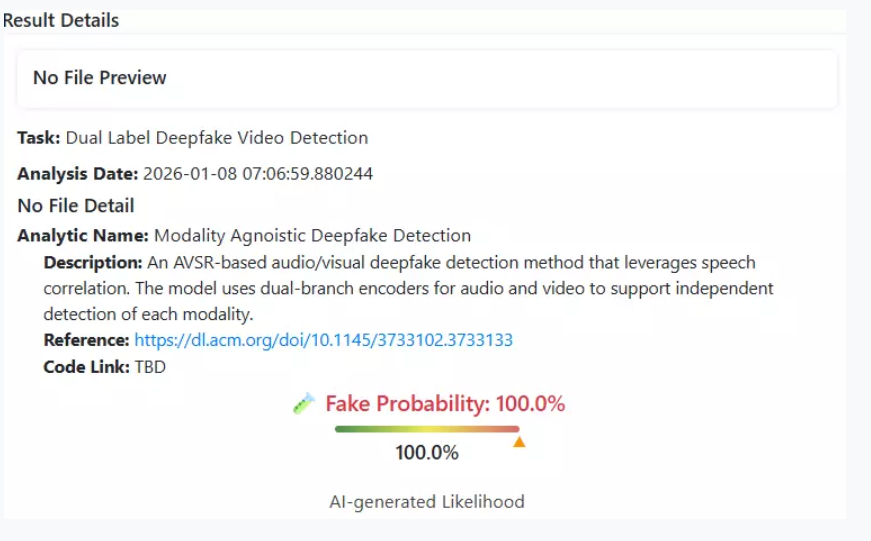
The viral video was analysed using the AI detection tool Deepfake-O-Meter.Its AVSRDD (2025) module flagged the video as AI-generated, confirming that the visuals were digitally created and not recorded in real life.
Multiple indicators within the footage,such as unnatural body balance, environmental inconsistencies, and visual artifacts are consistent with AI-generated content.
Conclusion
The viral video purportedly showing a yogi meditating on a frozen mountain is not real. It has been created using artificial intelligence and is being circulated on social media with a misleading narrative. Users are advised to exercise caution and verify content before sharing such sensational claims.

Related Blogs
.webp)
Introduction
Union Minister of State for Electronics and IT, Rajeev Chandrasekhar, announced that rules for the Digital Personal Data Protection (DPDP) Act are expected to be released by the end of January. The rules will be subject to a month-long consultation process, but their notification may be delayed until after the general elections in April-May 2024. Chandrasekhar mentioned changes to the current IT regulations would be made in the next few days to address the problem of deepfakes on social networking sites.
The government has observed a varied response from platforms regarding advisory measures on deepfakes, leading to the decision to enforce more specific rules. During the Digital India Dialogue, platforms were made aware of existing provisions and the consequences of non-compliance. An advisory was issued, and new amended IT rules will be released if satisfaction with compliance is not achieved.
When Sachin Tendulkar reported a deepfake on a site where he was seen endorsing a gaming application, it raised concerns about the exploitation of deepfakes. Tendulkar urged the reporting of such incidents and underlined the need for social media companies to be watchful, receptive to grievances, and quick to address disinformation and deepfakes.
The DPDP Act, 2023
The Digital Personal Data Protection Act (DPDP) 2023 is a brand-new framework for digital personal data protection that aims to protect individuals' digital personal data. The act ensures compliance by the platforms collecting personal data. The act aims to provide consent-based data collection techniques. DPDP Act 2023 is an important step toward protecting individual privacy. The Act, which requires express consent for the acquisition, administration, and processing of personal data, seeks to guarantee that organisations follow the stated objective for which user consent was granted. This proactive strategy coincides with global data protection trends and demonstrates India's commitment to safeguarding user information in the digital era.
Amendments to IT rules
Minister Chandrasekhar declared that existing IT regulations would be amended in order to combat the rising problem of deepfakes and disinformation on social media platforms. These adjustments, which will be published over the next few days, are primarily aimed at countering widespread of false information and deepfake. The decision follows a range of responses from platforms to deepfake recommendations made during Digital India Dialogues.
The government's stance: blocking non-compliant platforms
Minister Chandrasekhar reaffirmed the government's commitment to enforcing the updated guidelines. If platforms fail to follow compliance, the government may consider banning them. This severe position demonstrates the government's commitment to safeguarding Indian residents from the possible harm caused by false information.
Empowering Users with Education and Awareness
In addition to the upcoming DPDP Act Rules/recommendations and IT regulation changes, the government recognises the critical role that user education plays in establishing a robust digital environment. Minister Rajeev Chandrasekhar emphasised the necessity for comprehensive awareness programs to educate individuals about their digital rights and the need to protect personal information.
These instructional programs seek to equip users to make informed decisions about giving consent to their data. By developing a culture of digital literacy, the government hopes to guarantee that citizens have the information to safeguard themselves in an increasingly linked digital environment.
Balancing Innovation with User Protection
As India continues to explore its digital frontier, the junction of technology innovation and user safety remains a difficult balance. The upcoming Rules on the DPDP Act and modifications to existing IT rules represent the government's proactive efforts to build a strong framework that supports innovation while protecting user privacy and combating disinformation. Recognising the changing nature of the digital world, the government is actively participating in continuing discussions with stakeholders such as industry professionals, academia, and civil society. These conversations promote a collaborative approach to policy creation, ensuring that legislation is adaptable to the changing nature of cyber risks and technology breakthroughs. Such inclusive talks demonstrate the government's dedication to transparent and participatory governance, in which many viewpoints contribute to the creation of effective and nuanced policy. These advances reflect an important milestone in India's digital journey, as the country prepares to set a good example by creating responsible and safe digital ecosystems for its residents.
Reference :
- https://economictimes.indiatimes.com/tech/technology/govt-may-release-personal-data-bill-rules-in-a-fortnight/articleshow/106162669.cms?from=mdr
- https://www.business-standard.com/india-news/dpdp-rules-expected-to-be-released-by-end-of-the-month-mos-chandrasekhar-124011600679_1.html

Executive Summary:
A video is going viral on social media with the claim that President Droupadi Murmu has allegedly demanded an independent inquiry into the loss of Rafale jets. In the video clip, Murmu can allegedly be heard saying that India should investigate the reasons behind the loss of the aircraft and learn from its mistakes. A research by the research wing of the CyberPeace revealed that the viral video has been tampered with. President Droupadi Murmu had made no such statement.
Claim:
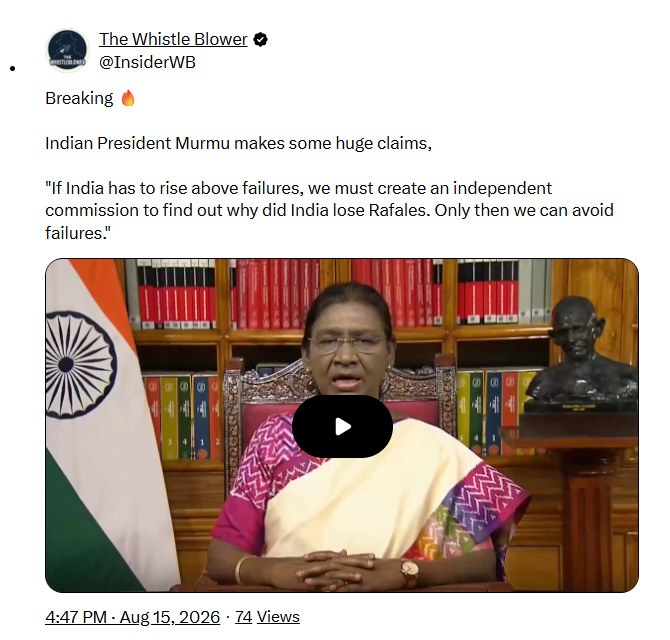
A video being shared on social media claims that President Droupadi Murmu has demanded the formation of an independent commission to investigate the causes behind the loss of India’s Rafale aircraft. In the viral video, Murmu can allegedly be heard stating that such an inquiry would help India avoid similar failures in the future.
https://archive.ph/UbLYj#selection-295.0-295.214
https://x.com/InsiderWB/status/2088669027258552509
Fact Check
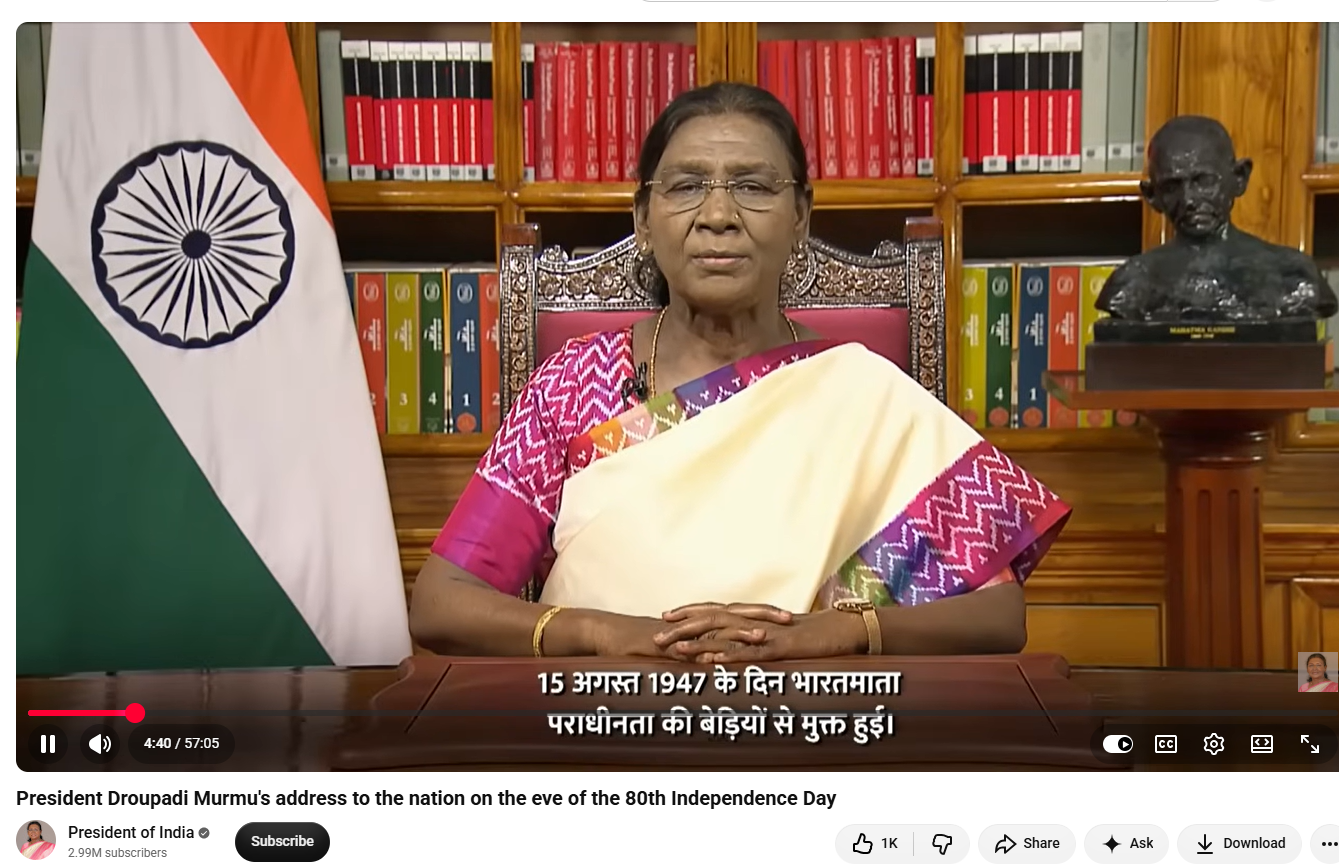
During the research, we first conducted a customized keyword search using terms like "President Murmu", "Rafale jets", and "inquiry". During this search, we found no reliable media reports or official statements confirming the claim that President Droupadi Murmu had demanded an independent probe into the loss of Rafale aircraft. Upon performing a reverse image search on keyframes of the viral video, we found the original video of President Droupadi Murmu’s address to the nation uploaded on the official YouTube channel of the President of India on August 14, 2026. This address was delivered on the eve of India's 80th Independence Day. In the original video, President Murmu can be seen speaking in the exact same outfit and against the same background as visible in the viral clip. However, a review of the complete speech revealed no mention of Rafale aircraft or any demand for an independent inquiry into their alleged loss.
https://www.youtube.com/watch?v=BggdVYCyH6c
Following this, we analyzed the viral clip using several AI detection tools. Hive Moderation indicated a high probability that the video contained AI-generated or deepfake content.
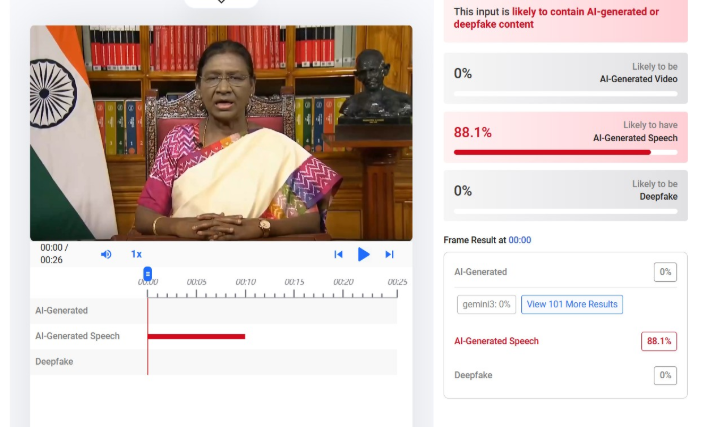
Meanwhile, Resemble AI flagged the audio as fake.

Conclusion
The statement regarding an independent probe into the alleged loss of Rafale aircraft in the viral video has been falsely attributed to President Droupadi Murmu. The clip appears to be manipulated using AI-generated video and audio. There is no such statement in the President's original Independence Day address.
Executive Summary:
A video is being widely circulated on social media in connection with the relief and rescue operations following the devastating floods in Nepal. The video shows security personnel rescuing a girl trapped under debris and later giving her soup. The video is being shared with the claim that security personnel rescued a girl who had been buried under mud three days after the disaster in Timure village of Nepal’s Rasuwa district. A research by CyberPeace Research Wing found the viral claim to be false. Our research revealed that the viral video does not depict a real incident but is AI-generated.
Claim:
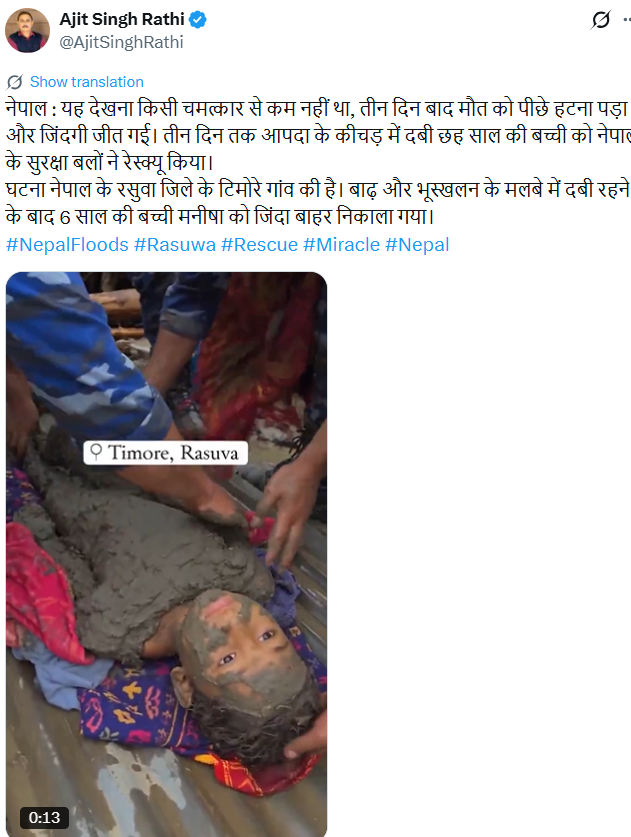
A user on social media platform X (formerly Twitter) shared the viral video with the caption: “Nepal: It was nothing short of a miracle to witness this. After three days, death had to retreat and life emerged victorious. A six-year-old girl, who had been buried under the disaster debris for three days, was rescued by Nepal’s security forces. The incident took place in Timure village of Nepal’s Rasuwa district. Six-year-old Manisha was pulled out alive after being buried under debris caused by floods and landslides.”
https://x.com/AjitSinghRathi/status/2094306889001742826?s=20
Fact Check:
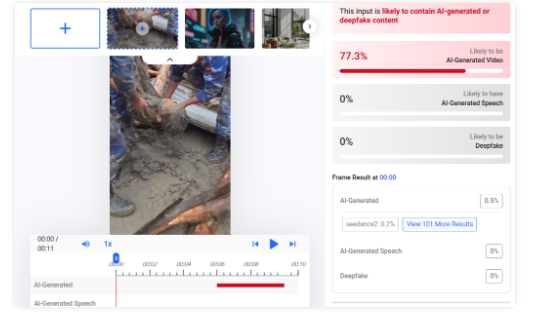
A close examination of the viral video revealed several inconsistencies, raising suspicions that the video was AI-generated. We then scanned the viral video using the AI detection tool Hive Moderation. According to the results, there is a 77 per cent likelihood that the viral video is AI-generated.
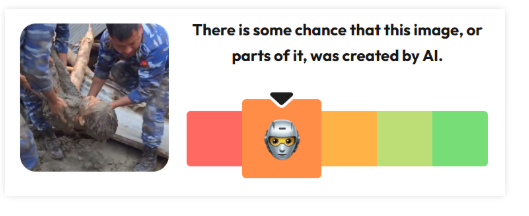
As part of our research, we scanned the video using the AI detection tool Wasitai. According to the results, the viral video is AI-generated.
Conclusion:
Our research found the viral claim to be false. Our findings revealed that the viral video does not depict a real incident but is AI-generated.
